WPLMS Chat
Antivirus scan
Powered by ClamAV
✅ Verified clean
This product file has passed our security filters.
Want to run a fresh ClamAV scan right now? Takes a few seconds and shows scanner version, signature DB and live result.
This can take 5 to 30 seconds.
Clean file Threat detected
No threats detected in this file.
- File
- Size
- Scanned
- ClamAV
- Signature database
⚡ Powered by ClamAV
Scan could not be completed
Report product
If you detected an issue (broken file, malware, inappropriate content, etc.) let us know and we'll review it ASAP.
Sign in to report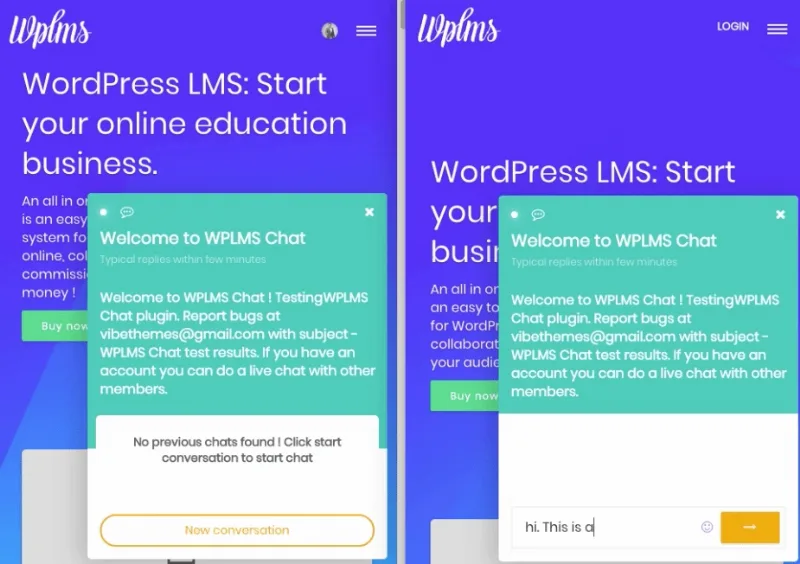
About WPLMS Chat
The question comes up inside the unit, and that is where to answer it
A student gets stuck in the middle of a lesson. To ask, they have to leave, find out how to contact the instructor and explain where they were. The question arrives without context, and meanwhile the unit stays half done.
WPLMS Chat lets you embed the chat in the unit itself. There, too, the course instructor has the power to mark the student's unit as finished. The conversation stops being a separate channel and becomes a tool within the course path.
It is a real-time chat add-on for WPLMS, designed for online learning needs. It goes beyond the pre-purchase question, though it covers that too.
Conversations and notices for an academy
- Personal chat: a direct conversation between two people.
- Group chat: several people in the same conversation.
- Course chats: conversations tied to a specific course.
- Built-in notifications: the add-on has its own notification system.
- LMS connection: the chat links to platform functions, such as the finished unit.
The chat at each stage of the course
Before buying. Someone looking for a course can talk to the instructor by clicking on their avatar. That way, the pre-enrollment question goes straight to the person teaching the course.
During the course. Students taking the same course can talk to each other and invite other members to the conversation.
Inside the unit. With the chat embedded, the instructor attends to the student in the unit itself and can mark it as finished. If your course depends on someone reviewing progress, it is worth deciding beforehand what condition the student must meet for that to happen.
The interface also changes slightly depending on who uses it: it is not the same for a logged-out visitor, a logged-in member or an instructor or administrator. Before opening it to everyone, review it with an account of each type.
Your chat rests on a Firebase project
These real-time features are built on ReactJS and Firebase, and a Google account is a prerequisite. So the add-on is not enough on its own: you also need to prepare a Firebase project and connect it to your site.
If your academy already uses Firebase for other WPLMS functions, such as social login or push notifications, it is worth checking which project and configuration you have before starting. This step happens outside WordPress.
Nor is WPLMS Chat a standalone chat for any WordPress site. It is a WPLMS add-on, and its most useful functions, such as the unit one, depend on that platform.
Connecting the chat to your academy
You need WPLMS running and a Google account. Then follow these steps:
- Install and activate WPLMS Chat.
- Create your Firebase project and enable Realtime Database.
- Copy the Firebase config.
- Paste it, with the database URL, into wp-admin, VibeBP, Settings.
- Test a conversation logged out and with student and instructor accounts.
If a Firebase error appears during setup, enable Realtime Database, copy the config again and paste it once more.
Other ways to talk on your site
WPLMS is the course platform this add-on runs on. If you do not need unit-related functions, Wise Chat Pro offers rooms and private conversations, with messages in your own database.
In a PeepSo community, PeepSo Core: Chat adds private messages and real-time chat. If you already use Better Messages, Better Messages Voice Messages adds voice messages to it.
Situations for instructors and administrators
Does it work without WPLMS?
No. It is an add-on for that platform.
Do I need a Google account?
Yes. The real-time features are built on Firebase and a Google account is a prerequisite.
Can a visitor write before enrolling?
Yes. Someone looking for a course can talk to the instructor by clicking on their avatar.
Can the instructor mark a unit as finished?
Yes, with the chat embedded in the unit.
What do I do if a Firebase error appears during setup?
Enable Realtime Database, copy the config again and paste it, with the database URL, into the VibeBP settings.
Topics
Version history
-
v
1.3 Current 16 May 2024
Customer reviews
Sign in to leave a review. Only people who have the product can review it.
No reviews for this product yet.
Frequently asked questions
-
GPL (General Public License) is the license under which WordPress and most premium plugins/themes are distributed. It grants you the right to use, modify and redistribute the software in as many projects as you want, with no domain restrictions.
-
Yes. With membership you get automatic updates via our GPLClub Updater plugin (installed on your WP, detects new versions and applies them). With individual purchase, you get one year of manual updates from your account.
-
Depends on the plan. Monthly: 3 domains. Semi-annual: 7. Annual and Lifetime: 15. Individual purchase: 1 domain.
-
GPLClub offers its own support for installation, configuration and compatibility. For direct support from the original author (feature requests, product-specific bugs), a license purchased from the author is required.