YITH WooCommerce Auctions Premium
Antivirus scan
Powered by ClamAV
✅ Verified clean
This product file has passed our security filters.
Want to run a fresh ClamAV scan right now? Takes a few seconds and shows scanner version, signature DB and live result.
This can take 5 to 30 seconds.
Clean file Threat detected
No threats detected in this file.
- File
- Size
- Scanned
- ClamAV
- Signature database
⚡ Powered by ClamAV
Scan could not be completed
Report product
If you detected an issue (broken file, malware, inappropriate content, etc.) let us know and we'll review it ASAP.
Sign in to report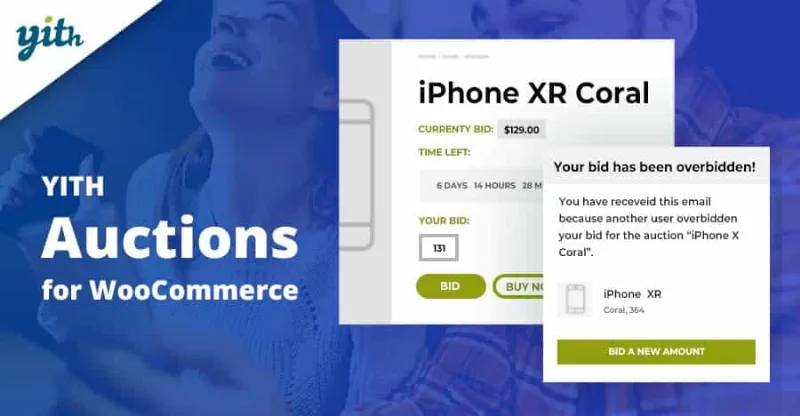
About YITH WooCommerce Auctions Premium
Auctioning in your store without sinking the price of what you sell
Selling a unique piece, a limited edition or something you have run out of often ends up with a fixed price nobody knows is high or low: either you undercharge, or the product sits there. YITH WooCommerce Auctions Premium turns that doubt into a mechanism: your buyers set the price, and you set the floor.
People who buy this plugin usually sell things without a clear market price: a customized item or an out-of-stock product. In those cases scarcity works in your favor, but only if the starting price doesn't give the product away. That is why the most valuable setting here is not the bid itself, but the reserve price: the minimum you accept, below which nobody wins the auction.
Auction types and prices you can define in YITH WooCommerce Auctions Premium
Each auction is configured separately. These are the pieces that matter:
- Start price, minimum increment and reserve price: the first opens the bidding, the second sets how much each bid must go up and the third protects your margin.
- Buy now price: lets users end the auction by purchasing the product. It can be hidden automatically when the first bid comes in or when a bid exceeds the reserve.
- Manual or automatic bids: in automatic bidding, eBay style, the user enters the maximum they would pay and the system raises the bid for them up to that limit. In manual bidding, each new higher bid notifies the others so they bid again.
- Reversed auction: the lowest bid wins, instead of the highest.
- Secret auction: the current bid and the list of bids are hidden.
- Participation fee: the user pays a fee at checkout before being able to bid.
- Extra commission for the winner: it covers costs such as taxes, management or legal costs, and can be shown on the product page or only at checkout.
- Start and end dates, and automatic extension: if someone bids a few minutes before the close, the end is pushed back.
What it needs to go further
Some features depend on other YITH plugins. Asking for a valid card before bidding and automatically charging the winner require YITH Stripe. Letting your vendors create their own auctions while you keep a share requires YITH WooCommerce Multi Vendor. Without them, the plugin works, but collecting payment from the winner depends on the order that is generated and on the person paying.
Frequently asked questions before you decide
Can I stop a winner who then doesn't pay?
There is no total guarantee, but you have several barriers: asking for confirmation before each bid is published, requiring registration, charging a participation fee and, with YITH Stripe, requiring a valid card and automatically charging the winner. If they still don't pay, you can notify the second-highest bidder or reschedule the auction.
What happens if nobody reaches the reserve price?
Nobody wins. You can choose to have the auction rescheduled and published again automatically.
Can users follow an auction without bidding?
Yes. They can sign up and receive email notifications, or add it to a watchlist they check from a widget or from their account.
Can I show the countdown?
Yes, there are 4 countdown styles with customizable colors, or you can disable it and show only the end date.
Email notifications that keep bidding alive
An auction works if people come back. The plugin sends emails to those following the auction and to bidders when there is a new bid, when it is about to end, when someone outbids them (which encourages them to bid again) and when it ends. When it closes, you can automatically generate an order with pending payment status, with the checkout link in the email to the winner, so they don't have to guess how to pay.
Auctions are displayed with shortcodes, widgets and blocks
You don't have to leave the auctions buried in the shop. With shortcodes you can create pages with active auctions, scheduled ones or those from specific categories. There are also widgets for sidebars and Gutenberg blocks to insert them on any page.
Before publishing the first one, decide three things: the reserve price of each product, whether bidding will be manual or automatic and whether you require registration or a card to take part. Test the whole flow as a buyer: bidding, being outbid, winning and reaching the pending payment order. If you use a heavily customized theme, check in the demo how the countdown and the bid form look.
Topics
Version history
-
v
4.25.0 Current 27 Jul 2026
-
v
4.22.0 2 Apr 2026
Customer reviews
Sign in to leave a review. Only people who have the product can review it.
No reviews for this product yet.
Frequently asked questions
-
GPL (General Public License) is the license under which WordPress and most premium plugins/themes are distributed. It grants you the right to use, modify and redistribute the software in as many projects as you want, with no domain restrictions.
-
Yes. With membership you get automatic updates via our GPLClub Updater plugin (installed on your WP, detects new versions and applies them). With individual purchase, you get one year of manual updates from your account.
-
Depends on the plan. Monthly: 3 domains. Semi-annual: 7. Annual and Lifetime: 15. Individual purchase: 1 domain.
-
GPLClub offers its own support for installation, configuration and compatibility. For direct support from the original author (feature requests, product-specific bugs), a license purchased from the author is required.