ZigZagPress Formo WordPress Theme
Antivirus scan
Powered by ClamAV
✅ Verified clean
This product file has passed our security filters.
Want to run a fresh ClamAV scan right now? Takes a few seconds and shows scanner version, signature DB and live result.
This can take 5 to 30 seconds.
Clean file Threat detected
No threats detected in this file.
- File
- Size
- Scanned
- ClamAV
- Signature database
⚡ Powered by ClamAV
Scan could not be completed
Report product
If you detected an issue (broken file, malware, inappropriate content, etc.) let us know and we'll review it ASAP.
Sign in to report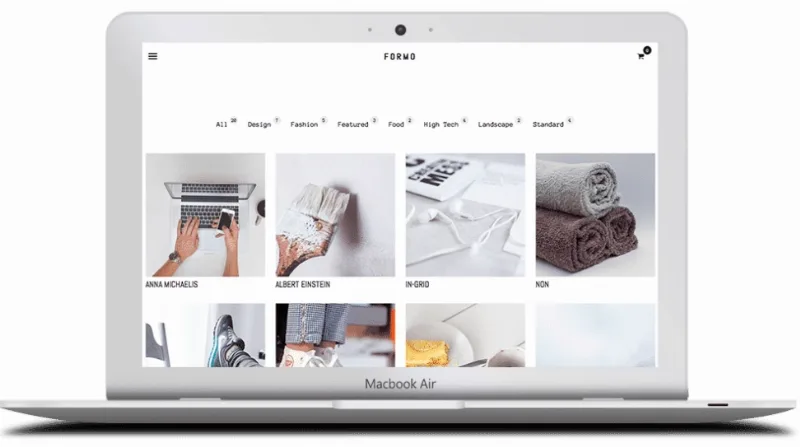
About ZigZagPress Formo WordPress Theme
A counter next to each category shows how much you have published
You open your site and, above the grid, each category shows its figure: Design 7, Fashion 5, Food 2. It is a useful detail for guiding whoever arrives, and also a public confession. A category with two posts tells the visitor that the subject has barely begun.
With a list of categories and counters in plain view, the way you classify becomes part of the design. Formo, by ZigzagPress, is a Genesis child theme that organizes its front page that way: categories with their number and a grid of posts with image and title. It pays to sort your content before loading it, because visitors will see that structure from the first moment.
Two front pages: grid or widget storefront
The demo shows two ways to open the site, and each serves a different goal.
- Grid front page: a category list with counters and eight posts with image and title. It suits a site that lives on what it publishes.
- Widget front page: a promotional banner with a button, product categories with thumbnails and their figures, then blocks of recent, featured, top rated and on-sale products, closing with the newsletter.
In the header, a cart icon shows the items and subtotal, with links to view the cart and check out. The demo shop, with sample products, combines categories with counters, sale labels, star ratings and numbered pagination.
Posts and portfolio with the image up front
The menu brings together home, about, blog, portfolio, shop, templates, styles and contact. Blog and portfolio follow the same visual logic, with square thumbnails and a title below.
- Portfolio: the Selected Work page shows eight projects in a grid, and seven category links with counters. Each link opens its own category page.
- Single project: featured image, title, date, author, text and links to the previous and next one with a thumbnail. The demo example has no gallery or client details.
- Single post: featured image, date, author, categories, an author block and four related posts with thumbnails.
- Templates: 404 page, archive and search.
Shortcodes and styles for text pages
Formo includes shortcodes that extend Genesis, useful for service or information pages:
- Accordion, toggle and tabs to group content.
- Button and testimonial block.
- Service boxes in two and three columns.
The styles section also gathers columns, image alignment, headings from H1 to H6, nested lists, tables, quotes and code blocks. It is worth opening those pages before writing so you know which formatting is available.
Genesis first, Formo second
The only requirement of its own is Genesis Framework, because Formo is a child theme. Its theme options let you adjust features without coding, the design is mobile responsive, the SEO options and functions are inherited from Genesis, and the .po and .mo files allow translating it. Follow this order:
- Install Genesis Framework on your WordPress.
- Upload Formo and activate it.
- Define a few categories and distribute your posts before showing the counters.
- Choose the front page: grid or widget version.
- If you are going to sell, test the shop and cart with your first products.
- Create the contact and about pages, and check the menu on a phone.
Staying on Genesis or skipping a parent theme
The grid and the portfolio give priority to the thumbnail, so plan on your own images. The demo's posts are regular posts, and its features include neither bookings nor quote forms.
If you want to stay on Genesis, look at Pretty Creative Pro, a package for that framework, or Wellness Pro, by StudioPress. For a blog with a shop and no parent theme, Morvarid is a minimalist blog and shop theme.
Formo in practice, with Genesis underneath
Does it work without Genesis Framework?
No. Formo is a child theme and requires Genesis Framework.
Does it work for selling?
Yes. The demo includes shop, cart and checkout, plus a front page with product blocks.
Can it be translated?
Yes. It includes .po and .mo files for localization.
Where do the SEO options come from?
From Genesis Framework. Formo inherits its options and functions.
Which shortcodes does it include?
Accordion, toggle, tabs, button, testimonial and service boxes in two and three columns.
Topics
Version history
-
v
1.1 Current 12 Jun 2024
Customer reviews
Sign in to leave a review. Only people who have the product can review it.
No reviews for this product yet.
Frequently asked questions
-
GPL (General Public License) is the license under which WordPress and most premium plugins/themes are distributed. It grants you the right to use, modify and redistribute the software in as many projects as you want, with no domain restrictions.
-
Yes. With membership you get automatic updates via our GPLClub Updater plugin (installed on your WP, detects new versions and applies them). With individual purchase, you get one year of manual updates from your account.
-
Depends on the plan. Monthly: 3 domains. Semi-annual: 7. Annual and Lifetime: 15. Individual purchase: 1 domain.
-
GPLClub offers its own support for installation, configuration and compatibility. For direct support from the original author (feature requests, product-specific bugs), a license purchased from the author is required.