Birthday Coupons for WooCommerce
Antivirus scan
Powered by ClamAV
✅ Verified clean
This product file has passed our security filters.
Want to run a fresh ClamAV scan right now? Takes a few seconds and shows scanner version, signature DB and live result.
This can take 5 to 30 seconds.
Clean file Threat detected
No threats detected in this file.
- File
- Size
- Scanned
- ClamAV
- Signature database
⚡ Powered by ClamAV
Scan could not be completed
Report product
If you detected an issue (broken file, malware, inappropriate content, etc.) let us know and we'll review it ASAP.
Sign in to reportNewer version out, or a problem?
About Birthday Coupons for WooCommerce
Special discounts for your customers on their birthday
Offering coupons on their birthday can increase your customers' trust in your store and bring in additional revenue when they use them.
Birthday Coupons for WooCommerce automates the sending. It sends birthday coupons to your customers by email, and the discount is ready to use on their purchases.
Two ways to ask for the birth date: at signup and at checkout
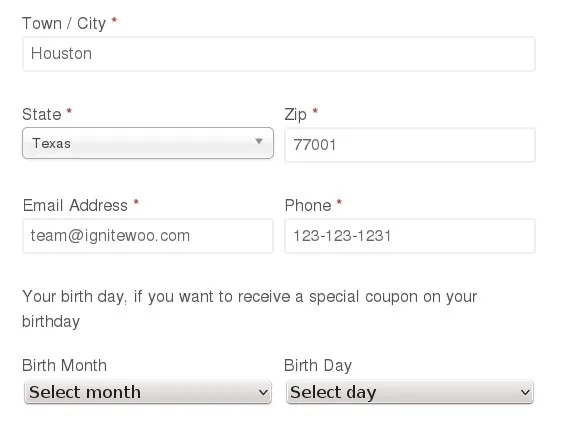
The plugin shows a birth date field depending on whether the user is a guest or registered.
Visitors who sign up
Someone who does not have an account yet finds the date field on the signup form. With that date, they will receive the coupon on their birthday.
Customers who already have an account and buy
A registered customer who adds products to the cart and goes to checkout sees a field to enter their birth date. If they fill it in, they will also receive the coupon, and you can make the field mandatory.
When the coupon arrives and what the customer sees
You can schedule the send before the date, on the same day or after it. When the moment comes, the customer receives an email with the coupon details and its code. After that, in the store:
- The coupon is applied automatically to the cart if it meets the conditions, so the customer does not have to type any code.
- Active coupons appear on the cart page and in the My Coupons section of My Account, where used ones are also listed.
- Customers can subscribe to or unsubscribe from the birthday emails.
Rules so the discount reaches only the people you choose
You can create unlimited coupon campaigns, each with its own conditions. In each one you decide:
- Which users or user roles receive the coupon, and which are excluded.
- Whether the coupon is granted only once, so it does not repeat the following year.
- Who receives it based on purchase history: number of orders placed or amount spent in the store.
- Which products it applies to, and the minimum and maximum cart total.
- A percentage or fixed-amount discount, with the number of days before it expires.
A practical idea: limit the coupon to customers with a certain number of orders, so the discount rewards those who already buy. From the admin, you can also track the coupons in a dedicated table.
Frequently asked questions about birthday coupons
Can guest customers also receive the coupon?
Yes. Someone who does not have an account yet finds the birth date field on the signup form, and the coupon is sent using that date.
Can I send the coupon before or after the birthday?
Yes. You can choose whether the send happens before the date, on the same day or after it.
Does the customer have to type the code?
Not necessarily. With automatic application, the coupon is applied to the cart if it meets the conditions.
Can I limit the coupon to certain products?
Yes. You can restrict its use to specific products and set a minimum or maximum cart total.
Needs WooCommerce active for the coupons to work
It is an extension of WooCommerce, so the store must have it installed and active. It is also compatible with HPOS order storage, and the texts the customer sees can be translated and customized.
Topics
Version history
-
v
1.5 Current 13 May 2024
Customer reviews
Sign in to leave a review. Only people who have the product can review it.
No reviews for this product yet.
Frequently asked questions
-
GPL (General Public License) is the license under which WordPress and most premium plugins/themes are distributed. It grants you the right to use, modify and redistribute the software in as many projects as you want, with no domain restrictions.
-
Yes. With membership you get automatic updates via our GPLClub Updater plugin (installed on your WP, detects new versions and applies them). With individual purchase, you get one year of manual updates from your account.
-
Depends on the plan. Monthly: 3 domains. Semi-annual: 7. Annual and Lifetime: 15. Individual purchase: 1 domain.
-
GPLClub offers its own support for installation, configuration and compatibility. For direct support from the original author (feature requests, product-specific bugs), a license purchased from the author is required.