Card Elements Pro for Elementor
Antivirus scan
Powered by ClamAV
✅ Verified clean
This product file has passed our security filters.
Want to run a fresh ClamAV scan right now? Takes a few seconds and shows scanner version, signature DB and live result.
This can take 5 to 30 seconds.
Clean file Threat detected
No threats detected in this file.
- File
- Size
- Scanned
- ClamAV
- Signature database
⚡ Powered by ClamAV
Scan could not be completed
Report product
If you detected an issue (broken file, malware, inappropriate content, etc.) let us know and we'll review it ASAP.
Sign in to report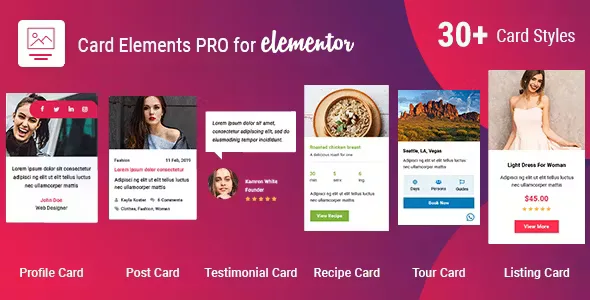
About Card Elements Pro for Elementor
Building a team page, a testimonials block or a blog post listing in Elementor often ends up as columns of text and images lined up by eye, with every block different from the last and a design that changes from page to page. Card Elements Pro for Elementor solves that with ready-designed card widgets you add to the editor.
A team page built with cards, step by step
Imagine you need to present your team on a new page. The workflow with this plugin is short:
- You open the page with Elementor. The left panel shows a dedicated section called Card Elements Pro, with the plugin's widgets.
- You pick the Profile Card widget. It comes with more than 10 card styles, so you don't start from a blank block: you choose the one that best fits your company's image.
- You decide which fields are visible. There are toggles to show or hide fields. If you have no job title or social links for one person, you switch them off.
- You add social networks. Profile and post cards support social buttons with different styles and effects.
- You adjust columns and the hover effect. Each card has a predefined hover effect, and you can spread the elements across several columns.
One limit to keep in mind: the styles are the ones the plugin ships with. If your brand needs a very different card, you will have to adjust it from Elementor or with your own CSS, because it is not a free-form design editor.
Six card types for six uses
Card Elements Pro is not just for teams. It includes these widgets:
- Profile Card: more than 10 styles, for teams or personal profiles.
- Testimonial Card: more than 5 styles, for customer reviews.
- Post Card: more than 5 styles for post listings, with up to 6 columns.
- Listing Card: 5 styles, for listing showcases.
- Recipe Card: 5 styles, for recipes and food.
- Tour Card: 5 styles, for travel and tour packages.
Testimonials: the proof that usually stays hidden
Many businesses have good customer reviews buried in an email or a forgotten page. With Testimonial Card you can bring them to the homepage in a polished design and switch style without rebuilding anything. One tip: use only real reviews you can back up. Inventing or editing them can have legal consequences and destroys trust.
What to know before using it with Elementor
It is an add-on: it needs Elementor installed and is managed from its editor. It does not replace the page builder or work on its own. Also, the post widgets display WordPress content; they are not a booking or payment system for tours or recipes. A Tour Card presents the package, it does not handle the purchase. Check in the demo whether the customization level of each card covers what you need.
Frequently asked questions about Card Elements Pro for Elementor
Do I need to know how to code?
No. Styles are changed from the Elementor panel, without touching code.
Does it adapt to mobile?
Yes, the cards are responsive and display on phones, tablets and computers.
Can I show my blog posts in columns?
Yes, with Post Card you can go up to 6 columns.
Can I hide fields I don't use?
Yes, there are toggles to show or hide fields in the cards.
Version history
-
v
1.1.5 Current 3 Aug 2026
-
v
1.1.2 18 Feb 2025
Customer reviews
Sign in to leave a review. Only people who have the product can review it.
No reviews for this product yet.
Frequently asked questions
-
GPL (General Public License) is the license under which WordPress and most premium plugins/themes are distributed. It grants you the right to use, modify and redistribute the software in as many projects as you want, with no domain restrictions.
-
Yes. With membership you get automatic updates via our GPLClub Updater plugin (installed on your WP, detects new versions and applies them). With individual purchase, you get one year of manual updates from your account.
-
Depends on the plan. Monthly: 3 domains. Semi-annual: 7. Annual and Lifetime: 15. Individual purchase: 1 domain.
-
GPLClub offers its own support for installation, configuration and compatibility. For direct support from the original author (feature requests, product-specific bugs), a license purchased from the author is required.