Divi Breadcrumbs Plugin
Antivirus scan
Powered by ClamAV
✅ Verified clean
This product file has passed our security filters.
Want to run a fresh ClamAV scan right now? Takes a few seconds and shows scanner version, signature DB and live result.
This can take 5 to 30 seconds.
Clean file Threat detected
No threats detected in this file.
- File
- Size
- Scanned
- ClamAV
- Signature database
⚡ Powered by ClamAV
Scan could not be completed
Report product
If you detected an issue (broken file, malware, inappropriate content, etc.) let us know and we'll review it ASAP.
Sign in to report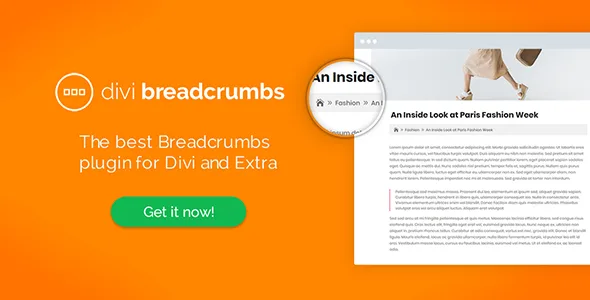
About Divi Breadcrumbs Plugin
A visitor lands from Google on an inner page of your site, reads a paragraph and has no idea where they are or how to go up one level. Without a visible trail, their only way out is often the browser's back button, and that button takes them off your site.
Divi Breadcrumbs: the breadcrumb trail that appears on its own
Divi Breadcrumbs adds a navigation trail (Home > Category > Post) to sites built with the Divi or Extra themes. It is designed as a settings-free plugin: you install it, activate it and it starts working. There are no configuration screens or advanced options to figure out before you see the result.
Most Divi sites are built page by page, with a lot of visual care, and the structure stays in the head of whoever built it. The visitor does not have that map. Breadcrumbs give it to them without you having to redesign the menu.
What it does for navigation and SEO
- Clear location: it shows the layers of the site down to the current page.
- Internal linking: it encourages an internal linking strategy across the site.
- Relationship between content: it helps search engines understand how your content types are grouped.
- All archives: it covers pages, posts, projects and custom post types, along with their taxonomies.
Breadcrumbs help, but they are not a ranking trick. If your categories are a catch-all drawer, the trail will show that mess as it is.
Minimal weight thanks to the icons Divi already includes
The separator in the trail uses the icon set built into Divi and Extra, so no extra fonts or assets are loaded. For anyone who cares about speed, it is an addition that adds no extra weight to the server or the site.
The look is adjusted in the Customizer, not with a builder
All the styling is done in the WordPress Customizer: font style, size and layout, which can be full width or standard width. That is enough to match the trail to your brand.
It only works with Divi or Extra, and has no per-page settings
It is an add-on for those two themes: it is not intended for others. What it already solves and what you will have to cover yourself:
- Already solved: the automatic trail across all content types, compatibility with Divi and Extra, basic styling from the Customizer and minimal weight.
- You cover it: a coherent category structure, which is what gives the trail its meaning.
- You cover it: if you need to place the trail at a specific point in a template or with custom effects, you will have to do it with CSS or with a professional.
- You cover it: check in the demo or on a test copy how it looks with your custom post types.
Frequently asked questions
Do I need to configure anything after activating it?
No. It works as soon as you install and activate it. You only go to the Customizer if you want to change the look.
Does it work with any theme?
No, it is for Divi and Extra.
Will it slow down the site?
It is designed not to: it reuses the icons the theme already includes and does not load extra fonts or assets.
Does it work with posts, projects and pages?
Yes, it covers pages, posts, projects and custom post types with their taxonomies.
Can I adapt it to my brand colors?
Yes, from the WordPress Customizer: typography, size and width of the trail.
Topics
Version history
-
v
1.4.5 Current 8 May 2024
Customer reviews
Sign in to leave a review. Only people who have the product can review it.
No reviews for this product yet.
Frequently asked questions
-
GPL (General Public License) is the license under which WordPress and most premium plugins/themes are distributed. It grants you the right to use, modify and redistribute the software in as many projects as you want, with no domain restrictions.
-
Yes. With membership you get automatic updates via our GPLClub Updater plugin (installed on your WP, detects new versions and applies them). With individual purchase, you get one year of manual updates from your account.
-
Depends on the plan. Monthly: 3 domains. Semi-annual: 7. Annual and Lifetime: 15. Individual purchase: 1 domain.
-
GPLClub offers its own support for installation, configuration and compatibility. For direct support from the original author (feature requests, product-specific bugs), a license purchased from the author is required.