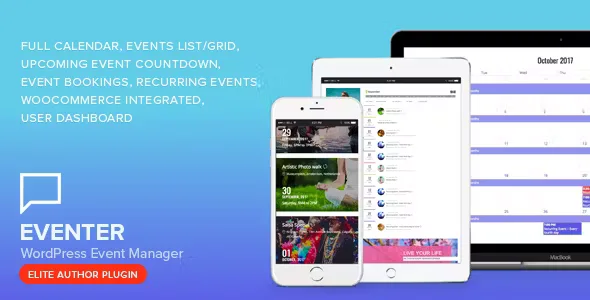
Eventer Event and Booking Manager Plugin
Antivirus scan
Powered by ClamAV
✅ Verified clean
This product file has passed our security filters.
Want to run a fresh ClamAV scan right now? Takes a few seconds and shows scanner version, signature DB and live result.
This can take 5 to 30 seconds.
Clean file Threat detected
No threats detected in this file.
- File
- Size
- Scanned
- ClamAV
- Signature database
⚡ Powered by ClamAV
Scan could not be completed
Report product
If you detected an issue (broken file, malware, inappropriate content, etc.) let us know and we'll review it ASAP.
Sign in to reportNewer version out, or a problem?
About Eventer Event and Booking Manager Plugin
Eventer by who runs each event
Keeping attendees in a spreadsheet and collecting payment by bank transfer turns chaotic as soon as one site hosts concerts, workshops and talks at the same time. Eventer lets you set up each event separately.
If you sell paid tickets
You can offer free or paid registration and create several ticket types for the same event. Payments go through WooCommerce, so you need it installed to sell tickets. Each registration generates a ticket with a QR code that you can print.
If your events repeat
The recurrence options cover the usual cases: every day, every week, every two weeks, a specific day of the week, every month or dates you choose. You can also exclude dates from a continuous recurring series.
If you work in several languages
Eventer is compatible with WPML for multilingual sites and includes a .pot file ready for translation.
If access control happens on the day
The check-in apps for Android and iOS validate tickets. They also support attendees who confirmed with RSVP and show the details of who has already checked in.
A full-width calendar and lists your audience can filter
The calendar spans the full width of the page. If your audience prefers lists, there are list and grid styles, plus a filter to search by category, tag, venue or organizer. Each event has buttons to share on social networks, and the site shows a countdown to the next event.
Anyone who wants to add an event to their calendar can save it to iCalendar, Yahoo Calendar, Outlook or Google Calendar. Each event can have its own manager.
Google Calendar only feeds your website in one direction
The Google Calendar sync is one-way: events from Google Calendar go to your site, but not the other way round. If you already keep your schedule in Google and want to publish it on your website, it fits well. If you expect the opposite direction, this feature does not cover it.
Frequently asked questions about Eventer
Do attendees receive their ticket by email?
Yes. Eventer sends email notifications, and the tickets are generated with a QR code that can be printed.
Can I export the attendee list?
Yes, bookings are exported to a CSV file. You can also upload events from a CSV file so you do not have to create them one by one.
Does it work for events in several languages?
Yes, it is compatible with WPML and includes a .pot file for translating the texts.
Are there numbered seats?
There is a seating map builder with reusable maps and seat selection for bookings.
Shortcodes and custom links to publish each event
An intuitive shortcode generator lets you insert calendars and lists. Eventer also integrates with Elementor and Visual Composer. Event URLs can be customized with permalink options.
The images from the live preview are not included in the plugin, so you will need to add your own photos.
Topics
Version history
-
v
3.11.4 Current 18 Nov 2025
Customer reviews
Sign in to leave a review. Only people who have the product can review it.
No reviews for this product yet.
Frequently asked questions
-
GPL (General Public License) is the license under which WordPress and most premium plugins/themes are distributed. It grants you the right to use, modify and redistribute the software in as many projects as you want, with no domain restrictions.
-
Yes. With membership you get automatic updates via our GPLClub Updater plugin (installed on your WP, detects new versions and applies them). With individual purchase, you get one year of manual updates from your account.
-
Depends on the plan. Monthly: 3 domains. Semi-annual: 7. Annual and Lifetime: 15. Individual purchase: 1 domain.
-
GPLClub offers its own support for installation, configuration and compatibility. For direct support from the original author (feature requests, product-specific bugs), a license purchased from the author is required.