Gravity Forms Collapsible Sections
Antivirus scan
Powered by ClamAV
✅ Verified clean
This product file has passed our security filters.
Want to run a fresh ClamAV scan right now? Takes a few seconds and shows scanner version, signature DB and live result.
This can take 5 to 30 seconds.
Clean file Threat detected
No threats detected in this file.
- File
- Size
- Scanned
- ClamAV
- Signature database
⚡ Powered by ClamAV
Scan could not be completed
Report product
If you detected an issue (broken file, malware, inappropriate content, etc.) let us know and we'll review it ASAP.
Sign in to report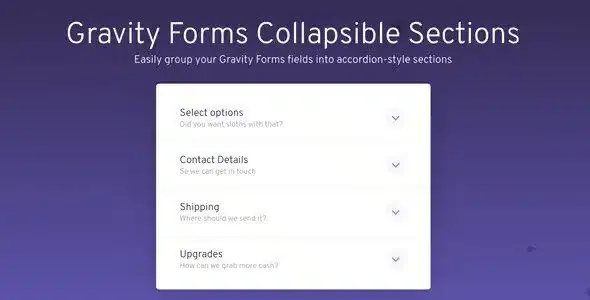
About Gravity Forms Collapsible Sections
Paging a form imposes an order; collapsing it lets people choose where to go next
Your long form was split into pages so as not to scare anyone off. Now, someone who only wants to review their billing details has to go forward and back without seeing what is in the rest. Pages organize the work, but they also hide the whole.
Collapsing is another way of shortening. Everything stays on one screen, each block shows its title and the person opens the one they need. Gravity Forms Collapsible Sections turns section fields into an accordion. It does not cut questions: if there are too many fields, they will still be there after collapsing them.
How it decides which fields collapse
The add-on works on Gravity Forms section fields, new or existing, and only affects the ones you enable. Each one can act in three ways:
- Start: opens a collapsible group.
- End: closes the group.
- Normal: works as an ordinary section field.
Groups can start and end at any point, and fields left outside display as usual. So you can keep name and email visible, and collapse only what is optional or detailed.
Options for each section and for the accordion
- Optional image for each section.
- Optional short description, with placement settings.
- Open by default: a section can appear expanded when the form loads.
- Accordion behavior, with its own settings.
- Submit button placement, also configurable.
- Scrolling: controls how the page moves on opening or closing, with landing offsets and animation.
This last point matters on sites with a fixed header, because the offset keeps the section title from ending up hidden beneath it. Check it with your theme.
Appearance comes from themes; marking what is complete, from code
It includes four display themes: Simple, Accordion, Bordered and Retro. Global settings apply to all collapsible fields on the site, and there are contextual settings as well. For something more specific you can add custom CSS or move the styles into your theme's CSS file.
If your forms sell something, it is compatible with the Gravity Forms Product Add-on for WooCommerce, so sections can also organize a product's options.
Showing which blocks are done is not a setting: it comes from a lightweight JavaScript snippet published by JetSloth, which you can inject with Gravity Wiz's Code Chest, plus a little CSS for the visual mark. It only checks whether the fields contain any value, without validating format or other requirements. A mistyped email would count as complete.
Setting it up on your Gravity Forms form
You need WordPress and Gravity Forms installed. The add-on works with new and existing forms, without rebuilding them.
- Activate the add-on with Gravity Forms already running.
- Add section fields or open the ones you have.
- Enable the collapsible option on each section you want to convert and choose whether it starts or ends a group.
- Place the fields that belong together between them.
- Choose the theme, the section open by default and the button placement.
- Submit a test leaving a required field in a closed section and watch how the form warns about it.
If your form needs to move step by step
When order does matter, pages still make sense. Gravity Perks Multi-page Navigation turns page names into links and allows them to be completed in any order. In another builder, Ninja Forms Multi-Part Forms splits the form into steps with a progress bar. The base of all this is still Gravity Forms.
Six notes on converting your form
Does it work on forms already published?
Yes. It works with new forms and the ones you already have, by updating their section fields.
Do all sections become collapsible?
No, only those where you enable the option.
Can I leave fields outside the accordion?
Yes. Groups start and end where you indicate, and the rest displays normally.
Can a section stay open on load?
Yes. Each section can be set to appear open by default.
Does it work alone, without Gravity Forms?
No. It is an add-on for Gravity Forms and acts on its section fields.
Can I show an image in each section?
Yes, it is optional and set section by section.
Topics
Version history
-
v
1.4.10 Current 2 Oct 2026
-
v
1.4.9 31 Jul 2026
-
v
1.4.7 13 Mar 2026
Customer reviews
Sign in to leave a review. Only people who have the product can review it.
No reviews for this product yet.
Frequently asked questions
-
GPL (General Public License) is the license under which WordPress and most premium plugins/themes are distributed. It grants you the right to use, modify and redistribute the software in as many projects as you want, with no domain restrictions.
-
Yes. With membership you get automatic updates via our GPLClub Updater plugin (installed on your WP, detects new versions and applies them). With individual purchase, you get one year of manual updates from your account.
-
Depends on the plan. Monthly: 3 domains. Semi-annual: 7. Annual and Lifetime: 15. Individual purchase: 1 domain.
-
GPLClub offers its own support for installation, configuration and compatibility. For direct support from the original author (feature requests, product-specific bugs), a license purchased from the author is required.