iFolders
Antivirus scan
Powered by ClamAV
✅ Verified clean
This product file has passed our security filters.
Want to run a fresh ClamAV scan right now? Takes a few seconds and shows scanner version, signature DB and live result.
This can take 5 to 30 seconds.
Clean file Threat detected
No threats detected in this file.
- File
- Size
- Scanned
- ClamAV
- Signature database
⚡ Powered by ClamAV
Scan could not be completed
Report product
If you detected an issue (broken file, malware, inappropriate content, etc.) let us know and we'll review it ASAP.
Sign in to reportNewer version out, or a problem?
About iFolders
When the media library and post lists become impossible to manage
A library with thousands of images or a list of posts where everything is mixed up wastes time every day: finding a specific file, knowing which author uploaded what, or repeating the same search after every change. The problem grows with the site, and on a blog with a lot of material it shows up sooner than you expect.
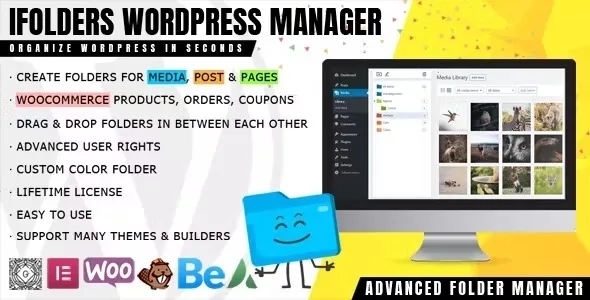
iFolders groups posts, pages, media files and custom post types into virtual folders and subfolders, which you can organize by date, topic, keyword or event. It is a layer of order that does not touch the content itself, and it works both for a photo library and for a site with several authors.
Move, sort and protect folders with iFolders
Drag and drop lets you move several items at once, both files and folders inside other folders, and create folders in bulk. These are its features:
- Sorting inside each folder: by name, date, modification or author.
- Folder filter: search by a word or phrase in the title, using the * and ? wildcards to match many or a single character.
- ZIP export: download selected folders with their subfolders and files, keeping the structure.
- Media replacement: change an image from the attachment details screen, keeping its properties and URL, without searching and changing each place it appears in the content.
- Direct upload: choose a folder and upload new files straight into it, from the library or the add new screen.
- Safe deletion: when you delete a folder, its items move to the Uncategorized folder so you can keep using them.
User and role permissions define who can view, edit, delete or assign items to a folder. It is recommended for multi-author blogs and sites, where you can give editing rights to some people and read-only access to others.
The folder sidebar can be resized to your liking and hidden when you do not need it, and the size you choose is saved. You can also give each folder a color in one click.
Decide whether iFolders fits your site: media, custom types or a WooCommerce store
iFolders organizes the content types WordPress includes by default: media files, posts, pages and users. It also manages all the custom post types you have registered.
If you sell with WooCommerce, it supports folders for products, orders and coupons. The folders do not alter hierarchy, permalinks or the order of your pages and posts.
Use cases include blogs with many photos, web developers who organize graphics and animations for websites, and online stores, where you can upload new products straight into category folders such as shoes, dresses or suits.
Common questions about folders, permissions and WooCommerce in iFolders
Does moving a post into a folder change its URL or its hierarchy?
No. The folders are virtual: adding a post, a page or an image does not modify its data, hierarchy, permalinks or order.
Can I limit who edits the folders?
Yes. You define permissions per user or role to view, edit, delete and assign items, so you can give editing rights to some people and read-only access to others.
What happens to the files if I delete a folder?
Nothing is lost. Its items move to the Uncategorized folder, where they stay available for later use.
Does it work for organizing WooCommerce products?
Yes. It supports folders for WooCommerce products, orders and coupons.
Can I upload files directly into a folder?
Yes. Select the folder and upload new files from the media library or from the add new screen.
Version history
-
v
1.3.7 Current 14 May 2024
Customer reviews
Sign in to leave a review. Only people who have the product can review it.
No reviews for this product yet.
Frequently asked questions
-
GPL (General Public License) is the license under which WordPress and most premium plugins/themes are distributed. It grants you the right to use, modify and redistribute the software in as many projects as you want, with no domain restrictions.
-
Yes. With membership you get automatic updates via our GPLClub Updater plugin (installed on your WP, detects new versions and applies them). With individual purchase, you get one year of manual updates from your account.
-
Depends on the plan. Monthly: 3 domains. Semi-annual: 7. Annual and Lifetime: 15. Individual purchase: 1 domain.
-
GPLClub offers its own support for installation, configuration and compatibility. For direct support from the original author (feature requests, product-specific bugs), a license purchased from the author is required.