Milano | Creative Minimal Portfolio & Photography WordPress Theme
Antivirus scan
Powered by ClamAV
✅ Verified clean
This product file has passed our security filters.
Want to run a fresh ClamAV scan right now? Takes a few seconds and shows scanner version, signature DB and live result.
This can take 5 to 30 seconds.
Clean file Threat detected
No threats detected in this file.
- File
- Size
- Scanned
- ClamAV
- Signature database
⚡ Powered by ClamAV
Scan could not be completed
Report product
If you detected an issue (broken file, malware, inappropriate content, etc.) let us know and we'll review it ASAP.
Sign in to report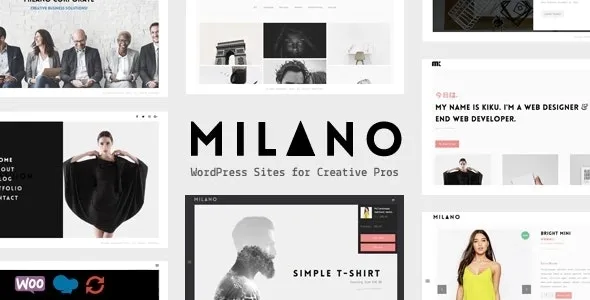
About Milano | Creative Minimal Portfolio & Photography WordPress Theme
The grid wins the click, the project page wins the commission
An art director lands on your portfolio, likes the grid and opens a piece of work. Inside she finds three stacked images and one line of text. She closes it without knowing what you did, how you solved it, or whether it resembles what she needs.
The front page decides whether someone clicks; the wish to write to you starts inside the project. Milano, a creative theme by BeantownThemes for photographers, agencies, designers and independent professionals, is worth looking at from that side. Besides its masonry portfolios it brings ten project page designs, and that choice weighs more than the number of columns.
What Milano puts on the table
- Ten complete demos with an importer, including agency, photography, illustrator, architecture, shop and one page.
- Dark monochrome variants of several demos, plus light and dark skins.
- Sortable masonry portfolio in 2, 3 or 4 columns, with filters you can hide to keep the view clean.
- Full-screen overlay menu and other styles: left, minimal, classic and centered.
- Full-screen slider with animated captions and three transition types.
- Revolution Slider home pages for sectors such as restaurant, gym, fashion, news and sports.
- Page elements: counters, team members, progress bars, tabs, accordions and pricing tables.
- Blog in zig-zag, in a five-column masonry grid, or in a simple format.
- Translation ready and WPML ready, with PO and MO files.
Which project design each job calls for
Before importing anything, open your three best projects and look at the material you have for each. That list will tell you which variants to use:
- Full width video, if the project is told in motion and you have a piece that can hold the full width.
- Carousel and Carousel v2, for a series of images of equal weight, such as a photo session.
- Parallax, with a parallax banner, if you have a large image for the header.
- Product, for work centered on an object or a product.
- Left and Right, each with spacing or without it, and Centered, to compare on the demo with your own images.
Prepare the text too: what the client asked for, which part you did and what the result was. Two or three sentences are enough for the project to make sense without you in the room.
Where Milano does not go
The block editor is not its route. The theme includes WPBakery Page Builder as its builder and is not optimized for Gutenberg. Elementor compatibility is not among its features either, so anyone who works daily with another builder should keep that in mind.
The sector home pages are just that, home pages. The restaurant, gym and fashion ones run on Revolution Slider, and bookings, menus and memberships are not among the theme's features.
Professional photography has its own processes. Private galleries where a client picks their photos are not among its features. Selling goes through WooCommerce, with minimal styling and its own listings.
Smooth scroll works only in Chrome and Opera.
Getting started with WPBakery and Revolution Slider
Milano includes WPBakery and Revolution Slider. Selling requires WooCommerce, and a site in several languages needs WPML.
- Install and activate the theme, along with the included plugins.
- Choose the demo by its structure and its menu, and import it.
- Settle on one project design per type of work, so the portfolio does not look assembled from pieces.
- Load three real projects first, and only then adjust columns, filters and effects.
Portfolios in the catalog with a different approach
If you prefer working with Elementor, Rhye brings 27 custom widgets for that builder and changes pages through AJAX. Harington centers everything on a project showcase with five variants, including a full-screen WebGL slider.
Zugan is also minimalist, with 36 portfolio layouts and artwork sales through WooCommerce.
Columns, shop, languages and dark mode in Milano
How many columns does the portfolio allow?
Two, three or four in masonry. There are also full-width grids of three, four and five columns.
Does it work for a shop?
Yes, with WooCommerce. It includes shop home pages, several product listings, a product page and a cart.
Does it work with several languages?
It is translation ready and compatible with WPML.
Does it have a dark mode?
It has light and dark skins, plus dark monochrome demos.
Topics
Version history
-
v
5.9 Current 5 May 2025
Customer reviews
Sign in to leave a review. Only people who have the product can review it.
No reviews for this product yet.
Frequently asked questions
-
GPL (General Public License) is the license under which WordPress and most premium plugins/themes are distributed. It grants you the right to use, modify and redistribute the software in as many projects as you want, with no domain restrictions.
-
Yes. With membership you get automatic updates via our GPLClub Updater plugin (installed on your WP, detects new versions and applies them). With individual purchase, you get one year of manual updates from your account.
-
Depends on the plan. Monthly: 3 domains. Semi-annual: 7. Annual and Lifetime: 15. Individual purchase: 1 domain.
-
GPLClub offers its own support for installation, configuration and compatibility. For direct support from the original author (feature requests, product-specific bugs), a license purchased from the author is required.