Paperbag – CSSIgniter
Antivirus scan
Powered by ClamAV
✅ Verified clean
This product file has passed our security filters.
Want to run a fresh ClamAV scan right now? Takes a few seconds and shows scanner version, signature DB and live result.
This can take 5 to 30 seconds.
Clean file Threat detected
No threats detected in this file.
- File
- Size
- Scanned
- ClamAV
- Signature database
⚡ Powered by ClamAV
Scan could not be completed
Report product
If you detected an issue (broken file, malware, inappropriate content, etc.) let us know and we'll review it ASAP.
Sign in to report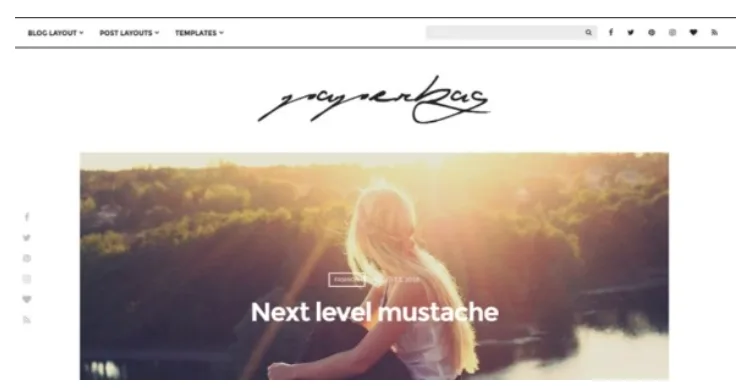
About Paperbag – CSSIgniter
A full outfit does not fit in a landscape photo
Anyone who photographs clothes or makeup tends to shoot vertically: head to shoes, or with the face filling the frame. Then they upload that image to a blog and run into the clash: the post listing is built for horizontal images, and what they took the most care over ends up cropped or out of place.
On a fashion blog, the photo format is part of the content, and it is worth seeing how a theme handles it before choosing one. Paperbag, by CSSIgniter, is a lifestyle and beauty blogging theme with a concrete answer to that problem: the Looks template.
Regular listings keep using landscape featured images. But a page with the Looks template shows vertical images, and each post supplies its own through a secondary image. That way the same article has one photo for the blog and another for the lookbook, with nothing to redo.
The Looks template and the other pieces
- Looks template: you choose the layout, the post category and the number of posts per page. It can also be the site front page.
- Ten layouts prepared for the blog.
- Front page slider using the featured images of your posts, by category or by post ID.
- Six custom widgets, on top of the WordPress ones.
- Page templates: Looks, fullwidth and page builder.
- Two menu locations: header and footer.
What changes from the Customizer
Everything is set under Appearance > Customize, with live preview and more than 80 options. The sections cover header layout and colors, layout options, front page slider, typography, global and sidebar colors, social networks, posts, pages and footer.
Typography and colors have their own sections, apart from the post options. You can define the visual identity without touching how the listings behave.
For the home page you choose between latest posts or a static page, and that page can use the Looks template. It is a basic decision: a blog to read, or a style catalog to browse.
Its built-in limits
The vertical image does not create itself. It has to be assigned on each post, in the secondary image tab of Post Utilities. If your post archive only has landscape photos, that work comes first.
The slider is not independent. Its images are the featured images of the posts, so they are the same ones as on the blog.
The footer has strict rules. Its menu does not support sub-menus, and the footer sidebar only displays the WPZOOM Social Feed widget.
It was not born as a shop. It is compatible with WooCommerce, handled mainly through styling and without modifying templates. Paperbag remains a blog theme.
From installed theme to your first Looks page
It installs from Appearance > Themes or by uploading the folder over FTP to wp-content/themes. These plugins are recommended, not mandatory, and are worth activating before importing the sample content: Socials Ignited, Contact Form 7, WPZOOM Social Feed Widget, Jetpack and One Click Import.
The steps to begin:
- Activate the theme and the plugins you will use.
- Import the sample content if you want to start from the demo.
- Create a page with the Looks template and choose its category.
- Add the vertical image to the posts in that category.
- Decide whether that page will be your static front page.
When Paperbag is not the blog you need
For a lifestyle blog, the catalog includes Buzz and Feminine. For a personal blog, FlexBlog.
If you actually need a company site, Flevr, also by CSSIgniter, organizes services, team, partners and portfolio as their own content types.
Before publishing your first lookbook
Can I use Looks as the front page?
Yes. Create the page with that template and set it as the static front page in the homepage settings.
Does it work for a photography blog?
You can add photo galleries, although it is aimed at lifestyle and beauty.
Can I sell with WooCommerce?
Yes, it is compatible, with the work done mainly through styling.
Does it work with page builders?
It includes a Page builder template and is compatible with Gutenberg and with Elementor Pro locations.
How do I show my Instagram?
With the WPZOOM Social Feed Widget plugin, in the theme sidebars.
Do I have to import the demo?
It is not mandatory. If you do, activate the recommended plugins first.
Topics
Version history
-
v
1.5.3 Current 8 Jan 2025
Customer reviews
Sign in to leave a review. Only people who have the product can review it.
No reviews for this product yet.
Frequently asked questions
-
GPL (General Public License) is the license under which WordPress and most premium plugins/themes are distributed. It grants you the right to use, modify and redistribute the software in as many projects as you want, with no domain restrictions.
-
Yes. With membership you get automatic updates via our GPLClub Updater plugin (installed on your WP, detects new versions and applies them). With individual purchase, you get one year of manual updates from your account.
-
Depends on the plan. Monthly: 3 domains. Semi-annual: 7. Annual and Lifetime: 15. Individual purchase: 1 domain.
-
GPLClub offers its own support for installation, configuration and compatibility. For direct support from the original author (feature requests, product-specific bugs), a license purchased from the author is required.
Related products
Bimba – Modern WooCommerce Theme for Your Craft Store
Durand – Beauty & Hair Salon WordPress Theme
Celerony – Creative Splitscreen WordPress Elementor Theme WordPress Theme