Sessions Music WordPress Theme By CSSIgniter
Antivirus scan
Powered by ClamAV
✅ Verified clean
This product file has passed our security filters.
Want to run a fresh ClamAV scan right now? Takes a few seconds and shows scanner version, signature DB and live result.
This can take 5 to 30 seconds.
Clean file Threat detected
No threats detected in this file.
- File
- Size
- Scanned
- ClamAV
- Signature database
⚡ Powered by ClamAV
Scan could not be completed
Report product
If you detected an issue (broken file, malware, inappropriate content, etc.) let us know and we'll review it ASAP.
Sign in to report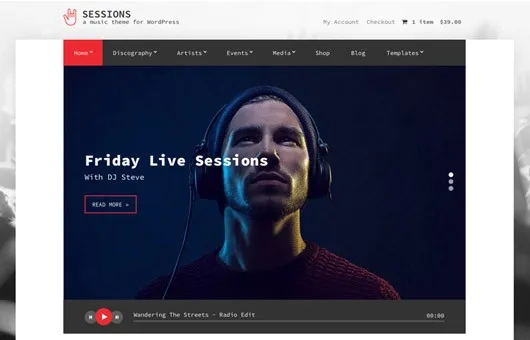
About Sessions Music WordPress Theme By CSSIgniter
Every link to another platform is a visitor who will miss your next show
You publish the new record on your site, add the platform buttons and the audience does the natural thing: taps one and goes to listen there. That person no longer passes by Saturday's date or the tickets, because another app now chooses the next song.
A music site that sends people elsewhere to listen hands its visit to someone else. Sessions, the CSSIgniter theme for music and entertainment professionals, goes the opposite way: tracks can play right where they appear, and events, videos and the shop stay one click away on the same site. It suits artists, labels, venues and stations that want listening to happen at home.
Six content types and listings with their own settings
Besides the usual posts and pages, Sessions separates material into six content types:
- Artists, for the artists.
- Discographies, for records with their tracks.
- Events, for scheduled dates.
- Galleries, for photos.
- Videos, for videos.
- Slideshow, to feature anything on the home page, linking wherever you want.
Each listing section has its own configuration. You can choose one to four columns, Isotope filtering and a Masonry effect, separately or combined. Galleries also optionally accept Staple or Jetpack styles.
The home page is built with widgets: seven made for the theme, which work there or in any sidebar and show any of that content.
Where the music plays in Sessions
The player is what holds up the theme's approach, and it has three listening points:
- On the album page. Each track on a record can be made playable right there.
- In a widget. Tracks also play wherever the record is displayed.
- On the home page. You choose a record and it plays in a large player.
That large player also accepts ShoutCast and IceCast streams, so a station can have its signal on the home page.
To make the most of it, leave several playable tracks on each record instead of a single sample, and place the record widget next to the upcoming events. That way whoever comes to listen also sees the date.
Tickets, records and downloads, and where the theme ends
Sessions brings WooCommerce integration to sell tickets, CDs or MP3 downloads, and keeps the site's look through to the end of the purchase.
Its limits are worth keeping clear:
- Continuous playback. A player that keeps sounding when you change page is not among its features.
- Radio. The player receives the stream; you supply the ShoutCast or IceCast signal.
- Tickets. They sell as WooCommerce products.
Sessions, from zero to the first published date
WooCommerce comes in if you will sell, and Jetpack if you want its galleries. The order matters, because the home page feeds on whatever is already loaded:
- Install and activate the theme.
- Create the artists and their records, with playable tracks.
- Add upcoming events, galleries and videos.
- Configure each listing: columns, filtering and Masonry effect.
- Build the home page with the widgets and choose the record or stream for the large player.
- Install WooCommerce and make a test purchase before announcing the sale.
Music themes in the catalog by what matters most
If you want the music to keep going while browsing, Kentha has a continuous player, plus a booking form and purchase links per album. Pulse navigates through Ajax without cutting playback, plays SoundCloud and Shoutcast, and sells audio with Easy Digital Downloads.
If your project revolves around a lineup rather than a catalog, Muzicon is aimed at concerts, festivals and clubs.
If you run a label, a venue or a station
Can it show several artists?
Yes. Artists is its own content type, separate from Discographies, and its listings have independent settings.
Does it work for a station?
Yes, if you broadcast through ShoutCast or IceCast. The home page player accepts those streams.
Can tickets be sold?
Yes, through WooCommerce, just like CDs and MP3 downloads.
Can people listen without opening the record?
Yes. Tracks also play in a widget, and a chosen record plays on the home page.
Topics
Version history
-
v
1.12.10 Current 18 Jun 2024
Customer reviews
Sign in to leave a review. Only people who have the product can review it.
No reviews for this product yet.
Frequently asked questions
-
GPL (General Public License) is the license under which WordPress and most premium plugins/themes are distributed. It grants you the right to use, modify and redistribute the software in as many projects as you want, with no domain restrictions.
-
Yes. With membership you get automatic updates via our GPLClub Updater plugin (installed on your WP, detects new versions and applies them). With individual purchase, you get one year of manual updates from your account.
-
Depends on the plan. Monthly: 3 domains. Semi-annual: 7. Annual and Lifetime: 15. Individual purchase: 1 domain.
-
GPLClub offers its own support for installation, configuration and compatibility. For direct support from the original author (feature requests, product-specific bugs), a license purchased from the author is required.