
Sticky Header on Scroll
Antivirus scan
Powered by ClamAV
✅ Verified clean
This product file has passed our security filters.
Want to run a fresh ClamAV scan right now? Takes a few seconds and shows scanner version, signature DB and live result.
This can take 5 to 30 seconds.
Clean file Threat detected
No threats detected in this file.
- File
- Size
- Scanned
- ClamAV
- Signature database
⚡ Powered by ClamAV
Scan could not be completed
Report product
If you detected an issue (broken file, malware, inappropriate content, etc.) let us know and we'll review it ASAP.
Sign in to report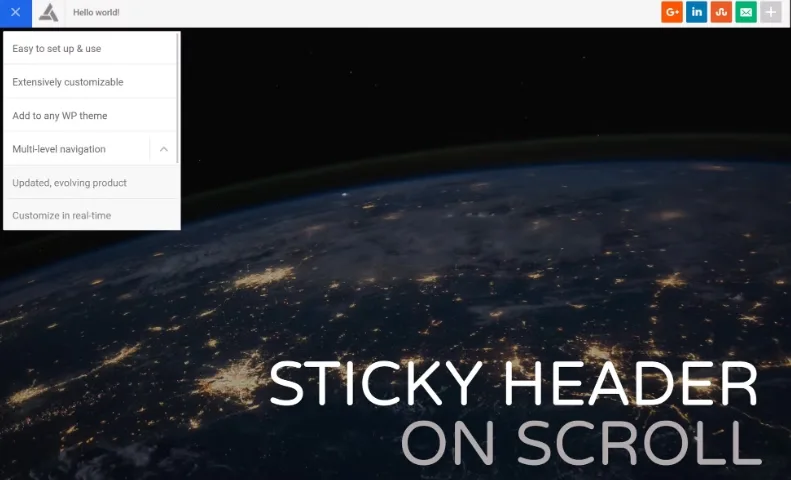
About Sticky Header on Scroll
The header that travels with the reader can be a different one
At the very top, your header has room for the logo, the full menu and a button or two. Halfway through a long article, that same bar pinned to the edge takes up screen space and offers choices meant for someone who just arrived. A person who is reading needs other things: knowing where they are, sharing what they read and moving on to the next post.
Once someone scrolls down they are no longer at the same moment as when they arrived, so the bar that goes with them can do a different job. Sticky Header on Scroll, by Bonfire Themes, starts from that difference: instead of freezing your theme's header, it adds its own that appears on scroll.
It works as a plugin, without switching or altering the theme you already have.
What the bar carries on scroll
- Dropdown menu: multi-level navigation, with a custom label on the button.
- Logo: as text or an uploaded image, with adjustable size and colors.
- Post title: shown on blog posts, with a custom prefix or none.
- Share buttons: on posts, with Facebook, Twitter, LinkedIn and email, among other options.
- Next post button: also on posts, with adjustable colors.
You can hide the dropdown, logo, title, share buttons and next post button separately, so the bar carries only what you need.
The whole look is adjusted with a preview
Settings are integrated into the WordPress Customizer and show changes in real time. These are the options that change the result most:
- Height and distance: you set the bar's height and how far the reader must scroll for it to appear.
- Slim design: a thinner variant of the header.
- Background: color with opacity, or an image as a pattern or full size, also with opacity.
- Dropdown: width, height, colors and an optional nicer scrollbar.
- Resolution: you can show it only at certain resolutions, for example on desktop alone.
- Theme header: you can hide it by giving its class or ID.
If you expect to pin your current bar, this is not the way
The plugin creates a new header. If you want your current menu, with its exact design, to stay stuck at the top, you will need another tool or a feature of your theme.
Your menu moves into a dropdown inside that bar, not a row of always-visible links. Three of its pieces, the title, the share buttons and the next post button, are meant for blog posts, so on a pages-only site its contribution drops to menu and logo.
It is also not Gutenberg optimized, and if you combine its bar with a sticky header from your theme, check that they do not overlap.
How to get it working in your theme
The process fits in a few steps and is best checked with a long post open:
- Install and activate the plugin in your WordPress.
- Open the Customizer and find its settings.
- Set the scroll distance at which it appears and its height.
- Configure the menu, the logo and the items you want on posts, and hide the rest.
- If your theme already has a sticky bar, hide the one you do not need with its class or ID.
- Test on desktop and on a phone, and limit the resolution if needed.
More ways to keep navigation in view
If what you want is a large sticky menu, Max Mega Menu Pro builds mega menus and adds sticky menus in its Pro version. UberMenu also creates mega menus, with the sticky menu as a separate extension. If your site uses OceanWP, look at OceanWP Sticky Header.
The floating bar, point by point
Do I have to change themes?
No. It is added to your current theme without altering it.
Can I hide my original header?
Yes. Give the element's class or ID and the plugin hides it.
Can I use it on desktop only?
Yes. You can limit it to the resolutions you specify.
When does it appear?
After the scroll distance you configure. That distance is adjustable.
Does the menu support submenus?
Yes. The dropdown is multi-level.
Does it work on a site with no blog?
Yes, for menu and logo. The title, share buttons and next post button appear on posts.
Version history
-
v
1.3 Current 15 May 2024
Customer reviews
Sign in to leave a review. Only people who have the product can review it.
No reviews for this product yet.
Frequently asked questions
-
GPL (General Public License) is the license under which WordPress and most premium plugins/themes are distributed. It grants you the right to use, modify and redistribute the software in as many projects as you want, with no domain restrictions.
-
Yes. With membership you get automatic updates via our GPLClub Updater plugin (installed on your WP, detects new versions and applies them). With individual purchase, you get one year of manual updates from your account.
-
Depends on the plan. Monthly: 3 domains. Semi-annual: 7. Annual and Lifetime: 15. Individual purchase: 1 domain.
-
GPLClub offers its own support for installation, configuration and compatibility. For direct support from the original author (feature requests, product-specific bugs), a license purchased from the author is required.
Related products
Mordern Counters Addon for WPBakery Page Builder (formerly Visual Composer)
Easy Digital Downloads - Payment Gateway Order
By Easy Digital Downloads
Memberpress GetResponse
By MemberPress
Ninja Forms Support for AMP
By Ninja Forms