Ultimate Player with YouTube, Vimeo, Ads WP Plugin
Antivirus scan
Powered by ClamAV
✅ Verified clean
This product file has passed our security filters.
Want to run a fresh ClamAV scan right now? Takes a few seconds and shows scanner version, signature DB and live result.
This can take 5 to 30 seconds.
Clean file Threat detected
No threats detected in this file.
- File
- Size
- Scanned
- ClamAV
- Signature database
⚡ Powered by ClamAV
Scan could not be completed
Report product
If you detected an issue (broken file, malware, inappropriate content, etc.) let us know and we'll review it ASAP.
Sign in to reportNewer version out, or a problem?
About Ultimate Player with YouTube, Vimeo, Ads WP Plugin
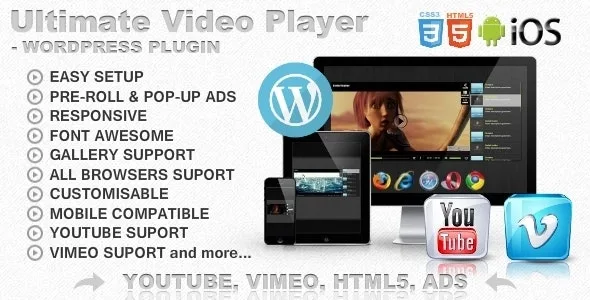
Your own videos, YouTube and Vimeo in a single player
Sites with video often end up with several separate players: the YouTube embed, the Vimeo embed and mp4 files uploaded to the media library, each with its own controls and look. Ultimate Player gathers those sources into one responsive player.
It supports HTML5 mp4 videos, YouTube and Vimeo videos through their APIs, and also Google Drive and Amazon S3 videos. There is no limit on the number of videos, so it works for a single video or a full collection.
Ultimate Player shows one video or a full gallery
If you want one featured video on a page
You can use it without a gallery and with a single video. You can add an optional logo and a preview image, which keeps the player paused when the page loads.
If you have a video catalogue
The gallery can sit on the right or at the bottom, with thumbnails, titles and descriptions for each video. From the player itself you can show or hide the gallery with a button: the video takes the full width and, when the gallery comes back, the visitor picks another one. The gallery can be dragged and scrolled with the mouse wheel or with a finger.
If each site has its own style
It includes five skins (Default, Classic, Minimal, Transparent and Silver), and you can combine one for the player with a different one for the gallery. The size is configurable, the Vimeo player accepts any colour you choose, and you can add an optional shadow. You can also turn off the logo, the Facebook and Twitter share button or the embed code if you don't need them. The icons are vectors, so they look sharp on high-resolution screens.
Ads before the video and during playback
The player includes its own advertising in two formats: a pre-roll ad, which plays before the video, and a pop-up ad, which can appear at any moment during playback and be hidden whenever you like. Each video can have its own ad, and both the pre-roll and the pop-up can be enabled or disabled separately.
It works with YouTube videos, Vimeo videos and your own mp4 files. You decide whether visitors can skip the pre-roll, and viewers can play or pause the ad, skip it or click it.
Controls the visitor uses with a finger, a mouse or a keyboard
The player adapts to desktop and to iOS and Android devices. Visitors can double-click to enter or leave fullscreen, press the space bar to play or pause, and use the Escape key to leave fullscreen. Hovering shows tooltips with the time and the volume percentage, there is a rewind button, and you can turn autoplay on or off and choose after how many seconds the controls disappear.
Frequently asked questions about Ultimate Player
Can I mix YouTube and Vimeo videos with my own mp4 files?
Yes. The player accepts mp4 files hosted on your server as well as YouTube and Vimeo videos through their APIs.
Is there a limit on the number of videos in the gallery?
No. The number of videos is unlimited, with or without a gallery.
Can I show ads on only some videos?
Yes. Each video can have its own pre-roll ad and pop-up ad, and you can enable or disable each one separately.
Can it match my theme's design?
Yes. There are five skins, the size is adjustable, and you can combine different skins for the player and the gallery, as well as remove the logo or the embed code if you don't need them.
The logo can only go in the bottom-left or bottom-right corner
If you want your logo, the player places it in the bottom-left or bottom-right corner. It is optional, so if you don't need it you can leave it out.
Topics
Version history
-
v
7.0.9 Current 8 Apr 2024
Customer reviews
Sign in to leave a review. Only people who have the product can review it.
No reviews for this product yet.
Frequently asked questions
-
GPL (General Public License) is the license under which WordPress and most premium plugins/themes are distributed. It grants you the right to use, modify and redistribute the software in as many projects as you want, with no domain restrictions.
-
Yes. With membership you get automatic updates via our GPLClub Updater plugin (installed on your WP, detects new versions and applies them). With individual purchase, you get one year of manual updates from your account.
-
Depends on the plan. Monthly: 3 domains. Semi-annual: 7. Annual and Lifetime: 15. Individual purchase: 1 domain.
-
GPLClub offers its own support for installation, configuration and compatibility. For direct support from the original author (feature requests, product-specific bugs), a license purchased from the author is required.