User Registration Advanced Fields Addon
Antivirus scan
Powered by ClamAV
✅ Verified clean
This product file has passed our security filters.
Want to run a fresh ClamAV scan right now? Takes a few seconds and shows scanner version, signature DB and live result.
This can take 5 to 30 seconds.
Clean file Threat detected
No threats detected in this file.
- File
- Size
- Scanned
- ClamAV
- Signature database
⚡ Powered by ClamAV
Scan could not be completed
Report product
If you detected an issue (broken file, malware, inappropriate content, etc.) let us know and we'll review it ASAP.
Sign in to report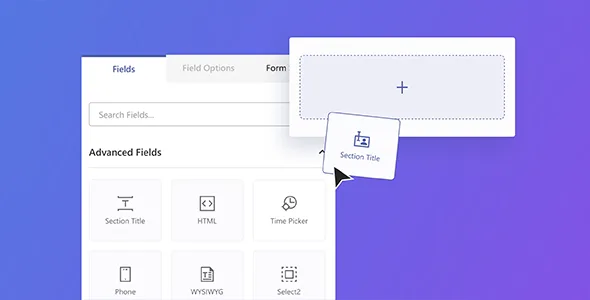
About User Registration Advanced Fields Addon
A registration form that only asks for name, email and password falls short as soon as you need to know more: what time a clinic prefers to be called, what budget a client has or what their professional profile is. Then come the improvised text fields, the instructions pasted in by hand and data that arrives in a format you can't use.
User Registration Advanced Fields Addon: 11 field types on top of the free base
It is an add-on for User Registration & Membership: it doesn't work on its own. It adds 11 field types to the 23 already included in the free plugin, and it is turned on from the plugin's own addons screen. You therefore need the base plugin and a paid plan that includes this addon.
A registration for a consultation or appointment-based service, step by step
Imagine you are registering clients for a service that works by appointment. This is how you walk through the form:
Step 1: organize the form
A long form is intimidating. Section Title divides it into blocks such as "Personal information" or "Preferences". With the HTML field you add instructions or even an embedded video, but note: it is display-only content and doesn't collect any answer.
Step 2: collect the phone number without a mess
The Phone field has two modes. The default mode lets you define your own input mask. Smart mode adds country flags and automatic formatting and validation by country. If your clients come from several countries, the second avoids badly typed numbers.
Step 3: the preferred time
With Time Picker the person chooses the time visually, useful for appointments, events or time slots. Note: it only collects a time inside the form; it is not a booking system with a calendar and it doesn't check availability.
Step 4: long lists and numeric values
Select2 is a searchable dropdown with infinite scrolling, built for lists such as countries. Multi Select2 allows several options to be chosen, with an optional "select all" and a configurable minimum. Range/Slider collects a number (budget, age, rating) with a slider control.
Step 5: profile and hidden data
WYSIWYG accepts bios with bold, italics and lists without anyone touching HTML. Profile Picture lets people upload a photo when registering. Custom URL asks for a website or portfolio. And Hidden Field stores data invisible to the person filling out the form, such as the visit source, UTM parameters or conditional logic triggers.
Step 6: show each field only when it applies
Each field has its own settings panel: label, description, field name and CSS classes, plus options specific to each type. To show the Time Picker only if someone chooses "Schedule appointment", or a WYSIWYG only for a specific role, you need to combine it with the Conditional Logic addon, which is separate.
Frequently asked questions before deciding
Can I use it with the free plugin?
No. It is a premium addon and requires a paid plan of the plugin that includes it.
Does it work for WooCommerce billing and shipping fields?
No. Those fields are unlocked with a different addon. This one covers the 11 types described above.
Can I use my own phone format instead of flags?
Yes: the default format lets you define your mask, and Smart adds flags and country-based validation.
Can they be combined with conditional logic?
Yes, showing or hiding fields depending on what the person answers during registration.
What to decide before adding fields
Every extra field is one more barrier for the person registering. Ask only for what you will use: if you won't call by phone or read a bio, don't include them. Advanced fields are for collecting the data you really need better, not for making the form longer.
Topics
Version history
-
v
1.6.22 Current 26 Jun 2026
-
v
1.6.20 12 Mar 2026
Customer reviews
Sign in to leave a review. Only people who have the product can review it.
No reviews for this product yet.
Frequently asked questions
-
GPL (General Public License) is the license under which WordPress and most premium plugins/themes are distributed. It grants you the right to use, modify and redistribute the software in as many projects as you want, with no domain restrictions.
-
Yes. With membership you get automatic updates via our GPLClub Updater plugin (installed on your WP, detects new versions and applies them). With individual purchase, you get one year of manual updates from your account.
-
Depends on the plan. Monthly: 3 domains. Semi-annual: 7. Annual and Lifetime: 15. Individual purchase: 1 domain.
-
GPLClub offers its own support for installation, configuration and compatibility. For direct support from the original author (feature requests, product-specific bugs), a license purchased from the author is required.