Woo Tabbed Category Product Listing - Pro
Antivirus scan
Powered by ClamAV
✅ Verified clean
This product file has passed our security filters.
Want to run a fresh ClamAV scan right now? Takes a few seconds and shows scanner version, signature DB and live result.
This can take 5 to 30 seconds.
Clean file Threat detected
No threats detected in this file.
- File
- Size
- Scanned
- ClamAV
- Signature database
⚡ Powered by ClamAV
Scan could not be completed
Report product
If you detected an issue (broken file, malware, inappropriate content, etc.) let us know and we'll review it ASAP.
Sign in to report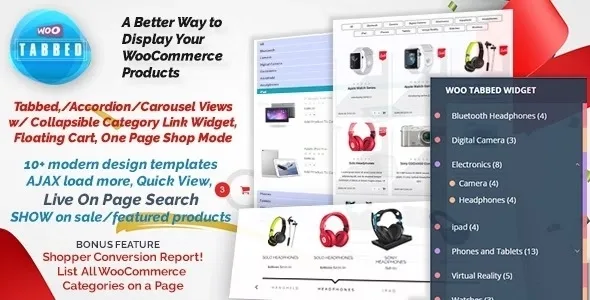
About Woo Tabbed Category Product Listing - Pro
A store with many categories hides its products
When a catalog grows, shoppers open a category, don't find what they wanted, go back and open another. Every extra click is a chance for them to leave. Woo Tabbed Category Product Listing - Pro gathers the categories on a single page, with tabs, accordion or carousel, so visitors can switch sections without leaving it.
A note on the sector: it appears under Real Estate, but it is a WooCommerce plugin. It is meant to list store products (for example, services or items you sell with a cart), not a property search tool with maps or listing pages.
Three ways to show categories: tabs, accordion or carousel
- Tabs: the standard mode, with products in a grid. There are 7 styles so it fits your theme.
- Accordion: visitors open only the category they care about. It works very well for showing only featured products.
- Carousel: designed for the homepage or a landing page, so customers browse products by category and decide fast. It is the best fit for products on sale.
The Pro version includes more than 10 responsive templates.
Filters, progressive loading and floating cart
The filter buttons at the top switch categories with AJAX, without reloading the page. They are customized from the admin panel and can be stacked or shown on a single line like a carousel. They also support subcategories: top-level ones come first and child categories appear in dropdowns.
You can set how many products show at first and load the rest with a Load More button. The add to cart button also works with AJAX, and the floating cart opens when a product is added. You can enable it across the whole site or only on the plugin's page.
Shortcodes worth knowing
- A shortcode with 4 tabs: Hot, New, Best Buy and Featured.
- A parameter to show only products on sale.
- A parameter to show only featured products.
- A shortcode to list all categories and subcategories on a page.
- A single page mode: clicking the title or image opens a lightbox with the details, instead of going to the product page.
Clear limit: it needs WooCommerce active and works with the categories and products you have already created. Featured and sale products must be marked by you in WooCommerce.
Frequently asked questions
Can I list all my products on a single page?
Yes, it is one of its main uses: all products grouped by category in tabs, accordion or carousel.
Can I show only what is on sale?
Yes, with the sale parameter of the shortcode, and it works with all templates.
Does it support subcategories?
Yes, both in the filters (with dropdowns) and in the shortcode that lists all categories.
Is it a property search tool?
No. It is a WooCommerce product listing. If you need property listings with maps, look for another tool.
It includes a category widget and a conversion report
Besides the listings, it comes with a category selection widget with collapsible links and a customer conversion report. These are extras: the core of the plugin remains the category listing.
Shortcodes are placed page by page
The plugin does not reorganize your store by itself: you decide which pages get each listing and with which parameters (sale only, featured only, single page mode). Before starting, check that your products have the right categories and that featured ones are marked, because that is what visitors will see. Test each template on mobile with your theme before choosing one.
Topics
Version history
-
v
10.1.4 Current 8 Jan 2025
Customer reviews
Sign in to leave a review. Only people who have the product can review it.
No reviews for this product yet.
Frequently asked questions
-
GPL (General Public License) is the license under which WordPress and most premium plugins/themes are distributed. It grants you the right to use, modify and redistribute the software in as many projects as you want, with no domain restrictions.
-
Yes. With membership you get automatic updates via our GPLClub Updater plugin (installed on your WP, detects new versions and applies them). With individual purchase, you get one year of manual updates from your account.
-
Depends on the plan. Monthly: 3 domains. Semi-annual: 7. Annual and Lifetime: 15. Individual purchase: 1 domain.
-
GPLClub offers its own support for installation, configuration and compatibility. For direct support from the original author (feature requests, product-specific bugs), a license purchased from the author is required.