WooCommerce AutomateWoo
Antivirus scan
Powered by ClamAV
✅ Verified clean
This product file has passed our security filters.
Want to run a fresh ClamAV scan right now? Takes a few seconds and shows scanner version, signature DB and live result.
This can take 5 to 30 seconds.
Clean file Threat detected
No threats detected in this file.
- File
- Size
- Scanned
- ClamAV
- Signature database
⚡ Powered by ClamAV
Scan could not be completed
Report product
If you detected an issue (broken file, malware, inappropriate content, etc.) let us know and we'll review it ASAP.
Sign in to report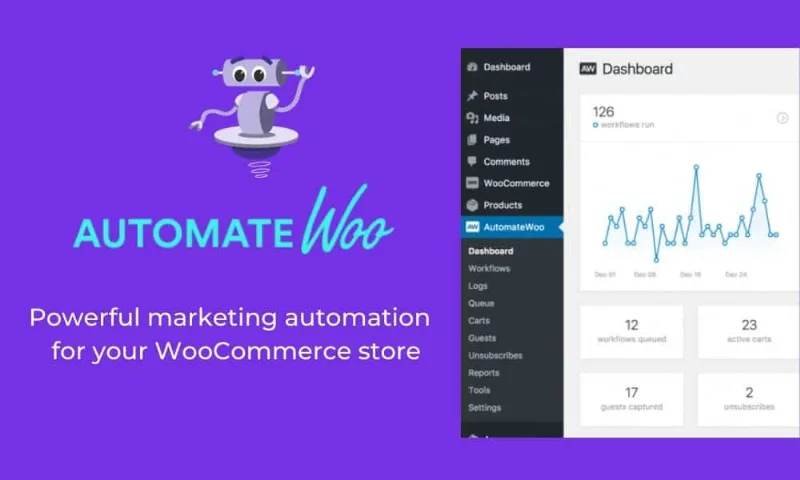
About WooCommerce AutomateWoo
Customers who buy once and never return take your margin with them
A WooCommerce store usually spends nearly all its effort bringing in new visitors and almost none on what happens afterwards: the cart left half-finished, the customer who bought six months ago and never came back, the subscription that fails because a card expired. Each of those leaks can be handled with a well-timed message, but doing it by hand is unworkable once orders arrive daily. AutomateWoo exists for that: so the store acts on its own when a customer does (or stops doing) something specific.
How AutomateWoo works: triggers, filters and actions
The logic is that of a workflow based on triggers, filters and actions, with which you can build automated campaigns of many kinds.
What you can automate, and what falls outside
- Abandoned carts: automatic emails at intervals you set to remind customers of what they left in the bag.
- Post-purchase follow-up: write to whoever bought a specific product to ask for a review or suggest another one.
- Inactive customers: win-back campaigns with offers and recommendations.
- Rewarded reviews: discounts for leaving feedback, limited by how many reviews the customer posted and what rating they gave.
- Personalized coupons: generated dynamically for each customer.
- Automatic VIP: assigns VIP status based on accumulated spend.
- Wishlists: scheduled reminders and a notice when a wished-for product goes on sale.
- Subscriptions: actions based on status changes, failed payments and renewal reminders, plus alerts before a saved card expires.
- SMS: for customers or administrators, with Twilio integration.
Where the limits are
It is not a separate email service: it orchestrates messages based on what happens in your store. Wishlists work with WooCommerce Wishlists or YITH Wishlists, so you need one of the two. Birthday emails and the refer-a-friend program are separate add-ons (Birthdays and Refer A Friend), not part of the base plugin. And SMS requires your own Twilio account. Card alerts and renewals only make sense if you sell subscriptions with WooCommerce Subscriptions.
Frequently asked questions about AutomateWoo
Is it worth it for a small store?
Yes, if you already have orders and carts to recover. With little traffic, start with a single flow, the abandoned cart one, and measure before adding more.
Can I reward only good reviews?
Yes: the review discount can be limited by the rating given and the number of reviews posted. Think the rules through carefully, because rewarding only positive opinions can undermine the credibility of your ratings.
Does it send SMS on its own?
No, it needs Twilio, with your own account.
Start with a single flow: the abandoned cart
Turning on every automation at once is the fastest way to overwhelm your customers. First create an abandoned cart flow with a single reminder, check how many carts it recovers, and then add post-purchase follow-up or inactive customer recovery. If you use coupons, set a usage limit and an expiry date so the discount does not become permanent. Since messages go to real customers, also make sure you have the consent required to send email or SMS marketing.
Topics
Version history
-
v
6.9.4 Current 21 Oct 2026
-
v
6.9.3 14 Oct 2026
-
v
6.9.2 30 Sep 2026
-
v
6.9.1 24 Sep 2026
-
v
6.9.0 16 Sep 2026
-
v
6.8.3 9 Sep 2026
-
v
6.8.2 5 Sep 2026
-
v
6.8.1 21 Aug 2026
-
v
6.3.1 15 Apr 2026
Customer reviews
Sign in to leave a review. Only people who have the product can review it.
No reviews for this product yet.
Frequently asked questions
-
GPL (General Public License) is the license under which WordPress and most premium plugins/themes are distributed. It grants you the right to use, modify and redistribute the software in as many projects as you want, with no domain restrictions.
-
Yes. With membership you get automatic updates via our GPLClub Updater plugin (installed on your WP, detects new versions and applies them). With individual purchase, you get one year of manual updates from your account.
-
Depends on the plan. Monthly: 3 domains. Semi-annual: 7. Annual and Lifetime: 15. Individual purchase: 1 domain.
-
GPLClub offers its own support for installation, configuration and compatibility. For direct support from the original author (feature requests, product-specific bugs), a license purchased from the author is required.