WooCommerce Cart popup premium
Antivirus scan
Powered by ClamAV
✅ Verified clean
This product file has passed our security filters.
Want to run a fresh ClamAV scan right now? Takes a few seconds and shows scanner version, signature DB and live result.
This can take 5 to 30 seconds.
Clean file Threat detected
No threats detected in this file.
- File
- Size
- Scanned
- ClamAV
- Signature database
⚡ Powered by ClamAV
Scan could not be completed
Report product
If you detected an issue (broken file, malware, inappropriate content, etc.) let us know and we'll review it ASAP.
Sign in to report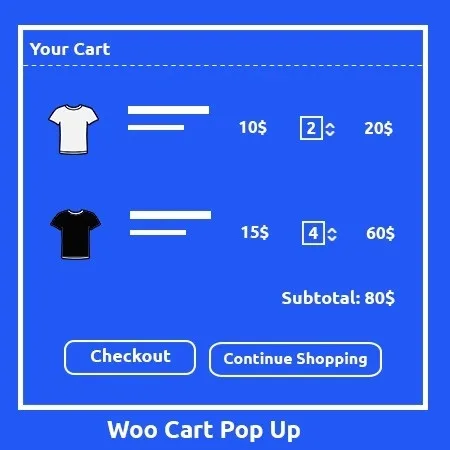
About WooCommerce Cart popup premium
Adding to cart shouldn't pull the customer away from what they were looking at
In many WooCommerce shops, clicking «Add to cart» reloads the page or sends the buyer to another screen. The customer who was heading for the second item on their list loses the thread, and you lose the cheapest sale to win: the one from someone who has already decided to buy and just needs no obstacles.
WooCommerce Cart popup works at exactly that moment: it adds the product without refreshing the page and shows what has just gone in inside a popup window, with buttons to go to the cart or to checkout. The customer decides whether to keep browsing or complete the purchase.
From the product page to checkout with WooCommerce Cart popup, step by step
Picture a phone accessories shop: someone comes in for a case and ends up with three items in the cart. This is how the visit goes:
- They click add to cart on the product page. The product goes in without the page refreshing, so what they were reading isn't interrupted. If you also sell from category listings, check in the demo how it behaves there.
- The window with the added item appears. They can see all the items in the cart and change the quantity right there, without opening the cart page.
- They see related, up-sell or cross-sell products. The window can show related, up-sell and cross-sell products: the natural place to offer the charger next to the case. Whether the suggestion makes sense depends on how you have organized your catalog.
- They choose where to go. The View cart and Checkout buttons let them decide. Note: they are shortcuts to your cart and checkout pages, which must still exist and work.
- They keep browsing and come back whenever they want. A basket icon gives access to the cart from anywhere in the shop.
That is all it does: it speeds up the step of adding and deciding. It doesn't change your checkout process or add fields or payment methods to checkout.
Common questions before putting it in your shop
Does it work without WooCommerce?
No. It is a plugin for WooCommerce shops: without a WooCommerce cart it has nothing to show.
Can I change the look of the basket?
Yes. You can choose among several basket icons and style the popup window so it fits your design.
Can I put the cart in the header menu?
Yes, there is a shortcode designed for the header menu that you can also use anywhere else on the site.
Does it replace my cart page?
No. The window summarizes what was added and its buttons lead to the cart and to checkout, so those pages are still needed.
A basket with its own icon and a window in your style
The plugin is not just the window: the basket icon is one more element of your design. You can choose among several icons and style the popup. With the fly-to-cart animation, adding stops being a silent click.
It fits shops where buying more than one item per visit is normal. If you sell a single product or work with quotes, a popup after adding will hardly give you anything.
Topics
Version history
-
v
1.6 Current 15 May 2024
Customer reviews
Sign in to leave a review. Only people who have the product can review it.
No reviews for this product yet.
Frequently asked questions
-
GPL (General Public License) is the license under which WordPress and most premium plugins/themes are distributed. It grants you the right to use, modify and redistribute the software in as many projects as you want, with no domain restrictions.
-
Yes. With membership you get automatic updates via our GPLClub Updater plugin (installed on your WP, detects new versions and applies them). With individual purchase, you get one year of manual updates from your account.
-
Depends on the plan. Monthly: 3 domains. Semi-annual: 7. Annual and Lifetime: 15. Individual purchase: 1 domain.
-
GPLClub offers its own support for installation, configuration and compatibility. For direct support from the original author (feature requests, product-specific bugs), a license purchased from the author is required.