Woocommerce OpenPos Plugin
Antivirus scan
Powered by ClamAV
✅ Verified clean
This product file has passed our security filters.
Want to run a fresh ClamAV scan right now? Takes a few seconds and shows scanner version, signature DB and live result.
This can take 5 to 30 seconds.
Clean file Threat detected
No threats detected in this file.
- File
- Size
- Scanned
- ClamAV
- Signature database
⚡ Powered by ClamAV
Scan could not be completed
Report product
If you detected an issue (broken file, malware, inappropriate content, etc.) let us know and we'll review it ASAP.
Sign in to reportNewer version out, or a problem?
About Woocommerce OpenPos Plugin
One stock for the physical store and the WooCommerce website
A business with a counter and an online shop often ends up with two inventories that do not match: an item sells at the till while the website still shows it as available. OpenPOS works on top of WooCommerce products, so every sale at the point of sale deducts from the same stock the online customer sees. As a WooCommerce plugin, it needs WooCommerce active, because products, orders and payment gateways are WooCommerce's.
If you have several shops or warehouses, each one can work as an outlet with its own stock, and you can transfer goods between them and adjust stock from a single panel. It supports decimal stock and negative quantities. It also integrates with WooCommerce Product Add-Ons and WooCommerce Product Bundles, so variable products, products with add-ons or bundles go through the till just like simple ones.
Restaurant with tables or shop with a till: two ways to use the same OpenPOS
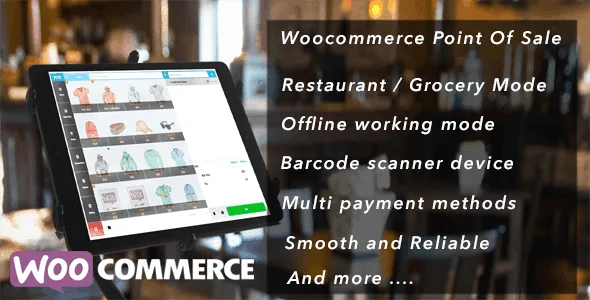
A café needs to think about tables and the kitchen, while a supermarket needs speed at the till. With OpenPOS you choose between the cafe or restaurant mode and the general or grocery mode.
- Restaurants, cafés and bars: table management with merging and transferring between tables, kitchen screen and no-touch orders. Waiter orders sync in real time with the kitchen from a phone, tablet or computer.
- General and grocery retail: shop mode with customer pole display, barcode reading with a scanner or the camera, and digital scales with weight barcodes.
There is also a rental mode for businesses such as karaoke, pool table hire or room rental.
Split payments, refunds and card terminals
A single ticket can be paid with several payment methods thanks to split payment. Refunds can be full or partial, and product exchanges can be full or partial too.
OpenPOS works with WooCommerce payment gateways and also lets you charge through your online store's gateway from the POS itself. There are integrations for Square, Stripe, Verifone P400 and WisePOS E terminals, and for magnetic card readers with Authorize.net. If you want to offer buy now and pay later, it includes LayBuy.
Cashier sessions under control in OpenPOS
Several people use the same till throughout the day. OpenPOS shows active sessions with the cashier's name, the location and the IP address.
A cashier can log off without losing their working session and without anyone else changing their data in the meantime. You also decide which WordPress users can log in to the POS panel.
Offline mode and barcode reading from a phone
A shop with an unstable connection cannot stop its till every time the network drops. OpenPOS keeps working in offline mode.
It has progressive web app support. It reads barcodes and QR codes with the device camera, a feature that requires HTTPS, and accepts any barcode scanner with automatic detection of input. It also prints receipts and labels, and supports thermal printers and cash drawers.
Frequently asked questions about OpenPOS
Does it work for online store orders as well as the till?
Yes. Stock is synced between the point of sale and the online store, and payments use WooCommerce payment gateways.
Is it compatible with high-performance order storage?
Yes, OpenPOS is compatible with HPOS, WooCommerce's high-performance order storage.
Can I print receipts and labels?
Yes. It includes receipts and barcode labels, and email receipts. With the Star CloudPRNT integration you can print without a dialog, including with several registers.
Is there a demo to see the panel before deciding?
Yes, there is a demo of the admin panel and another of the POS. Check in the demo whether the table or till flow fits your business.
Topics
Version history
-
v
8.3.0 Current 12 Mar 2026
Customer reviews
Sign in to leave a review. Only people who have the product can review it.
No reviews for this product yet.
Frequently asked questions
-
GPL (General Public License) is the license under which WordPress and most premium plugins/themes are distributed. It grants you the right to use, modify and redistribute the software in as many projects as you want, with no domain restrictions.
-
Yes. With membership you get automatic updates via our GPLClub Updater plugin (installed on your WP, detects new versions and applies them). With individual purchase, you get one year of manual updates from your account.
-
Depends on the plan. Monthly: 3 domains. Semi-annual: 7. Annual and Lifetime: 15. Individual purchase: 1 domain.
-
GPLClub offers its own support for installation, configuration and compatibility. For direct support from the original author (feature requests, product-specific bugs), a license purchased from the author is required.