WooCommerce Wallet Management
Antivirus scan
Powered by ClamAV
✅ Verified clean
This product file has passed our security filters.
Want to run a fresh ClamAV scan right now? Takes a few seconds and shows scanner version, signature DB and live result.
This can take 5 to 30 seconds.
Clean file Threat detected
No threats detected in this file.
- File
- Size
- Scanned
- ClamAV
- Signature database
⚡ Powered by ClamAV
Scan could not be completed
Report product
If you detected an issue (broken file, malware, inappropriate content, etc.) let us know and we'll review it ASAP.
Sign in to reportNewer version out, or a problem?
About WooCommerce Wallet Management
When the customer has to type payment details again on every purchase
In an online store, every payment the customer has to type in again is a sale at risk. A wallet balance changes that: the customer loads money once and spends it in the shop without repeating their payment details on each order. WooCommerce Wallet Management creates that wallet inside WooCommerce, so the balance stays in your own store and the payment process gets shorter.
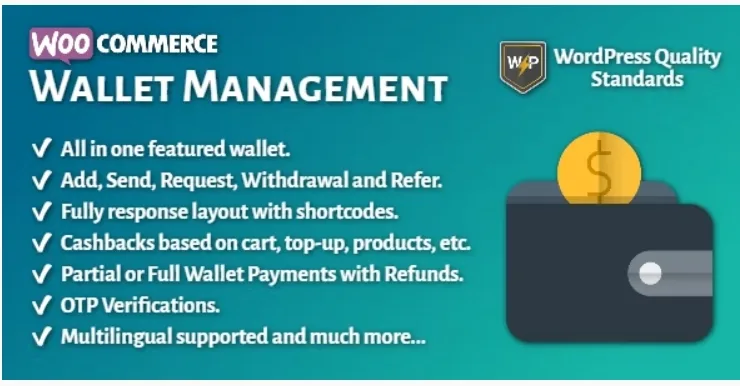
From their account, customers see their balance, top up, send, request or withdraw funds, and check the transaction history, all from one place.
Balance for refunds, cashback and referrals
Shops that have to refund money
When an order is refunded, the administrator can credit the refund directly to the customer's wallet. The amount is then available for their next purchase in the shop.
Shops that want customers to come back
Cashback can be calculated on the cart, on each top-up or on a specific product, so you can reward both the amount spent and the purchase of certain items. You can also assign a registration credit to new customers.
Shops that grow through recommendations
The administrator can enable or disable the referral system for customers. The person who refers and the new customer who registers can both earn the amount you set. The administrator defines the email the new user receives, and customers can edit the text of their referral email.
Top-up and payment limits, OTP verification and CSV balance loading
The administrator decides how much can be topped up, how much of the balance can be used in a purchase, and how much can be sent, requested or withdrawn. For each of these operations a minimum and a maximum can be set:
- Top-ups: minimum and maximum limits, and the payment gateways enabled for them.
- Payment with balance: minimum and maximum limits, fixed or percentage, and partial payments can be switched on.
- Sending and requesting money: minimum and maximum limits.
- Withdrawals: minimum and maximum limits, and a fixed or percentage fee.
For specific operations you can require OTP verification, setting how long the code lasts and how many digits it has. You also decide whether withdrawals are available to customers, and you review each request to mark it as paid or cancel it.
If you manage many customers, you can export the user list with their balances to CSV, and credit or debit amounts in bulk by importing another CSV. Manual balance adjustments for each customer are also available.
Requires WooCommerce installed and active
It is an add-on for WooCommerce, so the store must have that plugin installed and active. Top-ups are made with the payment gateways the administrator enables for that purpose, and the balance is used to pay for orders in the store.
Frequently asked questions about WooCommerce Wallet Management
Can the customer pay only part of the order with their balance?
Yes, as long as the administrator has partial payments enabled.
Can I require a verification code before some operations?
Yes. You choose which balance operations require OTP verification and set the code's expiry time and length.
How do I manage withdrawal requests?
From the administrator area you see the list of requests and mark them as paid or cancel them. You can set a fixed or percentage fee, as well as minimum and maximum limits.
Can I load balances for many customers at once?
Yes, by importing a CSV with the amounts. Before that, you can export the list of users with their balances to review it.
WooCommerce Wallet Management shortcodes to show the balance
Built-in shortcodes display wallet information on any page, with an adaptable layout. The administrator can also review all wallet-related transactions whenever needed.
Topics
Version history
-
v
2.6.0 Current 13 May 2024
Customer reviews
Sign in to leave a review. Only people who have the product can review it.
No reviews for this product yet.
Frequently asked questions
-
GPL (General Public License) is the license under which WordPress and most premium plugins/themes are distributed. It grants you the right to use, modify and redistribute the software in as many projects as you want, with no domain restrictions.
-
Yes. With membership you get automatic updates via our GPLClub Updater plugin (installed on your WP, detects new versions and applies them). With individual purchase, you get one year of manual updates from your account.
-
Depends on the plan. Monthly: 3 domains. Semi-annual: 7. Annual and Lifetime: 15. Individual purchase: 1 domain.
-
GPLClub offers its own support for installation, configuration and compatibility. For direct support from the original author (feature requests, product-specific bugs), a license purchased from the author is required.