WP Table Manager
Antivirus scan
Powered by ClamAV
✅ Verified clean
This product file has passed our security filters.
Want to run a fresh ClamAV scan right now? Takes a few seconds and shows scanner version, signature DB and live result.
This can take 5 to 30 seconds.
Clean file Threat detected
No threats detected in this file.
- File
- Size
- Scanned
- ClamAV
- Signature database
⚡ Powered by ClamAV
Scan could not be completed
Report product
If you detected an issue (broken file, malware, inappropriate content, etc.) let us know and we'll review it ASAP.
Sign in to report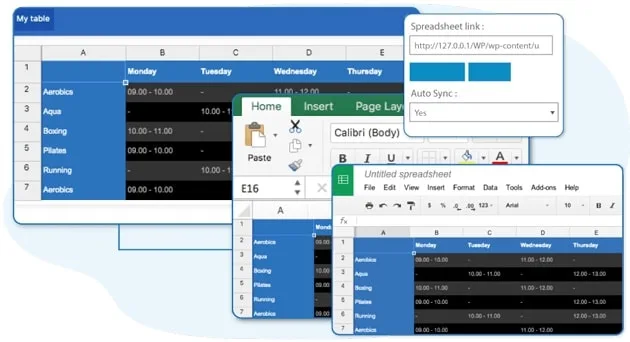
About WP Table Manager
For people who already keep their data in a spreadsheet and don't want to copy it by hand
Publishing prices, schedules or listings on a website often ends up as hand-pasted HTML, tables that break on mobile, or data nobody updates because touching the table feels risky. The problem is rarely the website: the data lives in an Excel file or a Google Sheets document that someone in the office maintains, and between that sheet and the page there is a manual step that ends up being skipped. An outdated table does more harm than no table: visitors read an old price and take it as true.
WP Table Manager makes sense if:
- Your team already works with spreadsheets and you want the website to be fed from them.
- You manage several tables and want an editor to handle them.
- You use Elementor, DIVI, WPBakery, Avada or the block editor and want to insert the table from there.
It is not what you need if you only want a small, fixed table: the standard WordPress table block is enough. Nor is it a forms plugin: to show data from Gravity Forms or Ninja Forms you need that plugin installed. And to sync with Google Sheets you need a Google account with the file in Drive.
A table editor for WordPress
WordPress has no tool designed for handling tables, and hand-written HTML is awkward. This plugin takes a different approach: a table editor for WordPress.
The look is also handled from the plugin: there are themes and colors for tables.
The plugin also includes table editing from the frontend. If whoever updates the data shouldn't enter the admin area, check in the demo which permissions it supports.
Excel, Google Sheets and CSV: the file stays the source
This is the most useful part for anyone who already has their information somewhere else. WP Table Manager imports and syncs data from several sources:
- Excel: data import and sync.
- Google Sheets: import and sync.
- Office 365 online Excel: import and sync.
- CSV: file import and sync.
If a table is edited both in the original sheet and on the website, decide beforehand which one takes priority so nobody overwrites someone else's work.
You can also create tables from WordPress database content, which is useful when the data is already inside your site.
Tables that read well on mobile and sort themselves
A wide table on a small screen is a classic way for websites to lose visitors. WP Table Manager includes options so tables adapt to mobile, plus sorting and filtering functions. If your table has many columns, test it on a real phone in the demo before deciding.
If you build your pages with a page builder, the plugin integrates with Elementor, DIVI, WPBakery, Avada and the block editor. You need the builder installed: the plugin integrates with it, it doesn't replace it.
Questions before installing WP Table Manager
Can I import my current Excel file?
Yes. It has Excel import and sync, and also CSV. If you work with Office 365 online Excel, import and sync are available.
Does it update by itself from Google Sheets?
The plugin lets you sync with Google Sheets, but the file must be in your Google Drive. Check in the demo how the sync is set up.
Does it work with my page builder?
It integrates with Elementor, DIVI, WPBakery, Avada and the WordPress block editor. With any other builder, run a test first.
Can it show data from my forms?
There is integration with Gravity Forms and Ninja Forms; with Gravity Forms, their data is turned into tables. You need that forms plugin installed, because WP Table Manager doesn't create forms.
Version history
-
v
4.2.3 Current 4 Jun 2026
-
v
4.2.2 14 Jan 2026
Customer reviews
Sign in to leave a review. Only people who have the product can review it.
No reviews for this product yet.
Frequently asked questions
-
GPL (General Public License) is the license under which WordPress and most premium plugins/themes are distributed. It grants you the right to use, modify and redistribute the software in as many projects as you want, with no domain restrictions.
-
Yes. With membership you get automatic updates via our GPLClub Updater plugin (installed on your WP, detects new versions and applies them). With individual purchase, you get one year of manual updates from your account.
-
Depends on the plan. Monthly: 3 domains. Semi-annual: 7. Annual and Lifetime: 15. Individual purchase: 1 domain.
-
GPLClub offers its own support for installation, configuration and compatibility. For direct support from the original author (feature requests, product-specific bugs), a license purchased from the author is required.