WP Travel Engine - Extra Services
Antivirus scan
Powered by ClamAV
✅ Verified clean
This product file has passed our security filters.
Want to run a fresh ClamAV scan right now? Takes a few seconds and shows scanner version, signature DB and live result.
This can take 5 to 30 seconds.
Clean file Threat detected
No threats detected in this file.
- File
- Size
- Scanned
- ClamAV
- Signature database
⚡ Powered by ClamAV
Scan could not be completed
Report product
If you detected an issue (broken file, malware, inappropriate content, etc.) let us know and we'll review it ASAP.
Sign in to report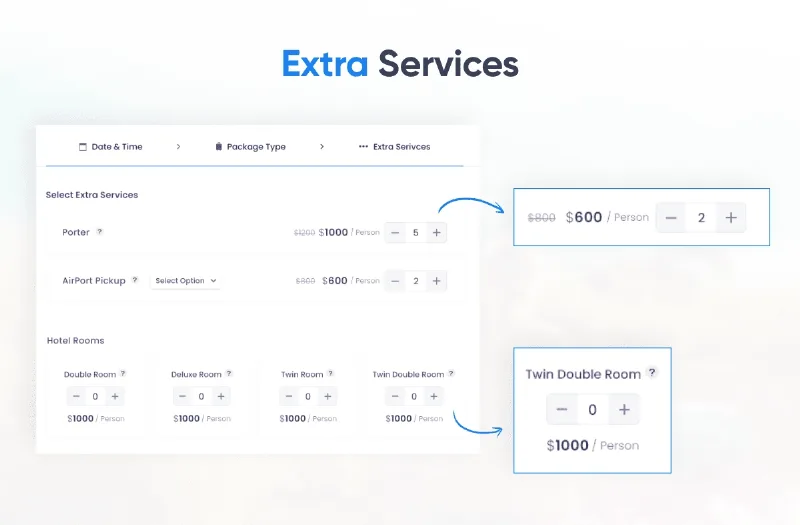
About WP Travel Engine - Extra Services
A travel operator often loses money on the details they never charge for: the airport transfer agreed by email, the car rental handled over WhatsApp, the special dinner nobody wrote down. Every extra settled outside the booking is either income that slips away or a misunderstanding at the destination.
The extra is sold during the booking, not after it
On a trip, customers decide on the accessories once they have decided on the main thing. That is the easiest moment to add something, and the worst one to start swapping emails. WP Travel Engine - Extra Services puts those services inside the booking process of each trip, so travelers pick them together with the date and the number of people. For you, that means a higher average order without calling anyone.
Simple services or services with several options: how they work in Extra Services
The plugin offers two service types, and it pays to choose well:
- Default: a service with a single price, such as a hotel transfer.
- Advanced: one service with several options, each with its own price. It works, for example, for a vehicle rental with different categories, or to offer options at the same price or at different prices depending on the level of service.
You can also create as many services as you want for each trip, mark a service as mandatory so it goes on every booking, and charge per unit or per traveler. In advanced services, options can be reordered by dragging them from the trip edit page, and there is a select-all checkbox. You can also duplicate a service, upload an image for it, add a badge label, and write a description for the extras step of the booking form.
What to be clear about before buying it
It is an add-on: it does not work on its own and requires WP Travel Engine to be installed. It is not a supplier or logistics manager: the plugin shows and charges the extra, but who drives the car or cooks the dinner is up to you. If you need to limit places or capacity for accommodations and extras, another add-on from the same family covers that, Resource Management, with which Extra Services is compatible.
Questions people ask before installing it
Can I use the same service on several trips?
Yes, global services exist. If you rename one, the new name updates on every trip where it is used.
Can I make a service mandatory?
Yes. It is useful for fees, insurance or anything that must go on every booking.
Is it charged per person or per unit?
You can choose either way of charging.
Does the extras step appear if the trip has no services?
No: the extra services tab is disabled automatically on trips that have none.
Services are created once and assigned trip by trip
To get started, define the services you repeat on almost every trip (transfers, meals, rentals) and keep the very specific ones for each trip page. Then test a full booking in the form: check how the extras look in the booking window with one trip and with several, and confirm that per-unit prices add up to what you expect before opening sales.
Topics
Version history
-
v
2.1.3 Current 13 May 2024
Customer reviews
Sign in to leave a review. Only people who have the product can review it.
No reviews for this product yet.
Frequently asked questions
-
GPL (General Public License) is the license under which WordPress and most premium plugins/themes are distributed. It grants you the right to use, modify and redistribute the software in as many projects as you want, with no domain restrictions.
-
Yes. With membership you get automatic updates via our GPLClub Updater plugin (installed on your WP, detects new versions and applies them). With individual purchase, you get one year of manual updates from your account.
-
Depends on the plan. Monthly: 3 domains. Semi-annual: 7. Annual and Lifetime: 15. Individual purchase: 1 domain.
-
GPLClub offers its own support for installation, configuration and compatibility. For direct support from the original author (feature requests, product-specific bugs), a license purchased from the author is required.