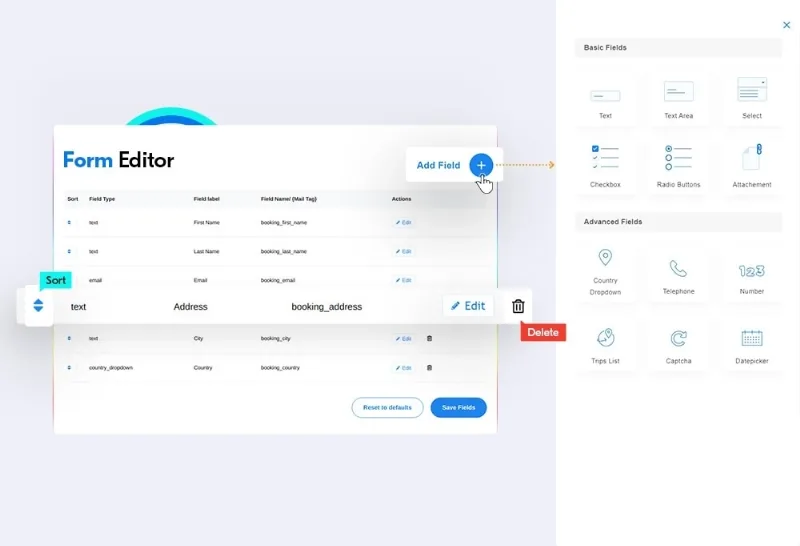
WP Travel Engine - Form Editor
Antivirus scan
Powered by ClamAV
✅ Verified clean
This product file has passed our security filters.
Want to run a fresh ClamAV scan right now? Takes a few seconds and shows scanner version, signature DB and live result.
This can take 5 to 30 seconds.
Clean file Threat detected
No threats detected in this file.
- File
- Size
- Scanned
- ClamAV
- Signature database
⚡ Powered by ClamAV
Scan could not be completed
Report product
If you detected an issue (broken file, malware, inappropriate content, etc.) let us know and we'll review it ASAP.
Sign in to reportNewer version out, or a problem?
About WP Travel Engine - Form Editor
An enquiry form that asks only for what that trip needs
In a travel agency, the enquiry form is usually the first contact with the customer, and extra fields slow down someone who was already willing to write. But missing fields force back-and-forth emails before you can prepare a proposal. The problem is not having a form, but having the right one for each type of trip.
Form Editor for WP Travel Engine lets you customise the plugin's core forms without touching code: the enquiry form, the booking form (checkout), the traveller information form and the emergency contact form. Management is done from the Form Editor admin dashboard.
Questions from those who adjust their forms with Form Editor
Can I remove fields that are already in the form?
Yes. You can delete the fields you do not need, edit the ones that already exist and change their order to gather exactly the information you need.
Do I need to know how to code?
No. It is designed for people without coding knowledge, with a simple interface and clear documentation.
Can I show a field only when the traveller answers something specific?
Yes. With conditional rules, a field appears or hides depending on what the traveller answered earlier.
Can I go back to the original settings if something goes wrong?
Yes. With one click you restore the forms to their default values.
Walking through an enquiry: from an unneeded field to the data you need
For the enquiry form you can add, edit, remove or reorder fields, so that only the data you need to respond is requested. The same editor is used to adjust the checkout form and the traveller forms.
The payment step: the checkout form and spam protection
The checkout form can also be adjusted with Form Editor, for smoother transactions.
To filter automated submissions you can add Google reCAPTCHA to your forms. It supports v2 and v3, and the protection also applies to checkout and traveller forms, so that only legitimate submissions come through.
Each traveller's details, documents and the lead traveller
On a trip with several travellers, you can adjust the traveller information form and the emergency contact form just like the rest and decide what each one asks for.
- Date of birth field with guided formatting and real-time validation, so the date is entered correctly the first time.
- Attachment fields that accept several files at once, so the traveller can send all their documents in one go.
- Conditional rules, so each field appears only when it applies.
Lead traveller and companion details
The lead traveller can have their own fields, edited separately from those of additional travellers, and traveller forms also support reCAPTCHA protection.
Requires WP Travel Engine and, for the waitlist, its add-on
Form Editor is an add-on for WP Travel Engine, so that plugin must be installed and active. It is compatible with WP Travel Engine PRO. If you also use the waitlist add-on, you can edit its fields from the editor too, so you can adjust that part of the process like the rest.
Topics
Version history
-
v
2.1.1 Current 13 May 2024
Customer reviews
Sign in to leave a review. Only people who have the product can review it.
No reviews for this product yet.
Frequently asked questions
-
GPL (General Public License) is the license under which WordPress and most premium plugins/themes are distributed. It grants you the right to use, modify and redistribute the software in as many projects as you want, with no domain restrictions.
-
Yes. With membership you get automatic updates via our GPLClub Updater plugin (installed on your WP, detects new versions and applies them). With individual purchase, you get one year of manual updates from your account.
-
Depends on the plan. Monthly: 3 domains. Semi-annual: 7. Annual and Lifetime: 15. Individual purchase: 1 domain.
-
GPLClub offers its own support for installation, configuration and compatibility. For direct support from the original author (feature requests, product-specific bugs), a license purchased from the author is required.