WPSubscription Pro
Antivirus scan
Powered by ClamAV
✅ Verified clean
This product file has passed our security filters.
Want to run a fresh ClamAV scan right now? Takes a few seconds and shows scanner version, signature DB and live result.
This can take 5 to 30 seconds.
Clean file Threat detected
No threats detected in this file.
- File
- Size
- Scanned
- ClamAV
- Signature database
⚡ Powered by ClamAV
Scan could not be completed
Report product
If you detected an issue (broken file, malware, inappropriate content, etc.) let us know and we'll review it ASAP.
Sign in to report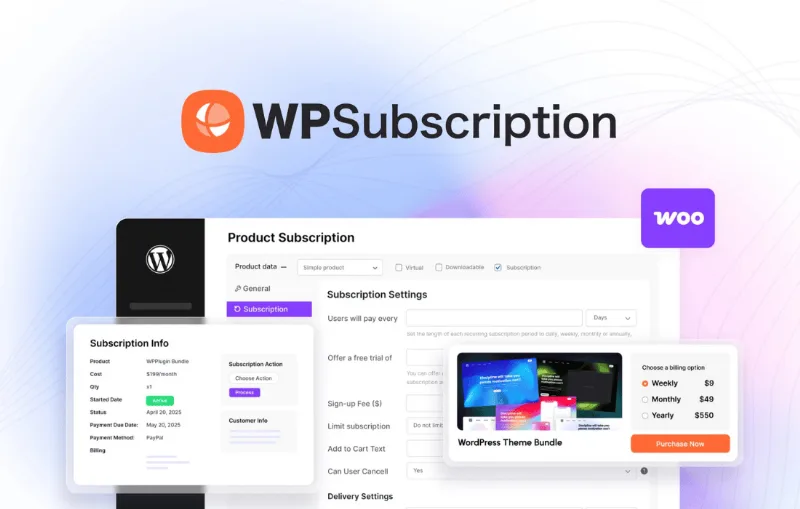
About WPSubscription Pro
Charging once is easy; getting customers to keep paying is hard
Anyone setting up a subscription in WooCommerce usually finds out late that the problem isn't the first charge, but what comes after: cards that fail, customers who want to pause instead of leaving, renewal notices nobody sent. In a recurring business, profit is decided at renewals, not at the initial sale. WPSubscription Pro works right there, inside WooCommerce, with tools built for conversion, retention and recovering failed payments.
What WPSubscription Pro does with every renewal
You create a subscription product from the WooCommerce product screen: price, billing interval (from daily to yearly), free trial period and automatic renewal.
- Plans with savings: you offer monthly, quarterly and annual options with automatic savings badges, and you can keep the one-time purchase alongside. There are also direct checkout links that take the customer straight into a plan.
- Split payments: an expensive product is charged in a fixed number of installments, and each one is collected automatically on its due date.
- Subscription boxes: delivery schedule, status of each shipment and address printing. With Build-a-Box you bundle several products into one price, one renewal and one shipment.
- Pay-as-you-go: a subscriber who runs out of product early taps renew early and pays, without changing the billing cycle.
- Retries and notices: automatic retries for failed charges, renewal reminders and emails for activation, payment, failure and cancellation.
- Self-service: from their account, customers upgrade, downgrade, pause or cancel their plan without asking you.
What to know before committing
Automatic renewal depends on the gateway. Stripe, PayPal and Paddle are among the compatible ones, and Razorpay and Mollie are Pro. If you prefer another one, manual renewal is available, but then the customer must pay every invoice. It is a plugin for WooCommerce: without that store it makes no sense. And it is not a full delivery system: the box handles schedule, status and addresses, not shipping logistics.
Frequently asked questions before deciding
Does it work for memberships and courses?
Yes: you can link member perks and Tutor LMS or LearnDash courses to an active subscription, and access ends when payments stop.
Can I sell with a free trial?
Yes. You set the trial days and billing starts on its own when the trial ends.
What happens if a payment fails?
There are automatic retries, an email notice and a subscription recovery feature. Even so, an expired card requires the customer to act.
What about software licenses?
Each renewal can issue a new key and retire the old one, useful if you sell annual plugins or apps.
Sectors where it fits best
Coffee, supplements, pet products or cosmetics live on replenishment: customers run out within weeks, so subscription savings and early renewal make sense. Installments also work for freelancers with retainer billing, churches with recurring donations or charities with a monthly donor program. In fashion, members pay for access, and you can show exclusive drops by user role.
Cancelling doesn't have to mean losing the customer
At cancellation, a survey asks the reason and a retention coupon invites them to stay. It is one of the few chances to win back someone who already decided to leave, and it is worth setting up from day one. For tracking, the payment history gathers each customer's transactions and the admin reports show subscribers and cancellations.
Start with a single subscription product
The guided setup takes you through creating the first product, so the sensible move is to launch one plan, test a complete purchase with your gateway and check that the renewal emails arrive. Then add annual plans, split payments or boxes. If you are coming from WooCommerce Subscriptions, the maker offers to migrate your data.
Topics
Version history
-
v
2.5.0 Current 31 Oct 2026
-
v
2.4.0 9 Oct 2026
-
v
2.1.0 30 Sep 2026
-
v
2.0.0 15 Sep 2026
-
v
1.18.1 6 Jul 2026
-
v
1.16.4 4 May 2026
Customer reviews
Sign in to leave a review. Only people who have the product can review it.
No reviews for this product yet.
Frequently asked questions
-
GPL (General Public License) is the license under which WordPress and most premium plugins/themes are distributed. It grants you the right to use, modify and redistribute the software in as many projects as you want, with no domain restrictions.
-
Yes. With membership you get automatic updates via our GPLClub Updater plugin (installed on your WP, detects new versions and applies them). With individual purchase, you get one year of manual updates from your account.
-
Depends on the plan. Monthly: 3 domains. Semi-annual: 7. Annual and Lifetime: 15. Individual purchase: 1 domain.
-
GPLClub offers its own support for installation, configuration and compatibility. For direct support from the original author (feature requests, product-specific bugs), a license purchased from the author is required.