YITH Easy Login & Register Popup
Antivirus scan
Powered by ClamAV
✅ Verified clean
This product file has passed our security filters.
Want to run a fresh ClamAV scan right now? Takes a few seconds and shows scanner version, signature DB and live result.
This can take 5 to 30 seconds.
Clean file Threat detected
No threats detected in this file.
- File
- Size
- Scanned
- ClamAV
- Signature database
⚡ Powered by ClamAV
Scan could not be completed
Report product
If you detected an issue (broken file, malware, inappropriate content, etc.) let us know and we'll review it ASAP.
Sign in to report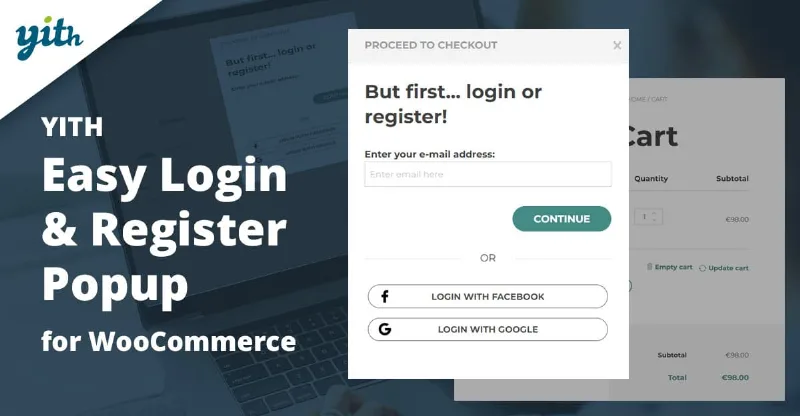
About YITH Easy Login & Register Popup
Many carts are lost right at the step where the store asks the customer to identify themselves: a long form or a forgotten password that forces them to go to their email, click a link and start the purchase over. YITH Easy Login & Register Popup puts that whole journey inside a modal window so the customer does not leave the checkout.
The customer who forgets their password is the one who loses you the most sales
Someone who reaches checkout with a full cart and cannot remember their password has already decided to buy, and is the easiest to lose. The standard WooCommerce process sends them to their inbox, and every step outside your store is a chance to get distracted. This plugin offers an Amazon-inspired recovery: the customer receives a code, enters it in the same window, creates a new password and carries on with the purchase. If you prefer the traditional way, you can also keep the WooCommerce email with a link.
Three steps inside the same window: login, registration and recovery
The popup is organized in steps, and each one has its own settings:
- First step: your own title and texts, and the option to accept a username or only an email address.
- Login: welcome text, field and button labels, and the "stay logged in" checkbox selected or not by default.
- Registration: a single or repeated password field, a password security checkbox, a privacy policy checkbox with editable text (selected or not by default) and Google reCAPTCHA against junk registrations.
- Recovery: the email autocompleted with the one already typed in the previous step and a dedicated screen to create the new password.
In addition, the form autocompletes the email and lets users show or hide the password, two small details that prevent typing errors.
Login with Google and Facebook, and guest checkout
You can enable login with Facebook and Google so customers register with their social profile. You can also enable guest checkout for people who do not want to create an account. It is worth deciding what you prefer: if your business needs accounts to sell again (recurring orders, lists, history), guest checkout will remove friction at payment but leave you without customer data.
Beyond checkout: open it from the header or a button
With CSS selectors you can launch the popup from any element, for example the login or register link in the header. You can also make it appear when moving from the cart to checkout. In the design you control the width, the opening and closing animation, the background blur, your own close icon, whether it closes when clicking outside, and the colors of the background, overlay, texts, links and buttons (normal and on hover). For the CSS selectors you will need a basic understanding, or help from whoever looks after your site.
Your customers' accounts still need something else
This plugin solves identification, not the rest of the relationship with the customer. Here is what it covers and what it does not:
- It solves: login, registration and recovery in a modal window, social login with Google and Facebook, guest checkout, visual customization and texts.
- You will cover elsewhere: the design of the My account page, welcome or order emails, recovering carts that are already abandoned and writing your privacy policy.
- It needs WooCommerce: it is designed for stores running this plugin.
- Auction integration: to force users to identify themselves before bidding with the popup, you also need YITH Auctions for WooCommerce.
Frequently asked questions about YITH Easy Login & Register Popup
Does it replace the WooCommerce form?
It offers a modal window for login, registration and recovery, which you can use at checkout and in other areas of the site through CSS selectors.
Can I keep the classic password recovery?
Yes. You choose between the traditional WooCommerce process (email with a link) and the code process inside the window.
Can customers buy without creating an account?
Yes, by enabling the guest checkout option.
Does it work with social networks?
With Google and Facebook.
Does it protect against fake registrations?
You can enable Google reCAPTCHA on the registration form.
Topics
Version history
-
v
2.15.0 Current 22 May 2026
-
v
2.14.0 3 Apr 2026
Customer reviews
Sign in to leave a review. Only people who have the product can review it.
No reviews for this product yet.
Frequently asked questions
-
GPL (General Public License) is the license under which WordPress and most premium plugins/themes are distributed. It grants you the right to use, modify and redistribute the software in as many projects as you want, with no domain restrictions.
-
Yes. With membership you get automatic updates via our GPLClub Updater plugin (installed on your WP, detects new versions and applies them). With individual purchase, you get one year of manual updates from your account.
-
Depends on the plan. Monthly: 3 domains. Semi-annual: 7. Annual and Lifetime: 15. Individual purchase: 1 domain.
-
GPLClub offers its own support for installation, configuration and compatibility. For direct support from the original author (feature requests, product-specific bugs), a license purchased from the author is required.