YITH Woocommerce Affiliates Premium
Antivirus scan
Powered by ClamAV
✅ Verified clean
This product file has passed our security filters.
Want to run a fresh ClamAV scan right now? Takes a few seconds and shows scanner version, signature DB and live result.
This can take 5 to 30 seconds.
Clean file Threat detected
No threats detected in this file.
- File
- Size
- Scanned
- ClamAV
- Signature database
⚡ Powered by ClamAV
Scan could not be completed
Report product
If you detected an issue (broken file, malware, inappropriate content, etc.) let us know and we'll review it ASAP.
Sign in to report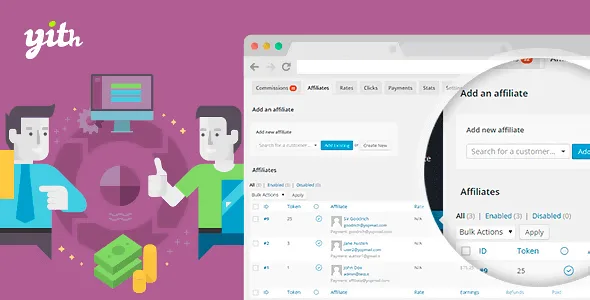
About YITH Woocommerce Affiliates Premium
Paying for ads without knowing if they sell, or paying only when they do
Pay-per-click advertising makes you pay even when nobody buys, and many shops find out too late that ad spend is eating their margin. An affiliate program flips the logic: bloggers, influencers or regular customers show your shop to their audience and you pay a commission only when a sale actually happens. YITH WooCommerce Affiliates Premium builds that system inside WooCommerce.
The underlying idea: in a small shop, the one who sells your product best is rarely an ad, but someone who already has the trust of an audience similar to your customer.
How an affiliate joins and how you stay in control
You create a registration page with a form tailored to you (name, email, blog or social URL, a short biography) and place it on any page with a shortcode. You decide whether to accept or reject each application.
- Affiliates table: you can add affiliates by hand (existing users or new ones), approve applications and see each one's commissions, earnings and conversion rate at a glance.
- Individual page: website, sign-up date, referral link, commissions generated and payments made. From there you can set a custom commission for that affiliate or ban them.
- Coupons per affiliate: you assign a discount code to each one to offer to their readers or followers, a way to give their audience a reason to buy.
Commissions and payments: where it really gets complicated
You set a global commission and override it with rules per affiliate, per user role or per product. For example, a general 20% and a different percentage for one specific product.
When it is paid
Payment can be manual or automatic. With manual, you pay from the affiliates table or the commissions table, or wait for the affiliate to request it from their dashboard. With automatic, you choose daily or monthly payment (on a fixed day), payment when a minimum amount is reached, or a combination: monthly but only if the threshold is met. You can also cap the maximum amount per payment; the remainder is paid in another request.
How it is paid
You can pay by bank transfer and mark the commission as paid in the panel. To automate it with PayPal or Stripe you need to combine it with other YITH plugins: YITH PayPal Payouts, YITH Account Funds or YITH Stripe Connect.
The affiliate dashboard and your own metrics
Each affiliate accesses their dashboard from an endpoint in My Account or from a custom page with the included shortcode. There they see visits, clicks and commissions, their balance, their referral link (and can create more), their personal details and the PayPal email where they get paid. They can request payment if you enable it.
You get an integrated dashboard to see the sales volume generated by affiliates, who performs best and which products attract the most leads.
Is YITH WooCommerce Affiliates Premium right for you? Questions and limits
It works if you already have a WooCommerce shop with a product worth recommending and are willing to recruit and manage affiliates. It does not bring an audience by itself: the plugin tracks and pays, but finding the affiliates is your job.
Can I pay automatically through PayPal or Stripe?
Yes, but with one of the additional YITH plugins mentioned. Without them, payment is manual (for example, bank transfer) and you mark it as paid in the panel.
Can I offer different commissions?
Yes: per affiliate, per user role or per product, in addition to the global commission.
Do I have to accept everyone who signs up?
No. You approve or reject each application yourself, and you can ban an affiliate later.
Does it work outside WooCommerce?
No: it is a plugin for WooCommerce shops.
Topics
Version history
-
v
3.29.0 Current 9 Oct 2026
-
v
3.27.0 15 Jun 2026
-
v
3.26.0 2 Apr 2026
Customer reviews
Sign in to leave a review. Only people who have the product can review it.
No reviews for this product yet.
Frequently asked questions
-
GPL (General Public License) is the license under which WordPress and most premium plugins/themes are distributed. It grants you the right to use, modify and redistribute the software in as many projects as you want, with no domain restrictions.
-
Yes. With membership you get automatic updates via our GPLClub Updater plugin (installed on your WP, detects new versions and applies them). With individual purchase, you get one year of manual updates from your account.
-
Depends on the plan. Monthly: 3 domains. Semi-annual: 7. Annual and Lifetime: 15. Individual purchase: 1 domain.
-
GPLClub offers its own support for installation, configuration and compatibility. For direct support from the original author (feature requests, product-specific bugs), a license purchased from the author is required.