YITH WooCommerce Deposits and Down Payments Premium
Antivirus scan
Powered by ClamAV
✅ Verified clean
This product file has passed our security filters.
Want to run a fresh ClamAV scan right now? Takes a few seconds and shows scanner version, signature DB and live result.
This can take 5 to 30 seconds.
Clean file Threat detected
No threats detected in this file.
- File
- Size
- Scanned
- ClamAV
- Signature database
⚡ Powered by ClamAV
Scan could not be completed
Report product
If you detected an issue (broken file, malware, inappropriate content, etc.) let us know and we'll review it ASAP.
Sign in to report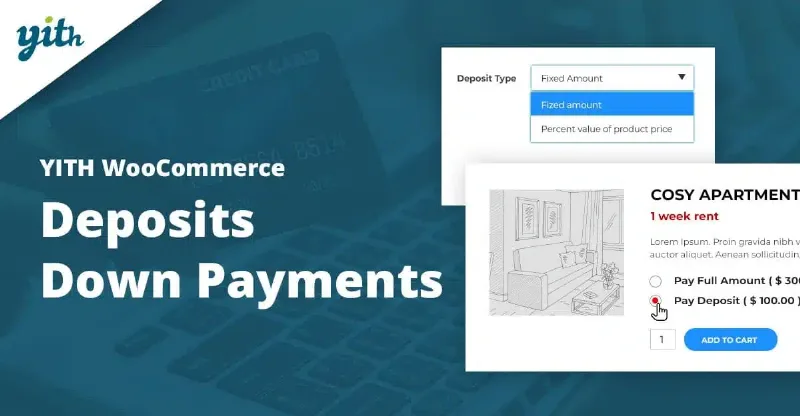
About YITH WooCommerce Deposits and Down Payments Premium
When the customer wants the product but cannot pay for it all today
In a store with expensive products, the obstacle is rarely that the customer dislikes what they see: it is that they do not have the full amount available right then. So they postpone the purchase, and in e-commerce postponing usually means never coming back. YITH WooCommerce Deposits and Down Payments Premium lets them reserve with an initial payment and pay the rest later, within the same WooCommerce flow.
It makes the most sense when what you sell is ordered, reserved or prepared in advance: tailor-made clothing, custom products or renting a room for an event.
Where the deposit is enabled and how much is requested
You can enable it across the whole shop from the global settings or only on specific products and categories. It also offers its own options for each variation of a variable product.
- Required or optional: the customer chooses between paying everything or only the deposit, or you make it mandatory.
- Fixed amount or percentage: for example a specific amount or a percentage of the price.
- Advanced rules: you can override the global amount with a different one per product or category, so a cheap item asks for a small deposit and an expensive one asks for a larger one.
- Shipping costs: you can decide whether they apply to the deposit order or to the balance order.
The outstanding balance: when it is paid and what happens if it is not
This is what shapes your operations the most. For each product you choose whether the balance is collected online or outside the shop.
- If you collect it online, a balance order is created with a pending payment status, which the customer can pay online.
- If you prefer to handle it manually (for example, the customer pays cash at your store), the balance order is put on hold, or you can prevent it from being created.
- If an order includes several deposits, you can generate a single balance order or one per product.
The deadline is set with a date from the calendar (for example, before December 10th) or with a number of days after the deposit was paid. If the customer does not pay, you can send them a reminder, automatically refund the deposit or cancel the order without a refund.
Email notifications and automatic charging with Stripe
The plugin sends an email to the administrator when someone pays a deposit and another one to the customer. It can also send the customer a notice requesting the balance when the deposit is about to expire. You can also hide the pay deposit button on shop pages, show custom notices on the product page, choose their position and change the labels.
If you use YITH WooCommerce Stripe, the balance can be charged automatically to the same card used to pay the deposit. That reduces unpaid orders, because the customer does not have to remember to come back.
Calendar-based bookings need another YITH plugin
It helps to separate what comes solved from what you will have to cover elsewhere.
- Already solved: fixed or percentage deposit, rules per product or category, balance orders, deadlines, reminders, refund or cancellation if unpaid, and emails.
- With another plugin: date or appointment bookings (hotels, consultations, rentals) are handled by YITH Booking and Appointment, which has an integration for paying deposit and balance. This plugin on its own is not a booking system.
- With another plugin: automatic balance charging requires YITH WooCommerce Stripe.
- By hand or with a professional: the legal texts about down payments and refund conditions, which you must write yourself.
Frequently asked questions
Can I use it only on some products?
Yes. You can enable it across the whole shop or limit it to specific products, categories or variations.
Can I collect the balance in my physical store?
Yes. You can prevent the balance order from being created or leave it on hold to handle the payment manually, for example in cash.
What happens if the customer does not pay the rest?
You decide: send a reminder, refund the deposit or cancel the order without a refund.
Is the balance charged automatically?
Only if you combine the plugin with YITH WooCommerce Stripe, which charges the balance to the same card used for the deposit. Without it, the customer must pay the balance order.
Topics
Version history
-
v
2.37.1 Current 5 Nov 2025
Customer reviews
Sign in to leave a review. Only people who have the product can review it.
No reviews for this product yet.
Frequently asked questions
-
GPL (General Public License) is the license under which WordPress and most premium plugins/themes are distributed. It grants you the right to use, modify and redistribute the software in as many projects as you want, with no domain restrictions.
-
Yes. With membership you get automatic updates via our GPLClub Updater plugin (installed on your WP, detects new versions and applies them). With individual purchase, you get one year of manual updates from your account.
-
Depends on the plan. Monthly: 3 domains. Semi-annual: 7. Annual and Lifetime: 15. Individual purchase: 1 domain.
-
GPLClub offers its own support for installation, configuration and compatibility. For direct support from the original author (feature requests, product-specific bugs), a license purchased from the author is required.