YITH WooCommerce Wishlist Premium
Antivirus scan
Powered by ClamAV
✅ Verified clean
This product file has passed our security filters.
Want to run a fresh ClamAV scan right now? Takes a few seconds and shows scanner version, signature DB and live result.
This can take 5 to 30 seconds.
Clean file Threat detected
No threats detected in this file.
- File
- Size
- Scanned
- ClamAV
- Signature database
⚡ Powered by ClamAV
Scan could not be completed
Report product
If you detected an issue (broken file, malware, inappropriate content, etc.) let us know and we'll review it ASAP.
Sign in to report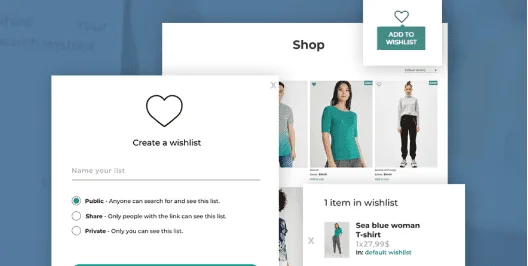
About YITH WooCommerce Wishlist Premium
The purchase that gets postponed while you never find out
Plenty of people walk into a store, look at a couple of products, like them and leave without buying. It is not that they do not want to: they put it off until later, and later they cannot find the product or remember where they saw it. Without somewhere to save it, that intention evaporates and you never know what was close to selling.
A wishlist is the only place where a customer tells you what they want before having paid. That makes it more than a button with a heart: it is a source of real demand data and a legitimate reason to write to them again about something they were already interested in. YITH WooCommerce Wishlist Premium is built to take advantage of exactly that.
YITH WooCommerce Wishlist Premium depending on what you sell
Fashion store or products with variations
Someone who saves a garment is usually waiting for a size or a color. The list lets them come back, check the price and availability and move on to checkout. You decide whether the table shows the chosen variation, the quantity and the add to cart button.
Gift store or products tied to special dates
Here the useful part is multiple lists: each user can create as many as they want, each with its own name and its own privacy. A public birthday list to share on social networks, a private Christmas list nobody sees and a wedding list reachable only with the link. It is the natural way for a customer to tell their family what to buy them, and for that family to end up in your store.
Store with frequent promotions
If you change prices or restock often, the list tells you who to notify. The plugin can send automatic emails when a saved product goes on sale or is back in stock, and also manual campaigns to everyone who has it on their list, for example to warn that only a few units are left or to offer a limited-time coupon.
Button, widget and list page: what your customer sees
- "Add to wishlist" button: as an icon (one included or your own) or as text, in the position you prefer, for example over the image or below the add to cart button. You can customize the messages and notices shown when adding or removing.
- Widget: place it in the header or wherever you like to have the list one click away, see the products and move them to the cart.
- List page: several layouts so it is not the dullest page in the store.
- Management by the customer: depending on the permissions you configure, they can rename and delete lists, move products between them and download a PDF.
From wishlist to an email with a reason
The most profitable part is not the button but what you do afterwards. A dedicated dashboard lets you see your customers' lists and which products appear most, useful information to decide what to feature, what to discount and what to restock sooner.
With that data, an email stops being a mass mailing: it reaches the person who saved that specific product, with a discount or a stock alert that really matters to them. That is what sets it apart from a generic newsletter.
Common questions before turning wishlists on
Can customers without an account use it?
Yes, if you allow it. You choose between opening it to everyone or requiring registration.
Can they buy from the list itself?
Yes. You can show the add to cart button and the quantity selector, and the customer can move products to the cart with one click.
Are the emails sent automatically?
The sale and back in stock ones are, yes, automatically. Campaigns about a specific product are prepared by you: you choose the product, write the text and send it.
Without an account, the list lives in the browser cookies
If you let unregistered visitors create lists, those lists are saved through cookies, so they depend on the browser they use. If you want customers to keep their list and you want useful data for marketing and remarketing, the sensible option is to require registration.
Topics
Version history
-
v
4.19.1 Current 23 Oct 2026
-
v
4.17.0 29 Jul 2026
-
v
4.14.0 7 Apr 2026
Customer reviews
Sign in to leave a review. Only people who have the product can review it.
No reviews for this product yet.
Frequently asked questions
-
GPL (General Public License) is the license under which WordPress and most premium plugins/themes are distributed. It grants you the right to use, modify and redistribute the software in as many projects as you want, with no domain restrictions.
-
Yes. With membership you get automatic updates via our GPLClub Updater plugin (installed on your WP, detects new versions and applies them). With individual purchase, you get one year of manual updates from your account.
-
Depends on the plan. Monthly: 3 domains. Semi-annual: 7. Annual and Lifetime: 15. Individual purchase: 1 domain.
-
GPLClub offers its own support for installation, configuration and compatibility. For direct support from the original author (feature requests, product-specific bugs), a license purchased from the author is required.