Advanced File Manager
Antivirus scan
Powered by ClamAV
✅ Verified clean
This product file has passed our security filters.
Want to run a fresh ClamAV scan right now? Takes a few seconds and shows scanner version, signature DB and live result.
This can take 5 to 30 seconds.
Clean file Threat detected
No threats detected in this file.
- File
- Size
- Scanned
- ClamAV
- Signature database
⚡ Powered by ClamAV
Scan could not be completed
Report product
If you detected an issue (broken file, malware, inappropriate content, etc.) let us know and we'll review it ASAP.
Sign in to report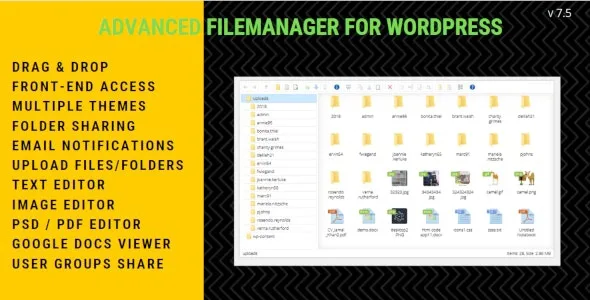
About Advanced File Manager
Giving a client a folder can mean giving them your site's code
Many businesses need somewhere each client can upload and collect their files: an accounting firm with its documents, a studio with its design proofs, a print shop with the originals. Building it inside WordPress seems the most convenient option. But a file manager in WordPress does not work on a separate library: it works on the server's real folders, the same ones holding the plugins, the theme and the configuration.
File Manager Plugin for WordPress, by getredhawkstudio, lets you view, edit and create files in the WordPress folder and its subfolders, and hand out folders with per-user permissions. That second part decides whether it is a useful tool or a hole: what you really configure here is what each person does not see.
Server folders with a desktop look
- Windows-style interface, based on elFinder, with a context menu, icon or list view and image thumbnails.
- Desktop operations: drag and drop, cut, copy and paste, upload files and folders, create and edit text files.
- Compressed archives in Zip, Tar, BZip and GZip.
- Image editing to crop, rotate and resize, and previews of audio, video and, through Google Docs, Office documents and PDFs.
- Automatic folder for each user and read or write permissions per user and per folder.
- Front-end shortcodes, visible only to those with permission, with restriction by user group.
- Email notice to the administrator and the user when a file is uploaded, and WPML compatibility.
How to hand out folders without opening up the server
One root per client, never the WordPress one. The automatic per-user folder is the right starting point. What you should avoid is giving a client access to the site root, even read-only: that is where the configuration file with the database details lives.
Write access only where needed. The plugin distinguishes read, upload and write. A client who only downloads their invoices does not need to be able to delete anything.
The front end, filtered by group. The fm_access shortcode limits who sees the manager according to their group; for example, administrators only. File URLs can also be hidden.
Not updated since 2021, and what it is not
It is not a complete client portal. Its features do not include client registration, invoicing or project records.
It is a product that has not moved for a while. Its last update is from October 2021 and the listed compatibility goes up to WordPress 6.0. In a plugin that writes to the server, that matters: test it on a staging install with your WordPress and PHP versions before taking it to production.
WordPress versions and how to set it up safely
The listed WordPress versions range from 4.9 to 6.0. Check your PHP version on the test copy.
- Install it on a copy of the site, not in production, and check that it works with your WordPress version.
- Disable the default folders you will not use.
- Turn on the automatic per-user folder and check which path it points to.
- Give each client only the permission they need: read, upload or write.
- Place the shortcode on a private page and test with a client account that cannot see another client's folders.
More recent activity, or downloads instead of folders
If you want something with more recent activity, WP File Manager Pro has a code editor with syntax checking, a database manager, permissions per user and per role, and an administrator notice with an activity log. If what you need is to hand out downloads rather than manage folders, WordPress Download Manager Pro goes down that road.
Per-user folders, the front end and versions
Can each user have their own folder?
Yes, it creates an automatic folder for each user, with read or write permissions per user and per folder.
Can it be used on the front end of the site?
Yes, with a shortcode that only those with permission see, and which can be limited by user group.
Does it edit code files?
It lets you edit text files in the WordPress folder, which is why it is worth tightly limiting who has write access.
Does it work with the latest WordPress version?
The listed compatibility goes up to WordPress 6.0 and the last update is from 2021. Test it first on a copy of the site.
Version history
-
v
7.5.6 Current 30 May 2024
Customer reviews
Sign in to leave a review. Only people who have the product can review it.
No reviews for this product yet.
Frequently asked questions
-
GPL (General Public License) is the license under which WordPress and most premium plugins/themes are distributed. It grants you the right to use, modify and redistribute the software in as many projects as you want, with no domain restrictions.
-
Yes. With membership you get automatic updates via our GPLClub Updater plugin (installed on your WP, detects new versions and applies them). With individual purchase, you get one year of manual updates from your account.
-
Depends on the plan. Monthly: 3 domains. Semi-annual: 7. Annual and Lifetime: 15. Individual purchase: 1 domain.
-
GPLClub offers its own support for installation, configuration and compatibility. For direct support from the original author (feature requests, product-specific bugs), a license purchased from the author is required.