AutoPost
Antivirus scan
Powered by ClamAV
✅ Verified clean
This product file has passed our security filters.
Want to run a fresh ClamAV scan right now? Takes a few seconds and shows scanner version, signature DB and live result.
This can take 5 to 30 seconds.
Clean file Threat detected
No threats detected in this file.
- File
- Size
- Scanned
- ClamAV
- Signature database
⚡ Powered by ClamAV
Scan could not be completed
Report product
If you detected an issue (broken file, malware, inappropriate content, etc.) let us know and we'll review it ASAP.
Sign in to report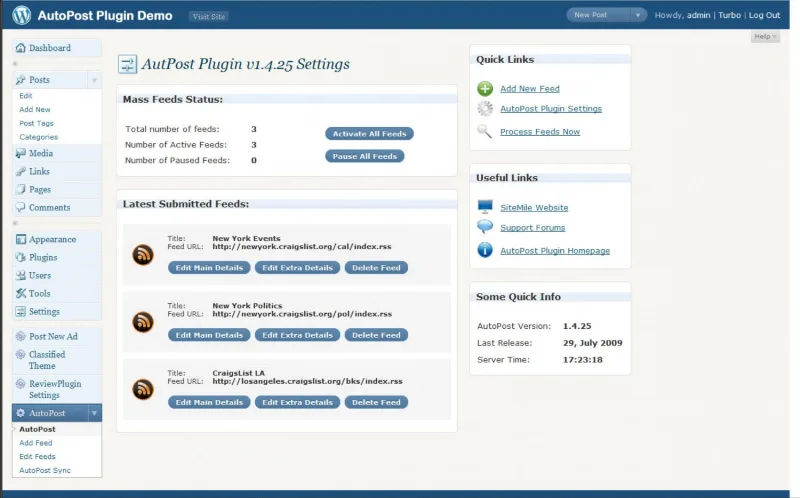
About AutoPost
With the status set to "publish," outside content goes live before you read it
You connect a feed, choose how often it is checked and how many entries are pulled in each pass. From then on the site works on its own, and what reaches the blog was written by someone else, at another time and with another standard.
The default status of the import decides whether a review happens: with "publish," every new entry goes public without anyone having read it; with "draft" or "private," it waits for you to read it.
Autopost is a WordPress plugin that imports the content of RSS and Atom feeds as posts. Each feed has its own schedule, category and author, and synchronization is started from the admin.
What it imports and how it places it on the site
- Source: any RSS or Atom feed, plus XML files read from an FTP server that you define.
- Schedule: the interval is set in minutes, hours or days, and each feed can be paused or reactivated.
- Quantity: you choose how many entries are imported from each feed.
- Destination: the category where they land, the author of each feed and custom taxonomies for each post.
- Fields: the content and the title, and also custom fields, are taken from RSS fields you specify.
- Images: they are downloaded and inserted into the WordPress media library.
- Status: publish, draft or private, as the default value.
An outside feed as a draft queue, to test
An example using settings it already has: you add a collaborator's feed, assign it to a category of its own, choose an author from your site and leave the status on draft. Each entry that arrives waits in the admin until someone decides whether it is published.
It is our own combination of functions. Try it first with a single feed: check whether the title and content reach the fields you expect, whether the images appear in the media library and whether the author and category are the ones you chose. Once that check is done, you decide whether to keep draft as the default status.
Per-feed settings and dependencies on the source
The author, the category and the pause are decided feed by feed, so two different sources can each have their own. That gives you control, and it also means reviewing each one separately.
The import depends on the source continuing to publish at the address you registered. If the feed changes address or stops updating, no new entries arrive.
Images are downloaded to your media library, so they sit on your own server and are not linked to the source site. To read XML files over FTP you need to be able to access the server where they are hosted.
The title and content come from the feed's fields. If you want other data to end up in custom fields or in the content, you assign it yourself from custom RSS fields.
First feed and first synchronization
You need a WordPress site where you can install plugins and the address of at least one feed. If you are going to read XML over FTP, you also need access to that server.
- Install the plugin with the WordPress installer and activate it.
- Add a feed with its address.
- Choose the category, the author and the default status.
- Set the interval and the number of entries per pass.
- Synchronize from the admin and review what arrived before leaving the feed on its own.
Feed importers to compare
To compare content import approaches, the catalog includes WP RSS Aggregator and its Feed to Post add-on.
Answers about Autopost
What status do imported posts get?
The one you choose as the default value: publish, draft or private.
Can I stop a feed without deleting it?
Yes. Each feed can be paused or activated, and also added or removed.
What happens to the images in the posts?
They are downloaded and inserted automatically into the WordPress media library.
Can it read XML files that are not a public feed?
Yes. You can define FTP servers and parse the XML files stored there.
Topics
Version history
-
v
1.9.1 Current 17 May 2024
Customer reviews
Sign in to leave a review. Only people who have the product can review it.
No reviews for this product yet.
Frequently asked questions
-
GPL (General Public License) is the license under which WordPress and most premium plugins/themes are distributed. It grants you the right to use, modify and redistribute the software in as many projects as you want, with no domain restrictions.
-
Yes. With membership you get automatic updates via our GPLClub Updater plugin (installed on your WP, detects new versions and applies them). With individual purchase, you get one year of manual updates from your account.
-
Depends on the plan. Monthly: 3 domains. Semi-annual: 7. Annual and Lifetime: 15. Individual purchase: 1 domain.
-
GPLClub offers its own support for installation, configuration and compatibility. For direct support from the original author (feature requests, product-specific bugs), a license purchased from the author is required.