BWD Map Masking
Antivirus scan
Powered by ClamAV
✅ Verified clean
This product file has passed our security filters.
Want to run a fresh ClamAV scan right now? Takes a few seconds and shows scanner version, signature DB and live result.
This can take 5 to 30 seconds.
Clean file Threat detected
No threats detected in this file.
- File
- Size
- Scanned
- ClamAV
- Signature database
⚡ Powered by ClamAV
Scan could not be completed
Report product
If you detected an issue (broken file, malware, inappropriate content, etc.) let us know and we'll review it ASAP.
Sign in to report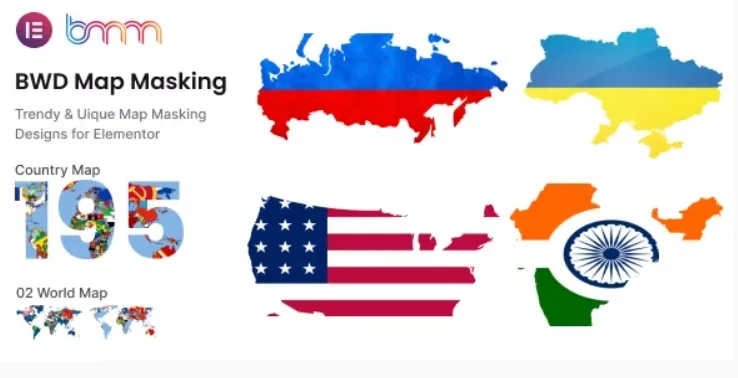
About BWD Map Masking
A Google Maps pin tells people where you are, not how far you reach
Showing a business's reach with a map screenshot, a heavy PNG or a grey iframe usually looks bland, out of place with the rest of the design and hard to adapt to your branding. Visitors don't need a street plan to know you operate in Portugal, they need to see it at a glance, with the shape of the country filled with an image of your own.
BWD Map Masking is an add-on for Elementor that uses the shape of a map as a mask. It comes with 195 countries and 2 world map shapes.
From "we work in Portugal" to a silhouette with your photo inside
This is the typical walkthrough for someone using it on a services page or the homepage:
- You choose the territory. If your message is about one country, you find yours among the 195; if it is global, you pick one of the 2 world shapes.
- You add it from Elementor, in the section where you want it to appear, working in the visual editor you are already used to.
- You decide what shows inside the mask. Careful: a mask crops, so if the important part of your photo is at the edges, it will be lost. Choose images with the subject in the center.
- You adjust the look. The plugin is designed to be customized quite a lot; check in the demo which specific controls you get before planning a very particular design.
- If your territory isn't on the list, you upload your own map. You can use a custom map image, for example for a region or a delivery area. The quality of the result will depend on how clean your image is.
Questions before installing BWD Map Masking
Does it work without Elementor?
No. It is an add-on that plugs into Elementor, so you need to have it installed on your site.
Can I mark my branches or let visitors search for an address?
That is not what it offers. If you need address search, routes or clickable points, you will have to combine it with another tool or use an interactive map plugin.
How many maps does it include?
195 countries and 2 world map shapes.
Can I use a map that isn't included?
Yes, it accepts a custom map image.
When BWD Map Masking is worth it
It pays off if your site is already built with Elementor and you want a visual element that explains right away where you work, without resorting to a generic map. If what you are after is a store locator, a map with routes or a location guide, this plugin falls short: it is not a geolocation tool.
Version history
-
v
1.0 Current 13 May 2024
Customer reviews
Sign in to leave a review. Only people who have the product can review it.
No reviews for this product yet.
Frequently asked questions
-
GPL (General Public License) is the license under which WordPress and most premium plugins/themes are distributed. It grants you the right to use, modify and redistribute the software in as many projects as you want, with no domain restrictions.
-
Yes. With membership you get automatic updates via our GPLClub Updater plugin (installed on your WP, detects new versions and applies them). With individual purchase, you get one year of manual updates from your account.
-
Depends on the plan. Monthly: 3 domains. Semi-annual: 7. Annual and Lifetime: 15. Individual purchase: 1 domain.
-
GPLClub offers its own support for installation, configuration and compatibility. For direct support from the original author (feature requests, product-specific bugs), a license purchased from the author is required.