Divi Assistant
Antivirus scan
Powered by ClamAV
✅ Verified clean
This product file has passed our security filters.
Want to run a fresh ClamAV scan right now? Takes a few seconds and shows scanner version, signature DB and live result.
This can take 5 to 30 seconds.
Clean file Threat detected
No threats detected in this file.
- File
- Size
- Scanned
- ClamAV
- Signature database
⚡ Powered by ClamAV
Scan could not be completed
Report product
If you detected an issue (broken file, malware, inappropriate content, etc.) let us know and we'll review it ASAP.
Sign in to report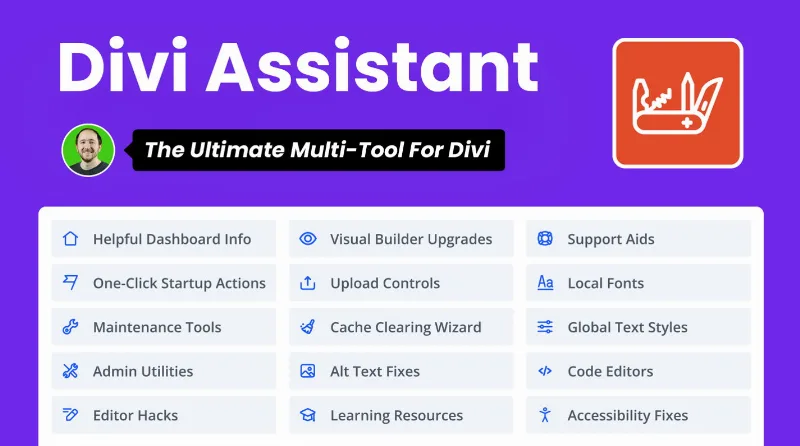
About Divi Assistant
Every new Divi site starts by repeating the last one
You remove the default plugins and themes, delete the starter pages, create the home page, build the menu, change the permalinks and generate a child theme. Then you define the same global colors and the same H1 to H6 styles you already defined on the previous site.
None of that is hard, and none of it shows in the final design. The cost of working with Divi grows with every client in the part that happens before design, which is why automating the setup comes before looking for another module. Divi Assistant, by Pee-Aye Creative, gathers that work into a single plugin, organized into helpers you switch on or off depending on what you use.
Site setup, handled from one panel
- Initial cleanup: removes the default plugins and themes, plus the WordPress starter pages and widgets.
- Basic structure: creates and assigns the home page, creates a navigation menu, changes the permalinks and disables comments.
- Child theme: generates it with a name, description and thumbnail, activates it and lets you export it.
- Your usual plugins: imports plugins from a saved list and exports your favorites as a zip file for other Divi sites.
- Global styles: global colors from the dashboard and styles for headings, body text, links and lists, including on smaller screens.
- Moving settings: exports settings to set up other Divi sites; on Divi 5 it also imports and exports variables.
The settings that save clicks for the rest of the project
- Visual Builder: enter and exit with the Escape key, sticky text toolbar, taller text area, 100% wide rows by default and the option to disable premade layouts, Divi AI or Divi Cloud.
- Code: an editing window for CSS, jQuery and PHP inside the builder, with error handling to prevent fatal errors from custom PHP.
- Media: SVG uploads, a maximum image size, replacing an image everywhere it is used, and alt text taken from the library or the title.
- Fonts: local font uploads.
- Accessibility: keyboard navigation outlines, ARIA attributes, a skip navigation link and a Tota11y button for finding issues.
- Maintenance: coming soon or maintenance pages with a bypass link, scheduled clearing of the Divi static CSS cache and blocking of automatic theme and plugin updates.
How far Divi Assistant goes
Its features do not include generating text or images with AI: the related setting is there to turn Divi AI off. There are no design modules among them either: its field is configuration and workflow.
Cache clearing refers to the Divi static CSS cache, so page caching is not among its features.
What it needs and how to get the first site running
It is built for the Divi theme and does not work with the Divi Builder plugin when another theme is active. With the Extra theme it works partially and without guarantees. It is compatible with Divi 4 and Divi 5, and only the administrator role sees its menu.
For a freshly installed site:
- Activate the Divi theme and install the plugin.
- Leave on only the helpers you will use.
- Run the starter tasks: cleanup, home page, menu and permalinks.
- Generate the child theme and define global colors and styles.
- Export the settings to apply them on the next site.
For the gaps this plugin leaves to others
If what you are missing is layout pieces, Divi Pixel adds more than 50 modules to the builder. For repeated work on mobile, Divi Responsive Helper, by the same maker, turns per-breakpoint corrections into global settings.
Before installing it on a client site
Does it work if I use Divi Builder with another theme?
No. It is built for the Divi theme and does not work with the Divi Builder plugin when another theme is active.
Will my client see the plugin menu?
The menu and settings are visible only to the administrator role. A client with a lower role does not see them.
Does it replace an SMTP mail plugin?
It includes managing SMTP settings and sending a test email.
Can I turn off the parts I do not use?
Yes. Helpers are switched on or off from the taskbar of its own dashboard, where you can also search the settings.
Topics
Version history
-
v
2.1.1 Current 8 Apr 2026
Customer reviews
Sign in to leave a review. Only people who have the product can review it.
No reviews for this product yet.
Frequently asked questions
-
GPL (General Public License) is the license under which WordPress and most premium plugins/themes are distributed. It grants you the right to use, modify and redistribute the software in as many projects as you want, with no domain restrictions.
-
Yes. With membership you get automatic updates via our GPLClub Updater plugin (installed on your WP, detects new versions and applies them). With individual purchase, you get one year of manual updates from your account.
-
Depends on the plan. Monthly: 3 domains. Semi-annual: 7. Annual and Lifetime: 15. Individual purchase: 1 domain.
-
GPLClub offers its own support for installation, configuration and compatibility. For direct support from the original author (feature requests, product-specific bugs), a license purchased from the author is required.