Latepoint Role Manager Addon
Antivirus scan
Powered by ClamAV
✅ Verified clean
This product file has passed our security filters.
Want to run a fresh ClamAV scan right now? Takes a few seconds and shows scanner version, signature DB and live result.
This can take 5 to 30 seconds.
Clean file Threat detected
No threats detected in this file.
- File
- Size
- Scanned
- ClamAV
- Signature database
⚡ Powered by ClamAV
Scan could not be completed
Report product
If you detected an issue (broken file, malware, inappropriate content, etc.) let us know and we'll review it ASAP.
Sign in to report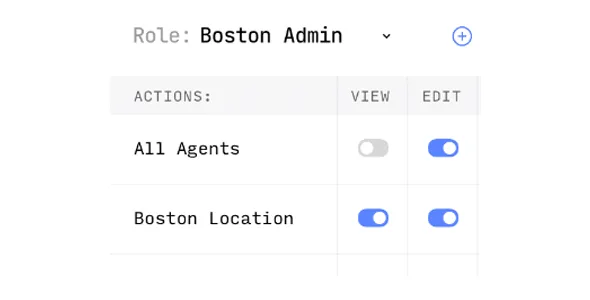
About Latepoint Role Manager Addon
Whoever runs your calendar takes no appointments and needs no master keys
Your team grows and someone starts confirming bookings, moving schedules and handling customers by phone. That person provides no service, so they do not fit as an agent. And since they need to get in and work, the quick way out is giving them an administrator account. That day you also hand over the settings, the payments and everything else they had no reason to touch.
A business with appointments can have more positions than the owner and whoever serves customers. Every person left with more access than they use is a risk nobody decided to take. Role Manager adds custom roles to LatePoint, with the capabilities you choose and access to restricted records, so you can create a position such as Manager and define what it can do.
How access gets divided with a custom role
- Custom roles named after the real positions in your business.
- Specific capabilities for each role, chosen by you.
- Permitted actions grouped in the Roles settings.
- Access to restricted records for those holding that role.
The value lies in separating decisions that travel together in an administrator account. Whoever handles daily operations can have one role, whoever does the accounting another, and neither needs what the other uses. Define each role from the person's tasks, not from what feels convenient to grant.
An agent and a custom role solve different things
In LatePoint, an agent is a staff member who provides services. They have their own schedule, list of services and connected calendar, and you link them to a WordPress user with the LatePoint Agent role. From their dashboard they manage their own appointments and schedule, and see only their customers' payments.
A custom role answers another question: what a person can do inside the system. That is why it fits someone who organizes, supervises or manages without taking appointments.
Role Manager already comes inside PRO Features
Before installing anything, check what you have active. LatePoint merged most of its utility add-ons into a single PRO add-on, and Role Manager is one of them. If you use PRO Features, the role features are already there.
Installing both pieces adds nothing and may cause conflicts, so deactivate this add-on if you use PRO Features.
Your first role in five steps
You need LatePoint installed and active. This order keeps you from handing out too many permissions:
- Install the add-on on your LatePoint site.
- Write down the person's real tasks before opening the settings.
- Create the role in the Roles settings and tick only the actions it needs.
- Assign it to a test user and log in with that account.
- Do a day of their work and add only what is missing.
Afterward, the LatePoint activity log helps you review what is done on the account. If someone leaves the position or changes tasks, adjust their role instead of widening someone else's.
Permissions beyond bookings
For roles across all of WordPress, not just bookings, User Role Editor Pro edits existing roles, creates new ones and assigns capabilities to them. Its features also include blocking admin menu items per role.
If you also want several locations, group bookings or reminders in LatePoint, PRO Features includes those pieces along with role management.
On roles, agents and accounts
Does it replace the LatePoint Agent role?
No. The agent is still whoever provides services. Custom roles serve other positions.
Can I name the role as I like?
Yes. You can create custom roles, such as Manager, and decide what each can do.
Should I install it if I have PRO Features?
No. Role Manager is already part of that add-on.
Does an agent see the whole business's payments?
No. Each agent sees only their own customers' payments.
Does it work without LatePoint?
No. It is an add-on for that plugin.
Topics
Version history
-
v
1.0.0 Current 8 May 2024
Customer reviews
Sign in to leave a review. Only people who have the product can review it.
No reviews for this product yet.
Frequently asked questions
-
GPL (General Public License) is the license under which WordPress and most premium plugins/themes are distributed. It grants you the right to use, modify and redistribute the software in as many projects as you want, with no domain restrictions.
-
Yes. With membership you get automatic updates via our GPLClub Updater plugin (installed on your WP, detects new versions and applies them). With individual purchase, you get one year of manual updates from your account.
-
Depends on the plan. Monthly: 3 domains. Semi-annual: 7. Annual and Lifetime: 15. Individual purchase: 1 domain.
-
GPLClub offers its own support for installation, configuration and compatibility. For direct support from the original author (feature requests, product-specific bugs), a license purchased from the author is required.