Woocommerce Product Tab Pro
Antivirus scan
Powered by ClamAV
✅ Verified clean
This product file has passed our security filters.
Want to run a fresh ClamAV scan right now? Takes a few seconds and shows scanner version, signature DB and live result.
This can take 5 to 30 seconds.
Clean file Threat detected
No threats detected in this file.
- File
- Size
- Scanned
- ClamAV
- Signature database
⚡ Powered by ClamAV
Scan could not be completed
Report product
If you detected an issue (broken file, malware, inappropriate content, etc.) let us know and we'll review it ASAP.
Sign in to report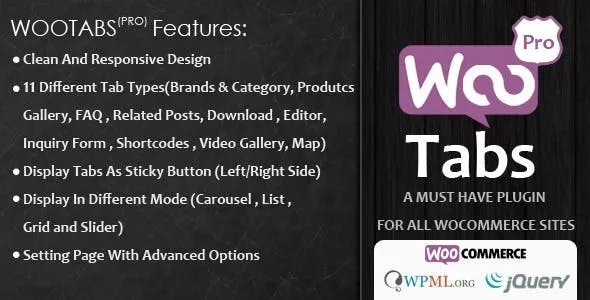
About Woocommerce Product Tab Pro
Text pasted into every product gets corrected in every product
If your shipping terms, your care guide or your manual live copied inside each description, the day they change you have to open the products one by one. The ones you miss will keep promising the old thing, and the customer who buys there will read a condition that no longer exists.
Woocommerce Product Tab Pro takes that content out of the description and moves it to extra tabs on the product page, added to the ones the shop already has. A global tab is written once and appears on every product. Another, created by query, reaches only a taxonomy, a category or the products you choose.
Eleven tab types, each with its own job
Extra tabs per product have no cap, and each one can be one of these types:
- Editor: your own content with a visual editor, including shortcodes and embedded video or maps.
- FAQ: questions and answers for one or several products.
- Inquiry: a request form about the product, sent through AJAX, with optional Google Captcha.
- Downloads: files the visitor can get from the tab.
- Map: three ways to show it: embedded map, location point or address.
- Photo gallery and video gallery: the video one displays as a grid or a slider.
- Products: a selection of other products to offer next to the one being viewed.
- Brands and category: all products from the same brand, or only the featured ones.
- Related posts and shortcodes: blog articles or the output of another plugin.
What goes global, what goes by family and what goes by product
Before creating anything, it pays to split the content into three levels, because the plugin gives you a tool for each:
- What applies to the whole shop goes in a global tab. If one product is the exception, the tab is disabled from that product's edit page.
- What applies to a family goes in a query tab, tied to the category or taxonomy.
- What belongs to a single item, such as its manual, goes in a tab on that product.
A tab you stop needing does not have to be deleted: it is disabled and stays saved for later.
Where they appear and what they hide
Your tabs can go before or after the WooCommerce ones, in their original position or on a sticky button on the left or right of the screen. Each one takes a title and an icon. Products display in four skins and, depending on the type, as carousel, list, grid or slider. You can use your WooCommerce theme style or the plugin's, and there is a custom CSS field.
A tab hides what it holds until the click, so a detail that decides the sale loses presence if you send it to fourth place. Its features do not include rewriting the content of native tabs or removing them: the plugin adds tabs to the existing ones. And the inquiry form brings you questions that someone has to answer, so check where they arrive before publishing it.
WooCommerce and your first global tab
It needs WooCommerce, and it works with multisite and with WPML. To get started:
- Install the plugin, ideally on a copy of your shop first.
- List the texts you repeat across products today.
- Create a global tab with them and check how it looks on several products.
- If you enable the inquiry form, set up the captcha in the WooCommerce settings and send a test.
When WPC Product Tabs or YITH Tab Manager fit better
If what you lack is ordering what already exists, WPC Product Tabs reorders tabs by dragging and lets you edit each one's title and text. If you want to disable native tabs or move them, YITH WooCommerce Tab Manager can do it, and also creates FAQ, form, map or download tabs.
Three answers when setting up the tabs
Can a global tab be removed from one product?
Yes. It is disabled from that product's edit page, and the others keep showing it.
Can I limit a tab to one category?
Yes. Query tabs are assigned by taxonomy, by category or to specific products.
Does it work for offering PDF manuals?
The downloads tab is meant for adding files that are downloaded from the product page.
Topics
Version history
-
v
4.2 Current 26 Oct 2026
-
v
3.2 30 May 2024
Customer reviews
Sign in to leave a review. Only people who have the product can review it.
No reviews for this product yet.
Frequently asked questions
-
GPL (General Public License) is the license under which WordPress and most premium plugins/themes are distributed. It grants you the right to use, modify and redistribute the software in as many projects as you want, with no domain restrictions.
-
Yes. With membership you get automatic updates via our GPLClub Updater plugin (installed on your WP, detects new versions and applies them). With individual purchase, you get one year of manual updates from your account.
-
Depends on the plan. Monthly: 3 domains. Semi-annual: 7. Annual and Lifetime: 15. Individual purchase: 1 domain.
-
GPLClub offers its own support for installation, configuration and compatibility. For direct support from the original author (feature requests, product-specific bugs), a license purchased from the author is required.