WooCommerce Product Table (Barn2)
Antivirus scan
Powered by ClamAV
✅ Verified clean
This product file has passed our security filters.
Want to run a fresh ClamAV scan right now? Takes a few seconds and shows scanner version, signature DB and live result.
This can take 5 to 30 seconds.
Clean file Threat detected
No threats detected in this file.
- File
- Size
- Scanned
- ClamAV
- Signature database
⚡ Powered by ClamAV
Scan could not be completed
Report product
If you detected an issue (broken file, malware, inappropriate content, etc.) let us know and we'll review it ASAP.
Sign in to report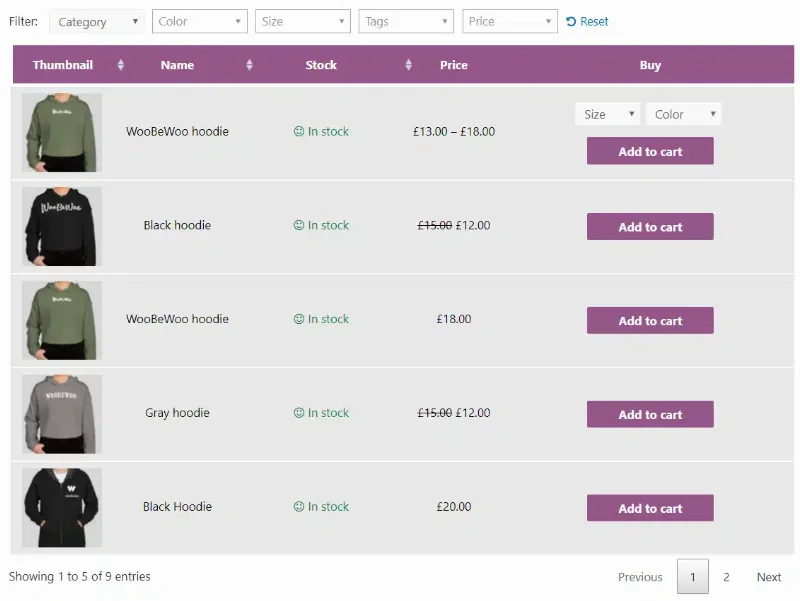
About WooCommerce Product Table (Barn2)
When a customer already knows what they want to buy, a grid-style WooCommerce shop gets in the way: open a product, pick the variation, go back, find the next one and repeat. With ten items it is bearable. With three hundred, someone restocking every week leaves or phones you to dictate the order.
A restocking order, step by step with WooCommerce Product Table (Barn2)
Picture a distributor selling to bars, shops or workshops. These are the steps of a typical order and what the plugin solves at each one.
- Arriving and seeing everything on one screen. The customer lands on a page with a table instead of a grid. Each row shows what you decide: image, name, SKU, price, stock, categories, weight, dimensions, reviews, custom fields or attributes.
- Finding their items. An instant keyword search, filters by category, tag, attribute or custom taxonomy, and sorting by clicking any column heading. You can sort by several columns in turn, for example brand and then price.
- Choosing quantities and variations. The purchase column supports a quantity selector, a button per row, multi-select checkboxes or both. For variable products there are three options: dropdowns in the row itself, one row per variation, or a button leading to the product page.
- Adding everything at once. With the boxes ticked, an «add selected to cart» button (above, below or both) sends the batch to the cart. You can enable or disable AJAX loading, meaning the page does not reload.
Important: the table speeds up buying, but it does not change your store's commercial logic. Volume pricing, role-based pricing or wholesale terms depend on how WooCommerce is set up or on other add-ons; the plugin does not create them.
A table with hundreds of products that stays manageable
You can list hundreds or thousands of products, and several tools stop the page from becoming unwieldy: rows per page, a maximum product limit, four pagination styles, or infinite scroll with a fixed height. Filters allow multiple selections, show how many products match each option and have their own internal search box, useful if a category has hundreds of values.
In addition, every search, filter or sort updates the URL. The customer can bookmark a filtered view, the back button works as expected and you can send them a direct link to the exact products.
Which products go into each table
You can create unlimited tables, each with its own content and settings. They can be filtered by category, tag, status, date, taxonomy term or custom field value, and even by specific ID or by excluding whole categories. There is a useful option for returning customers: list the products that user has already bought, for example in a favorites list inside their account.
Design and placement of WooCommerce Product Table (Barn2)
A step-by-step wizard creates the table. You then display it with a Gutenberg block or a shortcode, or enable the table layout on the shop page, categories and other WooCommerce templates. There are seven design templates (default, minimal, dark, neutral, rounded, delicate and nature) and settings for colors, sizes, borders and backgrounds. You can also rename or remove headings, set widths per screen size and combine columns, for example description under the name. Images can open in a lightbox, and audio, video and media playlists are supported.
For product options such as text fields, checkboxes, file uploads, radio buttons or date pickers, it integrates with WooCommerce Product Options, which is a separate plugin. For more advanced filtering, there is an integration with WooCommerce Product Filters, also separate. If the plugin's own filters are enough for you, you do not need it.
Frequently asked questions
Is it only for wholesalers?
No. It also suits restaurants with an order menu, large catalogs or stores listing events by date. But if you have ten products and little variety, a table adds little.
Can I change the buy button text?
Yes, for example «Add to Basket» or «Buy». You can also rename the button that links to the product page.
Can I sell variable products from the table?
Yes, in three ways: dropdowns in the row, one row per variation, or a link to the product page to choose them there.
Topics
Version history
-
v
5.0.1 Current 24 Oct 2026
-
v
5.0.0 17 Oct 2026
-
v
4.3.10 7 Sep 2026
-
v
4.3.9 19 Jun 2026
-
v
4.3.8 9 Apr 2026
Customer reviews
Sign in to leave a review. Only people who have the product can review it.
No reviews for this product yet.
Frequently asked questions
-
GPL (General Public License) is the license under which WordPress and most premium plugins/themes are distributed. It grants you the right to use, modify and redistribute the software in as many projects as you want, with no domain restrictions.
-
Yes. With membership you get automatic updates via our GPLClub Updater plugin (installed on your WP, detects new versions and applies them). With individual purchase, you get one year of manual updates from your account.
-
Depends on the plan. Monthly: 3 domains. Semi-annual: 7. Annual and Lifetime: 15. Individual purchase: 1 domain.
-
GPLClub offers its own support for installation, configuration and compatibility. For direct support from the original author (feature requests, product-specific bugs), a license purchased from the author is required.