WooCommerce URL Coupons
Antivirus scan
Powered by ClamAV
✅ Verified clean
This product file has passed our security filters.
Want to run a fresh ClamAV scan right now? Takes a few seconds and shows scanner version, signature DB and live result.
This can take 5 to 30 seconds.
Clean file Threat detected
No threats detected in this file.
- File
- Size
- Scanned
- ClamAV
- Signature database
⚡ Powered by ClamAV
Scan could not be completed
Report product
If you detected an issue (broken file, malware, inappropriate content, etc.) let us know and we'll review it ASAP.
Sign in to report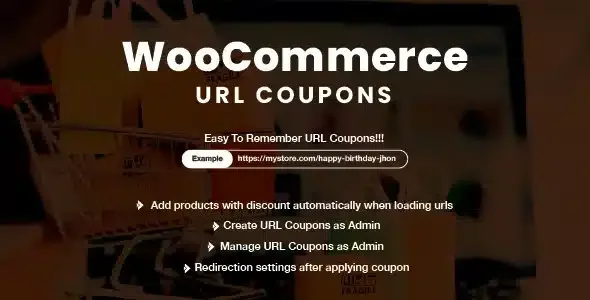
About WooCommerce URL Coupons
For the store that hands out coupons through outside channels, not for anyone who wants an automatic rule-based discount
WooCommerce coupons work fine until you step outside the store: a printed ad, a business card, an email or a pay-per-click ad forces the customer to copy a code and paste it into the cart. Many people never do. WooCommerce URL Coupons fixes exactly that step: every coupon gets its own web address and, when someone visits it, the discount is applied.
It suits you if you run campaigns with links or QR codes or want to measure which ad brings sales. It does not suit you if you are after a discount based on cart rules (for example by category or order total) that applies without the customer clicking anything: here the coupon is only activated when someone visits the URL. Nor does it replace WooCommerce: it is an add-on that works on top of the coupons you already create in WooCommerce > Coupons.
One URL per coupon and what happens after the click
In each coupon's screen you add its URL. From there you can decide three things:
- Apply only the discount when the link is visited.
- Add one or more products to the cart at the same time, handy if the campaign is for a specific item.
- Redirect the customer wherever you want, such as the cart or the checkout, to remove steps between the click and the purchase.
The rest of the coupon settings (minimum amount, expiry dates, usage limits) keep working as usual. It is also compatible with coupons imported through CSV with the corresponding extension.
Coupons without a coupon box: stopping the code hunt
Anyone who sees a coupon field at checkout tends to go looking for a code in another tab, and does not always come back. The plugin lets you hide the code fields in the cart, at checkout or in both, so that only coupons arriving through a URL are applied. Whoever has your link gets the discount; whoever does not sees nothing inviting them to search.
Think before turning it on: if you already hand out hand-typed codes (on a podcast, on social media or on invoices), those customers will not be able to use them. Turn all your codes into links first.
URLs that reward a page, a post or a person
You can use the address of an existing page or post to activate a coupon, so anyone who reads a particular article or lands on your landing page automatically gets the discount. It is a way to reward loyal readers without asking anything of them.
There is also a useful detail with custom URLs: if the coupon is «gracias», the address /coupon/gracias works, but so do /coupon/gracias-juan or /coupon/gracias-maria, so you can personalize the link for each customer using the same coupon. If you prefer a closed URL, you end it with a trailing slash and that behavior is disabled.
Compatibility with One Page Checkout and the block editor
Combined with WooCommerce One Page Checkout, the customer can click, see the product with its discount and pay on the same page. The plugin is listed as compatible with the cart and checkout blocks and with high performance order storage (HPOS). One Page Checkout is a separate extension: without it you do not get that flow.
Frequently asked questions
Does it work without WooCommerce?
No. It adds links to WooCommerce coupons and needs the store to be active.
Can I measure the result of an ad?
Yes, the idea is to use a different coupon URL per campaign (pay-per-click ads, print or email) and see how many purchases use each coupon.
Can I send a different link to each customer?
Yes, by adding a suffix to the coupon URL, such as gracias-ana, as long as you have not closed the URL with a trailing slash.
Does it add products to the cart automatically?
Yes, optionally: you choose one or more products that are added when the link is visited.
What should I check before launching a campaign?
Test the link with an empty cart and with products in it, and check in the demo or in your test environment that the coupon is applied in both cases.
Topics
Version history
-
v
2.16.4 Current 26 Aug 2026
-
v
2.16.2 10 Dec 2025
Customer reviews
Sign in to leave a review. Only people who have the product can review it.
No reviews for this product yet.
Frequently asked questions
-
GPL (General Public License) is the license under which WordPress and most premium plugins/themes are distributed. It grants you the right to use, modify and redistribute the software in as many projects as you want, with no domain restrictions.
-
Yes. With membership you get automatic updates via our GPLClub Updater plugin (installed on your WP, detects new versions and applies them). With individual purchase, you get one year of manual updates from your account.
-
Depends on the plan. Monthly: 3 domains. Semi-annual: 7. Annual and Lifetime: 15. Individual purchase: 1 domain.
-
GPLClub offers its own support for installation, configuration and compatibility. For direct support from the original author (feature requests, product-specific bugs), a license purchased from the author is required.