WordPress WhatsApp Support
Antivirus scan
Powered by ClamAV
✅ Verified clean
This product file has passed our security filters.
Want to run a fresh ClamAV scan right now? Takes a few seconds and shows scanner version, signature DB and live result.
This can take 5 to 30 seconds.
Clean file Threat detected
No threats detected in this file.
- File
- Size
- Scanned
- ClamAV
- Signature database
⚡ Powered by ClamAV
Scan could not be completed
Report product
If you detected an issue (broken file, malware, inappropriate content, etc.) let us know and we'll review it ASAP.
Sign in to report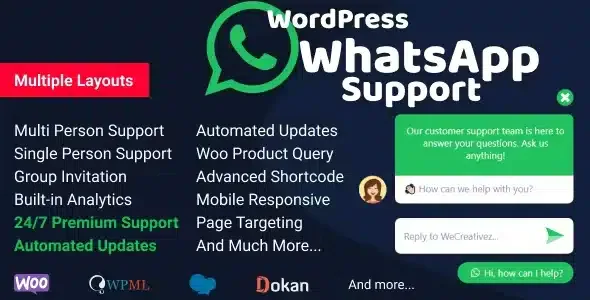
About WordPress WhatsApp Support
Visitors with a question don't want to open a form
Many people with a question before buying won't fill in a form or wait for an email: they open WhatsApp, which they already have at hand. If your site doesn't offer that route, the question goes unanswered and the visit is lost. WordPress WhatsApp Support displays a box on your site with your team's WhatsApp accounts, and when a visitor clicks one, they go straight to that person.
Whoever handles WhatsApp usually does it from a phone they also use outside working hours. Opening the channel is easy; the hard part is keeping it from becoming a permanent obligation. That is why control over schedules and over where the button appears matters more than the button itself.
From the first click to the reply: how it works in a shop with three people
Picture a shop with a sales person, a shipping person and the owner for special cases. This would be the path:
- You choose who is the face of support. You can show a single support person, several in one box, or an invitation to a WhatsApp group.
- You set when each one is available. Scheduling is by days, and with several support people you can define time slots to adjust each one's availability.
- You decide where it appears. You can filter by pages or slugs, enable or disable it on mobiles and on computers, and change the popup position separately on mobile and desktop. That way you can keep it out of the pages where you don't want it.
- You take care of the first message. There is a customizable welcome message and a design that is responsive and adjustable to your site. There is also an automatic popup with sound: use it carefully, because a sound alert aimed at someone who is just browsing can scare them off rather than invite them.
- You bring it to the product page. With WooCommerce, the product query button lets people ask about a specific item. If you sell with Dokan Multivendor, there is support at store level and product level, and you can hide the widget or the button when the number is missing.
- The visitor moves to WhatsApp. On a computer, WhatsApp Web opens; on a mobile, the app does.
That is where the plugin's job ends: it is an access point to the accounts, not a chat inside your site. The conversation is handled in WhatsApp, from each person's account, and someone has to reply.
Common questions before installing WordPress WhatsApp Support
Does it look good on mobile?
It is responsive, and you can also enable or disable it by device type and change the popup position on mobile and on desktop.
Can I show it only on some pages?
Yes, it is filtered by pages and by slugs.
Do I need WooCommerce?
The product query button is designed for WooCommerce.
Can each vendor in my marketplace have their own number?
With Dokan Multivendor there is support at store level and product level, with an option to hide the widget or the button if no number has been entered.
Standalone shortcode buttons for your texts and landing pages
Besides the floating box, a shortcode generator creates contact or support buttons, with no limit. Layout 8 includes click to call.
Before deciding, be clear that it is not a ticketing system or a shared inbox: each conversation reaches the WhatsApp account of the chosen person. Check in the demo how the box looks with several people inside your design.
Topics
Version history
-
v
2.5.3 Current 6 Sep 2025
Customer reviews
Sign in to leave a review. Only people who have the product can review it.
No reviews for this product yet.
Frequently asked questions
-
GPL (General Public License) is the license under which WordPress and most premium plugins/themes are distributed. It grants you the right to use, modify and redistribute the software in as many projects as you want, with no domain restrictions.
-
Yes. With membership you get automatic updates via our GPLClub Updater plugin (installed on your WP, detects new versions and applies them). With individual purchase, you get one year of manual updates from your account.
-
Depends on the plan. Monthly: 3 domains. Semi-annual: 7. Annual and Lifetime: 15. Individual purchase: 1 domain.
-
GPLClub offers its own support for installation, configuration and compatibility. For direct support from the original author (feature requests, product-specific bugs), a license purchased from the author is required.