GP Email Validator
Antivirus scan
Powered by ClamAV
✅ Verified clean
This product file has passed our security filters.
Want to run a fresh ClamAV scan right now? Takes a few seconds and shows scanner version, signature DB and live result.
This can take 5 to 30 seconds.
Clean file Threat detected
No threats detected in this file.
- File
- Size
- Scanned
- ClamAV
- Signature database
⚡ Powered by ClamAV
Scan could not be completed
Report product
If you detected an issue (broken file, malware, inappropriate content, etc.) let us know and we'll review it ASAP.
Sign in to report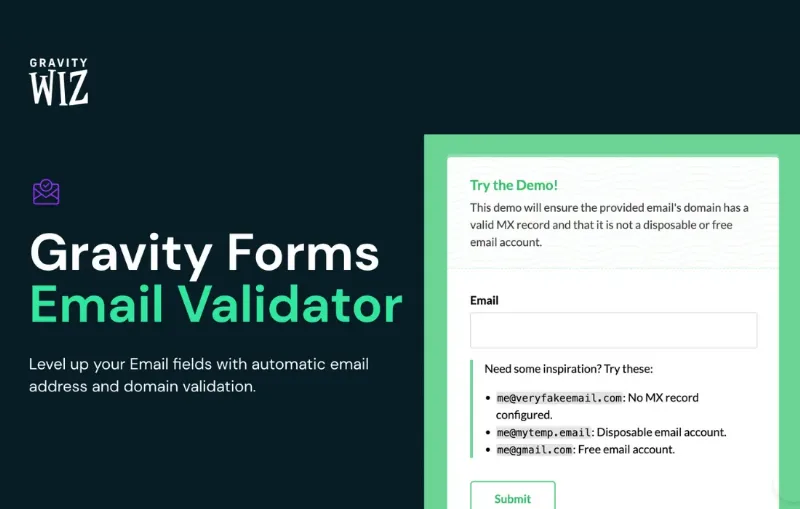
About GP Email Validator
A domain that receives mail does not prove the mailbox exists
A contact form that fills your list with bouncing addresses, or a lead who never gets your reply because they mistyped their address, has the same origin: the Gravity Forms Email field accepts almost anything shaped like an email.
GP Email Validator, by Gravity Wiz, adds automatic address and domain validation to those fields. By default it uses Basic, a local validator that looks at whether the domain has MX records and whether it is a disposable mail provider. That says the domain can receive mail, not that this particular mailbox exists. Basic does not talk to any mail server, so an invented address on a real domain gets through.
Finding out whether the mailbox responds is the job of an external service. So the useful question is not whether you validate, but what each bad email costs you and what rejecting a good one costs you.
The four GP Email Validator services
- Basic: built in and local. It requires MX and blocks disposable addresses, and it can also block free accounts and clean Gmail addresses that use the plus trick.
- Kickbox: rejects on Risky, Unknown or Undeliverable, the last one on from the start. It provides the "Did you mean?" typo suggestions, a beta feature.
- ZeroBounce: rejects on Catch-all, Unknown, Invalid, Do Not Mail, Spam Trap or Abuse. The last four come switched on.
- ClearBounce: rejects on Risky, Unknown or Undeliverable.
Separately there is the domain validator, with allow or block modes, one domain per line and rules for top-level domains.
What to do with the result after submission
The status and technical details are stored in the entry.
- Use it in notifications: the :gpev_status and :gpev_technical_details modifiers output it as a merge tag.
- Filter and condition: entries can be filtered by status, and using it in conditional logic takes the Conditional Logic: Entry Meta snippet.
- Never block: the Allow Invalid Submissions snippet lets every submission through and keeps the result.
What GP Email Validator leaves out
It validates at form submission. Its features do not include a review of the emails you already have stored.
The plus trick clashes with No Duplicates. With that cleaning on, Gravity Forms stops honoring the field setting that refuses duplicates.
An allowed domain does not skip validation. Its addresses are still blocked if they fail. To let one through, turn that block off in the validator and list the domains you do want blocked in the domain validator.
A temporary failure gives Unknown. With Kickbox and ZeroBounce, passing mail server problems return that status. If you set it as a rejection reason you can lose valid contacts; those results are not charged, so they can be checked again by hand.
Requirements and setting up the validator
It needs WordPress and Gravity Forms, and it works with Basic with nothing else. Kickbox, ZeroBounce or ClearBounce take an account with the service, an API key and an active payment method there.
- Install the perk. It applies itself to all Email fields, with Basic.
- Go to Forms, Settings, Email Validator and choose the service. That change affects all forms.
- With an external service, start in Sandbox mode and simulate results with test addresses. In ZeroBounce keys are not separated by mode.
- Choose the rejection criteria and test the form logged in as an administrator, because the rejection reason is only shown to administrators.
What this perk pairs with in Gravity Forms
It requires Gravity Forms. Against spam, Cloudflare Turnstile verifies the visitor in the background, with no puzzles, and has nothing to do with the address. GP Blocklist compares what was submitted with the WordPress disallowed keys list and also accepts IPs and CIDR ranges.
Questions about GP Email Validator
Do I need to pay an external service?
For Basic, no. For Kickbox, ZeroBounce and ClearBounce you do need an account with an active payment method.
What does a rejected visitor see?
A validation error. The specific reason is only visible to logged-in administrators, and the error text can be changed with the gpev_validation_error_message filter.
Can I accept only my company emails?
Yes, with the domain validator in allow mode.
Can I exclude a field?
Yes, from its Perks tab, by unchecking Enable Email Validator.
Topics
Version history
-
v
1.0.10 Current 29 May 2026
-
v
1.0.9 20 Feb 2026
Customer reviews
Sign in to leave a review. Only people who have the product can review it.
No reviews for this product yet.
Frequently asked questions
-
GPL (General Public License) is the license under which WordPress and most premium plugins/themes are distributed. It grants you the right to use, modify and redistribute the software in as many projects as you want, with no domain restrictions.
-
Yes. With membership you get automatic updates via our GPLClub Updater plugin (installed on your WP, detects new versions and applies them). With individual purchase, you get one year of manual updates from your account.
-
Depends on the plan. Monthly: 3 domains. Semi-annual: 7. Annual and Lifetime: 15. Individual purchase: 1 domain.
-
GPLClub offers its own support for installation, configuration and compatibility. For direct support from the original author (feature requests, product-specific bugs), a license purchased from the author is required.