WP Travel Engine - File Downloads
Antivirus scan
Powered by ClamAV
✅ Verified clean
This product file has passed our security filters.
Want to run a fresh ClamAV scan right now? Takes a few seconds and shows scanner version, signature DB and live result.
This can take 5 to 30 seconds.
Clean file Threat detected
No threats detected in this file.
- File
- Size
- Scanned
- ClamAV
- Signature database
⚡ Powered by ClamAV
Scan could not be completed
Report product
If you detected an issue (broken file, malware, inappropriate content, etc.) let us know and we'll review it ASAP.
Sign in to report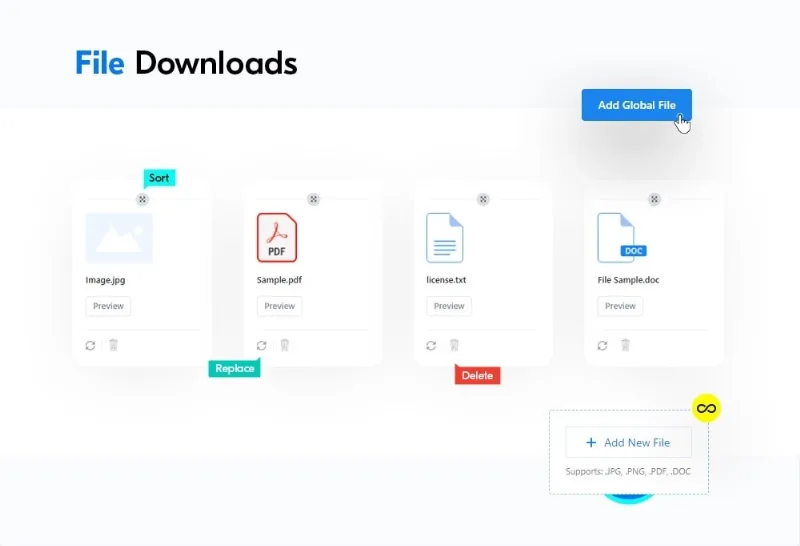
About WP Travel Engine - File Downloads
A rule changed and your old document is still on several trips
You sell several circuits in the same country. Each one carries its own PDF with the entry requirements, attached or linked separately. One day the rule changes, you update the file on two trips and forget the others. A traveler downloads the old version and plans their departure with it.
What fails there is the number of copies of the same document. Information shared by many trips should live in one place, and what is particular to each route, on that route.
File Downloads is a WP Travel Engine add-on that separates exactly those two things: global files and files specific to each trip, listed on the trip page so the visitor can view or save them.
Shared files for everything, specific files for each route
- Global files available to any trip, managed from one place.
- Specific files uploaded inside each trip, used only by that trip.
- Tailored selection: on each trip you choose which global files to attach.
- Global list as a fallback: shown on trips that have no files of their own.
- Global list always visible: it appears on all trips, first, and without duplicates.
- Virtually no limit on files, in the custom order you prefer.
Which documents to offer before departure
Think of what you explain today by email or phone: digital brochures, government rules and policies, last-minute notices for travelers, offline maps and guides, public transport and airport information, handbooks on the language or local dialect, and high-quality photos.
The add-on accepts PDF, DOC and images, and its uploader adds DOCX and text files. Since each trip's list names fewer formats, test DOCX and text on your installation before relying on them.
An important note: File Downloads publishes the files you upload and does not create them. You still prepare the brochure or guide outside WordPress.
Correcting a file without starting over
From the uploader you can upload several files at once, rename a badly titled one without uploading it again, replace it with another version in one click, delete it and preview it.
Preview works with images, text and PDF; DOC and DOCX cannot be previewed. If you update a global file to solve the problem from the start, open a couple of trips that use it and check they show the new version.
For the visitor you also decide the behavior: open the file in another tab or download it in one click. If you enable both options, one-click download takes priority. The section header and description are written in the settings.
The shortcode is the step you cannot skip
You need WP Travel Engine active. You also need WP Travel Engine Pro and the Partial Payment add-on, installed and activated. Run a full test before launching. Then:
- Go to WP Travel Engine, Settings, Extensions, File Downloads, and set the text and behavior.
- Upload your shared documents with Add New File.
- Open a trip in Trips, All Trips, and enter the File Downloads tab under Advanced Settings.
- Select global files or upload one exclusive to that trip.
- Click Update to save.
- Add the [trip_file_downloads] shortcode where the section should appear.
Without that shortcode, uploaded files do not show on the trip page.
Company documents and other pieces of your travel site
The base is WP Travel Engine, along with Partial Payment. For credentials and corporate documents, Legal Documents takes another approach: it manages PDF, JPEG, JPG and PNG from its own menu and displays them with a shortcode in pages, posts, widgets or tabs, with configurable columns.
If your site does not revolve around WP Travel Engine and you only want to manage downloads in WordPress, you can consider Download Monitor.
What happens to files on each trip
Why can't I see the files on the trip page?
Check that you added the [trip_file_downloads] shortcode where it should be displayed.
Can a file appear twice?
If it is on both the global list and the trip list, it shows only once.
Can I list the files outside a trip?
Yes, the shortcode can be placed anywhere on the site.
Is there a maximum number of documents per trip?
There is virtually no limit on the files you can add or manage.
Can a Word file be previewed?
No. Preview covers images, text and PDF.
Topics
Version history
-
v
2.0.3 Current 13 May 2024
Customer reviews
Sign in to leave a review. Only people who have the product can review it.
No reviews for this product yet.
Frequently asked questions
-
GPL (General Public License) is the license under which WordPress and most premium plugins/themes are distributed. It grants you the right to use, modify and redistribute the software in as many projects as you want, with no domain restrictions.
-
Yes. With membership you get automatic updates via our GPLClub Updater plugin (installed on your WP, detects new versions and applies them). With individual purchase, you get one year of manual updates from your account.
-
Depends on the plan. Monthly: 3 domains. Semi-annual: 7. Annual and Lifetime: 15. Individual purchase: 1 domain.
-
GPLClub offers its own support for installation, configuration and compatibility. For direct support from the original author (feature requests, product-specific bugs), a license purchased from the author is required.