Admin Columns Pro – Pods Addon
Antivirus scan
Powered by ClamAV
✅ Verified clean
This product file has passed our security filters.
Want to run a fresh ClamAV scan right now? Takes a few seconds and shows scanner version, signature DB and live result.
This can take 5 to 30 seconds.
Clean file Threat detected
No threats detected in this file.
- File
- Size
- Scanned
- ClamAV
- Signature database
⚡ Powered by ClamAV
Scan could not be completed
Report product
If you detected an issue (broken file, malware, inappropriate content, etc.) let us know and we'll review it ASAP.
Sign in to report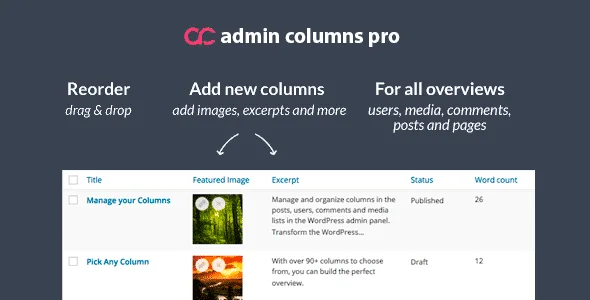
About Admin Columns Pro – Pods Addon
Editing a field from the list is writing to the database, and it is better if Pods does the writing
You have a content type created with Pods and several records with the price field filled in wrongly. From the admin list it seems convenient to fix them one by one in the column itself. But that value is not loose text: it has a storage format that depends on the field type.
An editable column is a way of writing to your database, which is why it matters that the Pods API stores the value and not a generic column.
This is the Pods addon for Admin Columns Pro. Admin Columns integrations with custom field plugins use each plugin's internal API to store the data in the correct format, and they add editing for multiple fields and serialized or relational data.
Which content and which Pods fields go into columns
- Content types: all post types, all taxonomies, custom settings pages, media, users and comments.
- Extended types: content types extended with Pods are also supported.
- Almost any Pod field can be turned into a column.
- Relationship fields: they are supported, including the advanced variations of the selection field (Pick).
The addon is there to decide which columns are shown on the overview pages of that content.
The features Admin Columns Pro brings
These are general Admin Columns Pro features, and it works on WordPress list tables:
- Smart filtering on content types, users and custom fields.
- Inline editing: you change a value from the list without opening the record.
- Bulk editing: you update the same data in many records at once.
- Sorting of text, dates, numbers and mixed values.
- CSV export of your content.
- Column sets for each task, which you switch between on the list.
On the generic custom field column, editing comes disabled by default, because it requires knowing how each value is stored in the database.
A Pod with text, relationship and date fields
Imagine a Pod with a text field, a relationship field and a date field. You create a column for each and change two values of the text field from the list; when you open those records in the Pods editor, the data appears just as if you had typed it there. Take it as a starting point and adapt it to your structure.
Which columns perform well depends on how you have defined your fields.
What this addon does not do
It does not replace Pods or Admin Columns Pro: it needs both. Among its functions there is no creation of content types or fields, because that is done in Pods. To know how each field type displays in a column, review the fields of your Pod one by one; the addon makes it possible for "almost any field" to be a column, not all of them.
To get started:
- Have Pods and Admin Columns Pro active, with the Pods content already created.
- Install and activate the Pods addon from the plugin installer.
- Open the Admin Columns settings, choose the table of your content type and add columns from Pods fields.
- Check which editing options each column offers.
Admin Columns with other field plugins
The base of this addon is Admin Columns Pro. If your custom fields are in another plugin, look at the addon for Advanced Custom Fields, or the WooCommerce one for the shop tables.
For Meta Box there is Meta Box Admin Columns.
Answers about Admin Columns Pro for Pods
Can I edit Pods fields from the list?
Yes. The addon adds editing for multiple fields and serialized or relational data, stored through the Pods API.
Which Pods content types does it support?
Post types, taxonomies, settings pages, media, users and comments.
Does it work with relationship fields?
Yes, including the advanced variations of the selection field.
Does it replace Pods?
No. It needs Pods and Admin Columns Pro active.
Version history
-
v
1.7 Current 28 Sep 2025
Customer reviews
Sign in to leave a review. Only people who have the product can review it.
No reviews for this product yet.
Frequently asked questions
-
GPL (General Public License) is the license under which WordPress and most premium plugins/themes are distributed. It grants you the right to use, modify and redistribute the software in as many projects as you want, with no domain restrictions.
-
Yes. With membership you get automatic updates via our GPLClub Updater plugin (installed on your WP, detects new versions and applies them). With individual purchase, you get one year of manual updates from your account.
-
Depends on the plan. Monthly: 3 domains. Semi-annual: 7. Annual and Lifetime: 15. Individual purchase: 1 domain.
-
GPLClub offers its own support for installation, configuration and compatibility. For direct support from the original author (feature requests, product-specific bugs), a license purchased from the author is required.