
Dg Blog Module
Antivirus scan
Powered by ClamAV
✅ Verified clean
This product file has passed our security filters.
Want to run a fresh ClamAV scan right now? Takes a few seconds and shows scanner version, signature DB and live result.
This can take 5 to 30 seconds.
Clean file Threat detected
No threats detected in this file.
- File
- Size
- Scanned
- ClamAV
- Signature database
⚡ Powered by ClamAV
Scan could not be completed
Report product
If you detected an issue (broken file, malware, inappropriate content, etc.) let us know and we'll review it ASAP.
Sign in to report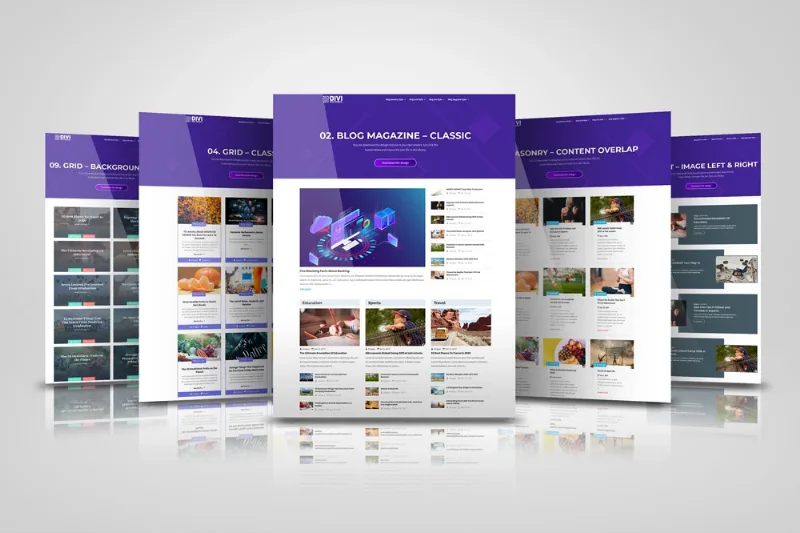
About Dg Blog Module
When every blog built with Divi looks the same
You publish a client's blog and find that the module that comes with Divi gives you two layouts and little else. You end up with listings that look like those of any other site built with the same builder, or you write CSS by hand just to move a date or space out a title.
The people who install this are usually designers or agencies delivering sites to third parties. The blog is the area clients look at most and the one that differs least between projects. Dg Blog Module is a module for Divi Builder that replaces that part with three layouts of its own (grid, masonry and list) and settings for almost every piece of a post.
Dg Blog Module: three layouts and every element in its place
The three layouts are customizable and you can create several variations from them. Besides grid and masonry, you can build:
- Image on the left and content on the right, or the other way round.
- Content overlaid on the image.
- Full-width posts.
There are nine post elements you can turn on and position: for example metadata with icons, a read more button with the text you choose and the standard Divi pagination. You also choose the resolution of the featured image, which helps when a heavy thumbnail slows down a long listing.
Design settings that save you CSS
- Up to 5 columns in grid or masonry, set per device.
- Featured image as background, with filters, shadows, borders and animations.
- Zoom and overlay on hover.
- Typography and spacing of their own for each element.
- Background color for each metadata item and vertical alignment.
- Pagination with styling options.
If you don't want to start from scratch, there are more than 50 premade blog layouts to download.
Posts, projects and archives: what you can display with it
The module is not limited to blog posts. It also displays projects or any custom content type, on whichever page you want. That makes it useful for a portfolio, a case study listing or a magazine with several sections.
To guide readers toward more content, you can show related posts based on specific categories. To organize the listing, sort by popularity, by date (newest to oldest or the reverse) or by category. You can also show random posts or the full content of each one. It works for designing archive pages and magazine or news style layouts.
If the site is multilingual, it works with translation plugins such as WPML.
Do you need Dg Blog Module or is Divi's own blog module enough?
If your blogs are simple and two layouts do the job, the standard module may be enough. If you work with clients who ask for different listings, column control per device, typography per element or related posts by category, you get those options here without leaving the builder.
Keep in mind that it is an add-on: it does not work without Divi Builder active on the site. It is not a standalone blog plugin and does not replace the builder.
Can I use it without Divi Builder?
No. Divi Builder must be available on your site.
Does it work with any theme?
Yes, as long as Divi Builder is installed.
Can I display projects or other content types?
Yes: posts, projects and any custom content type.
Can I show related posts?
Yes, based on specific categories, so visitors discover similar content.
Is it compatible with multilingual sites?
Yes, it works with translation plugins such as WPML.
Topics
Version history
-
v
1.0.11 Current 17 May 2024
Customer reviews
Sign in to leave a review. Only people who have the product can review it.
No reviews for this product yet.
Frequently asked questions
-
GPL (General Public License) is the license under which WordPress and most premium plugins/themes are distributed. It grants you the right to use, modify and redistribute the software in as many projects as you want, with no domain restrictions.
-
Yes. With membership you get automatic updates via our GPLClub Updater plugin (installed on your WP, detects new versions and applies them). With individual purchase, you get one year of manual updates from your account.
-
Depends on the plan. Monthly: 3 domains. Semi-annual: 7. Annual and Lifetime: 15. Individual purchase: 1 domain.
-
GPLClub offers its own support for installation, configuration and compatibility. For direct support from the original author (feature requests, product-specific bugs), a license purchased from the author is required.
Related products

WooCommerce Simple Auctions – WordPress Auctions
By WooCommerce

GeoDirectory Pay Per Lead
By GeoDirectory
WP Job Manager - Packages
By WP Job Manager
Events Showcase For Elementor And The Events Calendar
By The Events Calendar