Fundrize Responsive Donation and Charity Theme
Antivirus scan
Powered by ClamAV
✅ Verified clean
This product file has passed our security filters.
Want to run a fresh ClamAV scan right now? Takes a few seconds and shows scanner version, signature DB and live result.
This can take 5 to 30 seconds.
Clean file Threat detected
No threats detected in this file.
- File
- Size
- Scanned
- ClamAV
- Signature database
⚡ Powered by ClamAV
Scan could not be completed
Report product
If you detected an issue (broken file, malware, inappropriate content, etc.) let us know and we'll review it ASAP.
Sign in to report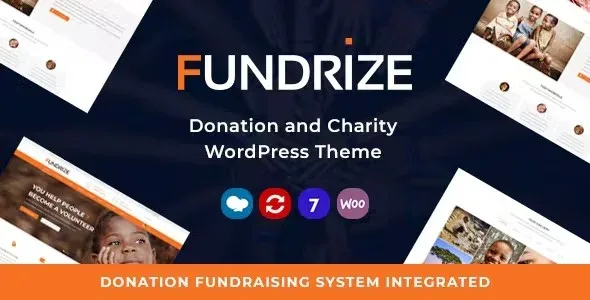
About Fundrize Responsive Donation and Charity Theme
A progress bar also shows what is still missing
Your organization needs a website that explains each cause and lets people give without running in circles. Fundrize handles that part with campaign cards: image, title, percentage, amount raised against the goal and a donate button. Each campaign page also shows the days left.
That bar is a public commitment with a date. Anyone visiting sees how far you have come, how much is missing and how much time remains. So it pays to decide before publishing which goal you can defend, what you will do if you fall short and who keeps the campaign updated.
A cause with a modest, reachable goal says something very different from a large figure left halfway. The theme gives you the shop window; the promise is yours to write.
The path of a donation in the demo
- Causes listing: twelve cards on the sample page, with progress and figures.
- Campaign page: goal, raised, days left, cause text and a Donate Now button.
- Donation page: quick amounts of 10, 50 and 100 dollars and an other-amount option.
- Donor details: first name, last name and email required, plus address, city, country and phone.
- Payment methods: PayPal and offline donation.
Ten homepages and the rest of the site
- Homepages and headers: ten home variants and four headers, with a header version per page or site-wide.
- Content types: gallery, portfolio, team members, testimonials and partners, among others.
- WPBakery elements: counters, accordions, tabs, pricing tables, Google Map, subscribe forms and galleries, among those the demo shows.
- Shop: WooCommerce integration, with clothing, drawings and souvenirs as sample products.
- Menus: column-based mega menu and one-page menu.
- Languages: compatible with WPML, and translatable with Loco Translate or Poedit.
What to check when setting up your campaign
The donation plugin. When you activate the theme, review which donation plugin it proposes. Payment methods and their settings will depend on it.
Recurring donations. The demo form has no recurring option. If your funding relies on monthly supporters, sort that out before choosing a theme.
Card payments. The demo only shows PayPal and offline donation. An offline donation arrives outside the website, so check how it shows up in the bar before trusting the figure.
The Twitter widget. Recent tweets needs Twitter developer credentials.
The import and your first published cause
The theme asks to install its plugins on activation, among them WPBakery Page Builder, Revolution Slider, Contact Form 7 and Mailchimp for WordPress. High server values are recommended, such as max_input_vars 3000, upload_max_filesize 64M and max_execution_time 180. Then:
- Activate the theme and install the plugins it proposes.
- Import the demo under Appearance, Import demo data. It can take several minutes.
- If your package includes the slider file, import it separately in Revolution Slider, Import.
- Set the front page and blog page under Settings, Reading.
- Adjust the accent color and the header in the customizer.
- Create a real cause and make a test donation from start to finish.
Content types come with WPBakery disabled. It is enabled in its Role Manager for administrators and editors.
Recurring giving, crowdfunding and other charity themes
To start from a donation plugin, the catalog has GiveWP and its Recurring Donations add-on. If your project revolves around crowdfunding, look at Funlin or Qizon. Another theme aimed at charities is Mercify.
Donations, payments and the demo: short answers
Can I accept cards?
It depends on the donation plugin and its gateways. The demo only shows PayPal and offline donation.
Does it work with Elementor?
Its pages and own elements are built with WPBakery Page Builder.
Can I sell T-shirts as well as receive donations?
Yes. The WooCommerce integration is the way, and the demo includes a sample shop.
Can donors type their own amount?
The demo combines fixed amounts with an other-amount option. Check it on your install.
Does the demo import in one click?
Yes, except for the slider, which is imported separately.
Topics
Version history
-
v
1.42 Current 5 Sep 2026
-
v
1.41 8 Apr 2026
Customer reviews
Sign in to leave a review. Only people who have the product can review it.
No reviews for this product yet.
Frequently asked questions
-
GPL (General Public License) is the license under which WordPress and most premium plugins/themes are distributed. It grants you the right to use, modify and redistribute the software in as many projects as you want, with no domain restrictions.
-
Yes. With membership you get automatic updates via our GPLClub Updater plugin (installed on your WP, detects new versions and applies them). With individual purchase, you get one year of manual updates from your account.
-
Depends on the plan. Monthly: 3 domains. Semi-annual: 7. Annual and Lifetime: 15. Individual purchase: 1 domain.
-
GPLClub offers its own support for installation, configuration and compatibility. For direct support from the original author (feature requests, product-specific bugs), a license purchased from the author is required.