Grand Conference | Event WordPress
Antivirus scan
Powered by ClamAV
✅ Verified clean
This product file has passed our security filters.
Want to run a fresh ClamAV scan right now? Takes a few seconds and shows scanner version, signature DB and live result.
This can take 5 to 30 seconds.
Clean file Threat detected
No threats detected in this file.
- File
- Size
- Scanned
- ClamAV
- Signature database
⚡ Powered by ClamAV
Scan could not be completed
Report product
If you detected an issue (broken file, malware, inappropriate content, etc.) let us know and we'll review it ASAP.
Sign in to report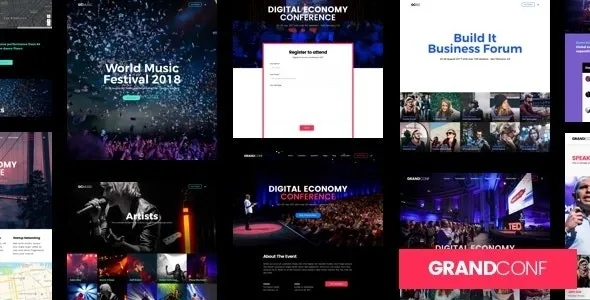
About Grand Conference | Event WordPress
A pricing table is not yet a box office
The conference site already looks finished: speakers, schedule, three rates and a buy button. Then comes the question left for last: when someone clicks that button, who takes the money, who issues the ticket and who knows how many seats are left?
In Grand Conference, by ThemeGoods, the design does not give that answer. A ticket in the theme is a price card with a booking button, and payment happens elsewhere. A box office does three jobs: taking payment, issuing the ticket and counting seats, and the theme leaves all three to another tool. The fees you pay, the data you collect and the work on event day all depend on that tool.
Three routes to selling or reserving a seat
- Card with WooCommerce: after the booking form, the selected product goes to the cart and is paid with the WooCommerce methods. You first create the product with its price and link it to the card.
- Card with external URL: after the form, the person goes to the address you set, useful if you already sell on your own or another platform.
- Event Tickets: this plugin from The Events Calendar adds RSVP reservations, with capacity and opening and closing dates, or sales through Tickets Commerce connected to PayPal and Stripe. RSVPs take no payment: they confirm the seat by email.
For a free or invitation-only event, look at RSVP first. If you will also sell other products, WooCommerce keeps tickets and products in the same store.
Speakers, sessions and days: the Grand Conference schedule
- Schedule days: group sessions by day.
- Session topics: let the schedule be filtered, for example by business or growth.
- Sessions: each has a start and end time, speakers and an optional room, and content can be left expanded by default.
- Speakers: bio page, grids, carousel and custom order, with several thumbnails per session.
- Multiple events: with The Events Calendar, one site publishes events with filters by keyword, category, date and location, and date, month or year views.
- Design: pages with Elementor, mega menus, Google Maps and a countdown.
What falls outside Grand Conference
The theme does not issue tickets by itself: WooCommerce, the external platform or Event Tickets takes the payment or confirms the seat. Its features do not include online event streaming, and door scanning comes from Event Tickets Plus and its QR check-in.
Custom attendee fields in Event Tickets require Event Tickets Plus. Nor is it optimized for the block editor: pages are laid out with Elementor.
Requirements and the order for building an event
It needs WordPress 6.0 or higher, PHP 7.4 or higher and MySQL 5.7 or higher. The demo importer works best with 180 seconds of execution time and 128M of memory. Elementor Pro is not needed to reproduce the demo pages, and the package includes Revolution Slider.
The working order:
- Install the theme and the plugins it suggests, such as Elementor and Contact Form 7.
- Import a full demo or only the page you need.
- Decide on the sales route and prepare products or tickets.
- Create days, topics, speakers and sessions, in that order.
- Add the session widget to a page with Elementor.
Exhibz, ITConf and the plugins that complete the sale
Exhibz includes ticket sales with Eventin on WooCommerce and webinar management with Zoom, and ITConf offers speakers, a schedule and WooCommerce sales. If you stay with Grand Conference and use Event Tickets, Event Tickets Plus adds registration fields for attendees, and The Events Calendar Pro is also compatible with the theme.
Common questions when organizing with this theme
Can I charge for tickets without WooCommerce?
Yes. With the external URL another platform takes the payment, and with Event Tickets you can use Tickets Commerce connected to PayPal and Stripe.
Do I need Elementor Pro?
Not to create the demo pages. They are built with the free version.
Does it work for several events at once?
It supports a single event or several. Multiple events work with The Events Calendar plugin.
Can the schedule be filtered by topic?
Yes. Session topics let visitors filter sessions on the schedule page.
Can it be translated?
Yes. It is compatible with WPML and works with Loco Translate.
Can I import only one demo page?
Yes. The importer can load the full site or a single page.
Topics
Version history
-
v
5.2 Current 18 Jun 2024
Customer reviews
Sign in to leave a review. Only people who have the product can review it.
No reviews for this product yet.
Frequently asked questions
-
GPL (General Public License) is the license under which WordPress and most premium plugins/themes are distributed. It grants you the right to use, modify and redistribute the software in as many projects as you want, with no domain restrictions.
-
Yes. With membership you get automatic updates via our GPLClub Updater plugin (installed on your WP, detects new versions and applies them). With individual purchase, you get one year of manual updates from your account.
-
Depends on the plan. Monthly: 3 domains. Semi-annual: 7. Annual and Lifetime: 15. Individual purchase: 1 domain.
-
GPLClub offers its own support for installation, configuration and compatibility. For direct support from the original author (feature requests, product-specific bugs), a license purchased from the author is required.
Related products
Theme Junkie – Company
Directorist dPlace – Tourism & Travel WordPress Directory Theme
By Directorist
Inoterior – Architecture & Interior Designer WordPress Theme + RTL