WooPrintInvoice - Order invoice print for WooCommerce
Antivirus scan
Powered by ClamAV
✅ Verified clean
This product file has passed our security filters.
Want to run a fresh ClamAV scan right now? Takes a few seconds and shows scanner version, signature DB and live result.
This can take 5 to 30 seconds.
Clean file Threat detected
No threats detected in this file.
- File
- Size
- Scanned
- ClamAV
- Signature database
⚡ Powered by ClamAV
Scan could not be completed
Report product
If you detected an issue (broken file, malware, inappropriate content, etc.) let us know and we'll review it ASAP.
Sign in to report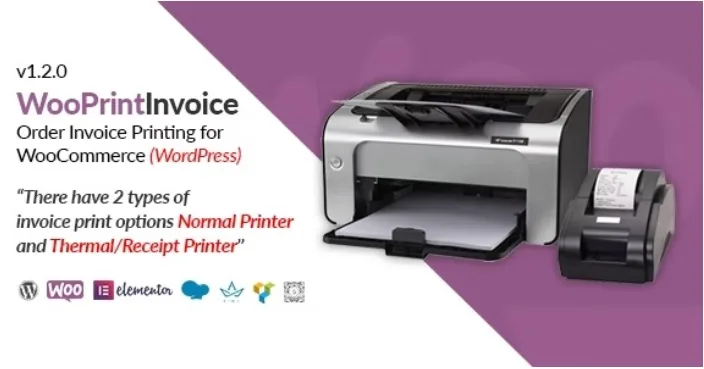
About WooPrintInvoice - Order invoice print for WooCommerce
The invoice starts with the printer next to the parcel
An order comes in and someone has to print its invoice. The office has a sheet printer. By the till or on the packing table there may be a receipt printer, with its narrow roll. A document built for a sheet does not work on that roll, and whoever is on duty ends up opening the order on screen and copying the details by hand.
The format of a printed invoice is decided by the machine at the workstation, and that decision comes before the logo or the colors. If you sell over the counter, deliver orders or prepare shipments with a thermal printer, the first thing to learn about an invoice plugin is whether it handles that paper.
WooPrintInvoice is a WooCommerce add-on for printing an order invoice, from both the admin and the customer account, with two print options: normal printer and thermal or receipt printer.
Where you print from and what each invoice carries
- Orders list: printing from the admin order table.
- My Account: customers print their invoice from their personal area.
- Customer email: an invoice print link inside the message.
- Admin email: the same link in the notice the shop receives.
- Two formats: normal printer and thermal or receipt printer.
- Your business details: company name, logo, address and invoice footer text.
- Its own settings panel, translation ready.
Fewer steps between the order and the paper
The link in the admin email brings printing closer to whoever gets the notice: they open the order message and reach the invoice from there, without looking the order up in the dashboard.
The customer side covers a different situation. Someone who needs their invoice to justify an expense can get it from My Account or from the link in their email, without writing to the shop to ask for it.
It prints invoices and its job ends there
Its features do not include PDF invoices attached to the email: what travels in the message is a print link. Nor do they include their own fiscal numbering, credit notes, delivery notes, pick lists or batch printing of several orders.
If your accounting or your warehouse depends on those documents, take a look at the options further down.
Installing it and fitting it to your printer
It needs WordPress with WooCommerce. To get it running:
- Upload the contents of the archive to wp-content/plugins.
- Activate the plugin from the Plugins page.
- In its settings, choose the printer type.
- Fill in the logo, address, company name and footer text.
- Turn on the print link in the customer and admin emails.
- Print a real order on your printer and check margins and width before using it every day.
If your store needs more documents than the invoice
Print Invoices & Packing Lists prints and emails invoices, per-order packing lists and pick lists that combine several orders, with bulk actions from the orders list.
PDF Invoices & Packing Slips Pro takes the PDF route: it adds credit notes, proformas, receipts and batch exports to a free WooCommerce invoice plugin.
Four notes on printers and customers
Does it work with a receipt printer?
Yes, it is one of its two print options. Test it with your model and roll width to confirm how the document comes out.
Can customers print the invoice themselves?
Yes, from My Account or from the link they receive by email.
Can I add my logo and my details?
Yes. You can change the company name, logo, address and footer text.
Does it work without WooCommerce?
No. It is a WooCommerce add-on and works on its orders.
Topics
Version history
-
v
1.2.0 Current 16 May 2024
Customer reviews
Sign in to leave a review. Only people who have the product can review it.
No reviews for this product yet.
Frequently asked questions
-
GPL (General Public License) is the license under which WordPress and most premium plugins/themes are distributed. It grants you the right to use, modify and redistribute the software in as many projects as you want, with no domain restrictions.
-
Yes. With membership you get automatic updates via our GPLClub Updater plugin (installed on your WP, detects new versions and applies them). With individual purchase, you get one year of manual updates from your account.
-
Depends on the plan. Monthly: 3 domains. Semi-annual: 7. Annual and Lifetime: 15. Individual purchase: 1 domain.
-
GPLClub offers its own support for installation, configuration and compatibility. For direct support from the original author (feature requests, product-specific bugs), a license purchased from the author is required.