WP Travel Engine - Trip Fixed Starting Dates
Antivirus scan
Powered by ClamAV
✅ Verified clean
This product file has passed our security filters.
Want to run a fresh ClamAV scan right now? Takes a few seconds and shows scanner version, signature DB and live result.
This can take 5 to 30 seconds.
Clean file Threat detected
No threats detected in this file.
- File
- Size
- Scanned
- ClamAV
- Signature database
⚡ Powered by ClamAV
Scan could not be completed
Report product
If you detected an issue (broken file, malware, inappropriate content, etc.) let us know and we'll review it ASAP.
Sign in to report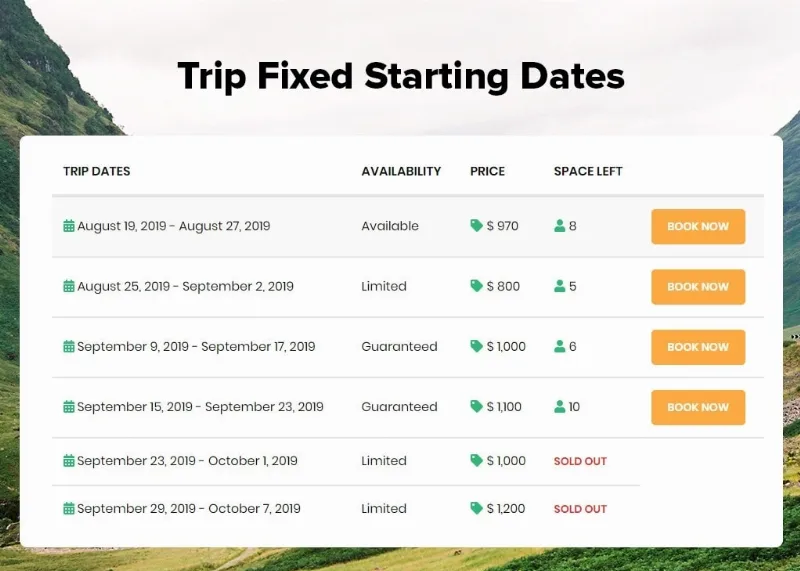
About WP Travel Engine - Trip Fixed Starting Dates
A departure that doesn't fill is a cost you never get back
By default, WP Travel Engine lets customers book every trip on any day of the year. That doesn't work if your route leaves on the first Saturday of each month, if the group departs with a guide and transport already contracted, or if the tour only exists in season. In a business built on departures, the seat you don't sell on a date can't be recovered: the guide, the vehicle and the lodging cost the same whether the group is full or half empty.
Trip Fixed Starting Dates turns those year-round open trips into departures with a date, seats and a calendar, so customers can only book when you actually run the trip.
How departures are set up with Trip Fixed Starting Dates
You can add one or several dates to each trip, with their times. It suits seasonal tours, events or group trips that need a precise schedule. So you don't have to type every departure one by one, there are recurring dates: daily, weekly, monthly or yearly, and also by a specific week and weekday of the month (for example, the second Sunday of every month).
- Seats per date: you set how many seats each departure has and travellers see how many are left. This lowers the risk of overselling.
- Excluded dates: you block holidays, maintenance or any day you can't operate, and customers only see the dates that are available.
- Custom date inquiry: a built-in form for people who can't find a date that suits them.
What travellers see before they decide
On the trip listing, each card shows its next available departure, and a drop-down menu lets visitors sort trips by departure date. Someone with fixed vacation days finds what leaves that week first, without opening trip after trip.
With the shortcode [WTE_TRIPS_FIXED_STARTING_DATES] you can show the fixed dates of all your trips in one place, whether it's the homepage or a page dedicated to the departure calendar.
When no date works for them, the inquiry form turns that visit into a contact you can follow up, instead of losing it. If you run few departures a year, that route matters more than it seems.
It needs WP Travel Engine and doesn't cover the rest of the booking
It is an add-on: it doesn't work on its own and requires WP Travel Engine to be installed and active. Split by task, it looks like this:
- Already solved: fixed dates with times, recurrences, seats per departure, date blocking, inquiry form, sorting by departure date and a dates shortcode.
- Covered by another add-on: the capacity limit for accommodations and extra services is controlled with a separate WP Travel Engine add-on, not this one.
- Handled by WP Travel Engine, not this add-on: the booking process, prices and payment.
- Up to you: writing each trip, deciding how many seats to open per departure and keeping the calendar up to date when your operations change.
Before you commit, check in the demo how the departure calendar looks on mobile, since that is where many travellers compare dates.
Frequently asked questions
Do I have to type every date by hand?
No. If your departures repeat daily, weekly, monthly or yearly, you set up the recurrence once. You can also schedule by weekday within the month.
How do I avoid selling more seats than I have?
By assigning a number of seats to each date. The customer sees the remaining seats, and you control the size of each group.
Can I close a specific date, such as a holiday?
Yes. You can exclude dates from booking and the customer will only see the ones that remain available.
What happens if the customer can't find a date that works?
They can send you an inquiry through the built-in form and ask for another date.
Does it work without WP Travel Engine?
No. It is an add-on for that plugin and depends on it to work.
Topics
Version history
-
v
2.3.15 Current 22 Feb 2025
Customer reviews
Sign in to leave a review. Only people who have the product can review it.
No reviews for this product yet.
Frequently asked questions
-
GPL (General Public License) is the license under which WordPress and most premium plugins/themes are distributed. It grants you the right to use, modify and redistribute the software in as many projects as you want, with no domain restrictions.
-
Yes. With membership you get automatic updates via our GPLClub Updater plugin (installed on your WP, detects new versions and applies them). With individual purchase, you get one year of manual updates from your account.
-
Depends on the plan. Monthly: 3 domains. Semi-annual: 7. Annual and Lifetime: 15. Individual purchase: 1 domain.
-
GPLClub offers its own support for installation, configuration and compatibility. For direct support from the original author (feature requests, product-specific bugs), a license purchased from the author is required.