WooCommerce Multiple Email Recipients
Antivirus scan
Powered by ClamAV
✅ Verified clean
This product file has passed our security filters.
Want to run a fresh ClamAV scan right now? Takes a few seconds and shows scanner version, signature DB and live result.
This can take 5 to 30 seconds.
Clean file Threat detected
No threats detected in this file.
- File
- Size
- Scanned
- ClamAV
- Signature database
⚡ Powered by ClamAV
Scan could not be completed
Report product
If you detected an issue (broken file, malware, inappropriate content, etc.) let us know and we'll review it ASAP.
Sign in to report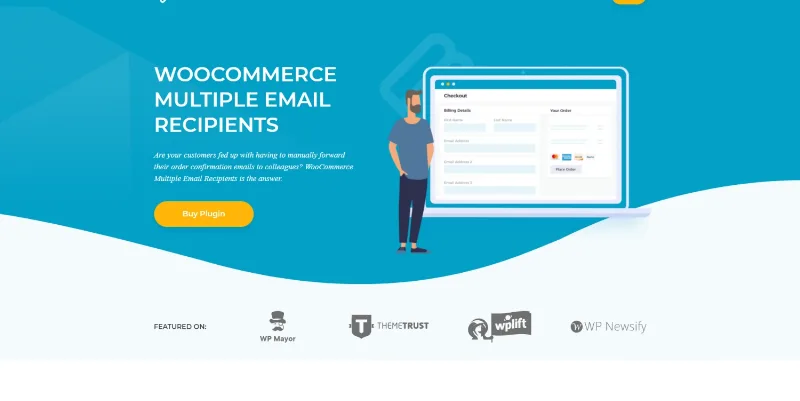
About WooCommerce Multiple Email Recipients
The copy for an accountant can also receive the reset password email
A customer asks for the invoice to reach their accountant too, and your supplier needs to hear about the orders that are theirs. Both are solved with additional email addresses, but each case is decided in a different place.
In Multiple Email Recipients you choose email by email which notices reach the extra addresses: if you tick reset password or new account, those emails go there too, so keep only the ones that person should read.
WooCommerce Multiple Email Recipients adds customer and administrator addresses to WooCommerce notifications. No code or theme template changes are needed.
Extra addresses for the customer
- Unlimited additional addresses per customer. In the settings you choose how many fields are shown.
- Where they are requested: only in the admin, or also at checkout and in the customer account. That way you can keep the checkout form short.
- Editing by you: the fields always appear on the Edit User screen, where you add addresses on the customer's behalf.
- Look: the new fields resemble the standard WooCommerce email field.
Administrator notifications by supplier, product or category
Administrator alerts can go to suppliers, dropshippers, warehouses or people on your team. You can limit a recipient to certain products or categories, so each supplier receives only the orders that correspond to them, or send the alerts for all orders to other addresses.
To decide which email carries extra recipients, you choose email by email:
- To the customer: on hold, processing, completed, refunded, customer note, reset password and new account.
- To the administrator: new order, cancelled order and failed order.
- From other plugins: recipients can be added to those of WooCommerce Subscriptions, Wholesale Pro, Memberships and AutomateWoo.
- Manual orders: the extra addresses are also included in emails for orders created in the admin.
A sample setup to test
A store with two warehouses could assign each warehouse to its categories and leave one global address for accounting. It is a combination of features that you should test with trial orders before using it live.
Getting started and compatibility
It works directly with WooCommerce and runs alongside SMTP and email delivery plugins. It is designed for WPML, WeGlot and TranslatePress, and for any well-coded theme. To start:
- Install and activate the plugin alongside WooCommerce.
- Open its settings and choose how many additional email fields to offer the customer.
- Decide whether they show only in the admin or also at checkout and in the account.
- For each email, mark whether it carries additional recipients, and add the administrator ones by product or category.
- Place a test order and check who receives each notice.
WooCommerce plugins to compare
Also available are WooCommerce Advanced Notifications, Email Template Customizer and Email Attachments, which touch WooCommerce emails in other ways.
Answers about Multiple Email Recipients
How many addresses can a customer add?
As many as you decide: there is no limit per customer, and you choose how many fields are shown.
Can I send each order only to the supplier it belongs to?
Yes. Administrator recipients can be limited to specific products or categories.
Does it work with emails from other plugins?
Yes, with those of WooCommerce Subscriptions, Wholesale Pro, Memberships and AutomateWoo.
Are they included on orders made from the admin?
Yes, the extra addresses are included in those emails.
Topics
Version history
-
v
1.2.16 Current 21 Oct 2026
-
v
1.2.15 29 Jul 2026
-
v
1.2.14 11 Sep 2025
Customer reviews
Sign in to leave a review. Only people who have the product can review it.
No reviews for this product yet.
Frequently asked questions
-
GPL (General Public License) is the license under which WordPress and most premium plugins/themes are distributed. It grants you the right to use, modify and redistribute the software in as many projects as you want, with no domain restrictions.
-
Yes. With membership you get automatic updates via our GPLClub Updater plugin (installed on your WP, detects new versions and applies them). With individual purchase, you get one year of manual updates from your account.
-
Depends on the plan. Monthly: 3 domains. Semi-annual: 7. Annual and Lifetime: 15. Individual purchase: 1 domain.
-
GPLClub offers its own support for installation, configuration and compatibility. For direct support from the original author (feature requests, product-specific bugs), a license purchased from the author is required.