
XT Variations As Singles for WooCommerce
Antivirus scan
Powered by ClamAV
✅ Verified clean
This product file has passed our security filters.
Want to run a fresh ClamAV scan right now? Takes a few seconds and shows scanner version, signature DB and live result.
This can take 5 to 30 seconds.
Clean file Threat detected
No threats detected in this file.
- File
- Size
- Scanned
- ClamAV
- Signature database
⚡ Powered by ClamAV
Scan could not be completed
Report product
If you detected an issue (broken file, malware, inappropriate content, etc.) let us know and we'll review it ASAP.
Sign in to report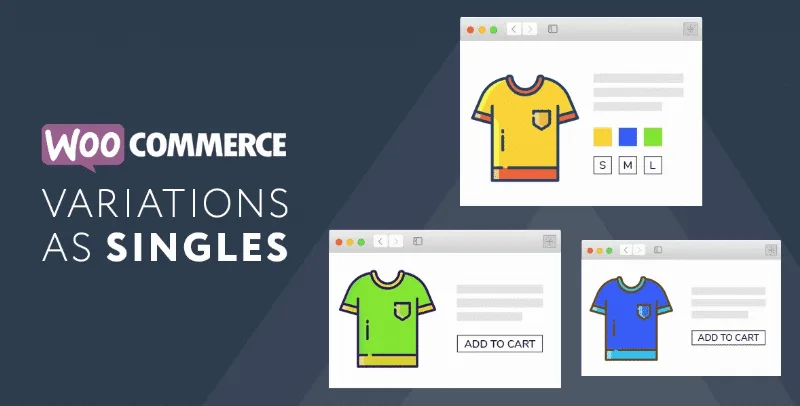
About XT Variations As Singles for WooCommerce
One card per variation does not create products, it creates new doors to the same page
You sell a T-shirt in six colors. The shop shows a single card, with the photo of one color, and whoever is looking for green has to go in to discover it exists. Turning each color into its own card seems to multiply your catalog.
Showing each variation as a card adds entries to the listing, but they all lead to the same product page, with a variation already chosen.
Variations As Singles for WooCommerce, by XplodedThemes, shows each variation of a WooCommerce variable product as its own card in the shop, with its photo, its title and its price. You can leave them next to the parent product or hide the parent.
What changes in the shop listing
- A card per variation with its own photo, title and price, next to the parent or without it.
- Automatic title: it is generated from the variation's options, or you write a display title of your own.
- Inherited rating: the cards show the rating and review count of the parent product.
- Visibility by area: catalog, filtered results and search results, each one separately.
- Per-variation settings: override the global visibility, mark it as featured, disable the add to cart button or keep it only in listings.
- Purchase button: AJAX add to cart from the listing, or "Select options" as an alternative, with an out of stock label and an option to hide what is out of stock.
- Global settings with exceptions: the defaults apply to all, and each variation can override them. There are bulk actions to change many at once.
Where each card leads
Each card links to the parent product and the variation arrives preselected through a parameter in the address, of the ?attribute_pa_color=sage kind. Cart lines also link to the exact variation.
There is a tool to reapply the visibility settings, and the filter counts stay correct.
A three-variation product, with and without the parent
A typical case: a variable product with three variations, two visible in the catalog and the third hidden from search results. The parent can be hidden or kept, depending on how you want the shop to read. The result depends on the theme and on the filtering plugins you have. Take it as a starting point and adapt it to your shop.
What it requires and what it shares with the parent
The plugin works on WooCommerce variable products, so WooCommerce is essential. The cards share the rating and reviews with the parent, so those ratings are not split by variation. Hiding the parent applies across the whole shop.
To get started:
- Install and activate the plugin with WooCommerce already active.
- Open its global settings and decide whether the parent is shown and in which areas the variations appear.
- Edit a variable product and review each variation's settings, such as the display title.
- Review the shop: each card leads to the preselected variation.
Variation tables and color swatches
To present variations in another way look at Product Variations Table, Variations Table or Linked Variations.
If you want color or image swatches inside the product page, there are options such as Variation Swatches Pro.
Answers about Variations As Singles
Can I hide the parent product?
Yes. You can show it next to its variations or hide it across the whole shop.
What does the customer see when clicking a variation?
They land on the parent product page with that variation already selected.
Can I show some variations only in listings?
Yes, each variation has its own setting for that.
Can the title of each card be changed?
Yes. It is generated from the variation's options, or you write a display title.
Topics
Version history
-
v
1.2.5 Current 29 Sep 2025
Customer reviews
Sign in to leave a review. Only people who have the product can review it.
No reviews for this product yet.
Frequently asked questions
-
GPL (General Public License) is the license under which WordPress and most premium plugins/themes are distributed. It grants you the right to use, modify and redistribute the software in as many projects as you want, with no domain restrictions.
-
Yes. With membership you get automatic updates via our GPLClub Updater plugin (installed on your WP, detects new versions and applies them). With individual purchase, you get one year of manual updates from your account.
-
Depends on the plan. Monthly: 3 domains. Semi-annual: 7. Annual and Lifetime: 15. Individual purchase: 1 domain.
-
GPLClub offers its own support for installation, configuration and compatibility. For direct support from the original author (feature requests, product-specific bugs), a license purchased from the author is required.
Related products
Easy Digital Downloads Frontend Submissions
By Easy Digital Downloads

LearnDash LMS bbPress Integration Addon
By LearnDash LMS
Shipping Zones by Drawing Premium for WooCommerce
WooCommerce Store Catalog PDF Download
By WooCommerce